DougDoug
Explorer
November 25, 2025
Solved

Error Code 0X204

  • November 25, 2025
  • 2 replies
  • 928 views

Everything was working fine until suddenly this message appeared and now I can't connect anymore. It just stopped working. I'm using version 7.2.9.1033 on macOS Tahoe. Any help would be greatly appreciated, Doug.
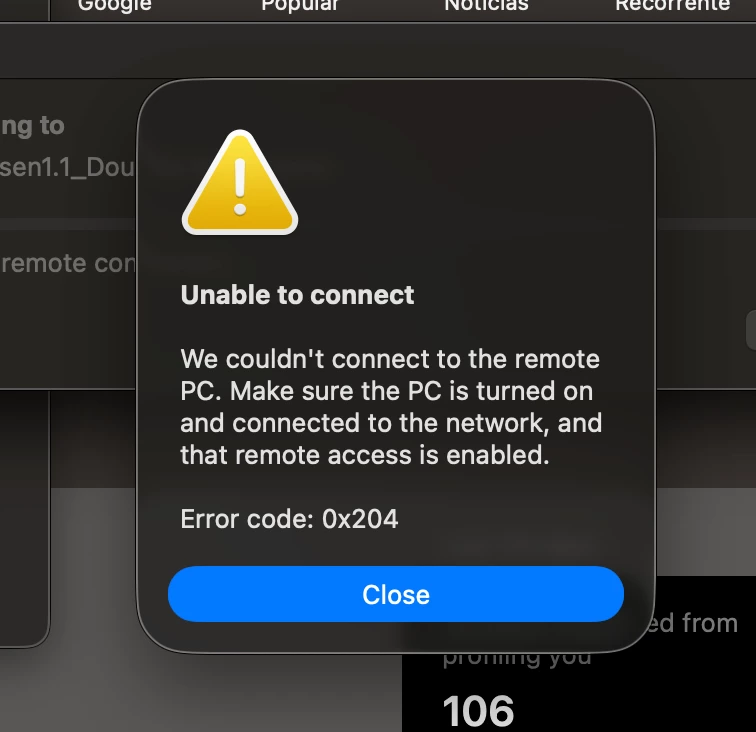

 

Screenshot 2025-11-25 at 2.55.20 PM.png

Best answer by Jean-Philippe_P

Hello DougDoug, 


Thank you for using the Community Forum. I will seek to get you an answer or help. We will reply to this thread with an update as soon as possible. 

2 replies

Jean-Philippe_P
Staff & Editor
Staff & Editor
November 28, 2025

Hello DougDoug, 


Thank you for using the Community Forum. I will seek to get you an answer or help. We will reply to this thread with an update as soon as possible. 

Jean-Philippe - Fortinet Community Team
DougDoug
DougDougAuthor
Explorer
November 28, 2025

This (attachment) is the error that truly corresponds to what I've been experiencing. Because of this, I can't access microsoft.app as shown in the previous screenshot.


I don't know how to solve it. I asked for help on ChatGPT and also had no success. If it's something beyond my permissions, I'll have to use an older machine.


Screenshot 2025-11-27 at 12.53.40 PM.png

funkylicious
SuperUser
SuperUser
November 29, 2025

it appears that your IT/EMS Admin configured access based on ZTNA/Posture tags that your computer doesnt have/isnt compliant.

you should see them in the Zero Trust Telemetry tag, note them down and get in touch with IT about them, they will clarify what's the issue.

"jack of all trades, master of none"
funkylicious
SuperUser
SuperUser
November 28, 2025

hi,

that issue seems to be related to Microsoft Remote Desktop if im not mistaken.

what's the error you are getting in FortiClient ? are you connected to the VPN while trying to RDP ?

"jack of all trades, master of none"
DougDoug
DougDougAuthor
Explorer
November 28, 2025

Yes, the first screenshot was from Microsoft, I'm a layman... these are the actual error reports.

Screenshot 2025-11-27 at 12.53.40 PM.png