
LuckJunq
Explorer
Nov 29, 2023 4:42 PM UTC
Question

Endpoint Installers
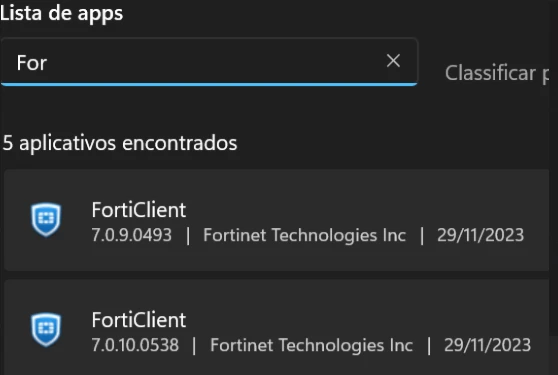
Captura de tela 2023-11-29 133716.png


Hello everyone,


I'm currently using FortiClient EMS version 7.0.9, and I've set up a LAB to update endpoints to version 7.0.10.

However, when I sent the update package for version 7.0.10 to the machines, the outcome was as follows:

  • The machines updated to the new version.
  • The machines are displaying two versions in the 'Add and Remove Programs' section of Windows. Both 7.0.9 and 7.0.10 are listed even after a reboot.

Could anyone assist me with information or guidance on this issue?

7 replies

Anthony_E
Staff
Staff
Dec 4, 2023 6:00 AM UTC

Hello LuckJunq,


Thank you for using the Community Forum. I will seek to get you an answer or help. We will reply to this thread with an update as soon as possible.


Thanks,

Translate
Best Regards
LuckJunq
LuckJunqAuthor
Explorer
Dec 6, 2023 1:46 AM UTC


Hello Anthony
I've gone through several tutorial videos, yet none of them demonstrated the Add and Remove Programs feature after completing the deployment via EMS. I'm uncertain whether any modifications are required in the 'mst' file or if configuring an installation of Forticlient.msi is necessary.
I appreciate your efforts and look forward to hearing back from you soon.

Best regards,

Translate
ebilcari
Staff
Staff
Dec 6, 2023 4:32 PM UTC

Did you verify if both packages are from the same architecture x86 or x64?

There are two separate packages available for FCT, Windows may interpret them as different software so in place of upgrading the existing, it will install the new one.

client arc.PNG

Translate
Emirjon
Anthony_E
Staff
Staff
Dec 6, 2023 5:52 AM UTC

Hello LuckJunq,


Thank you for your message and we are doing everything to find somebody to help you.


Regards,

Translate
Best Regards
ebilcari
Staff
Staff
Dec 11, 2023 1:42 PM UTC

I'm glad it worked out.

@LuckJunq I can't think of any other possible issues, maybe try to install manually on one of the hosts and see if windows classify it as an upgrade or as a new software.

Translate
Emirjon
LuckJunq
LuckJunqAuthor
Explorer
Dec 13, 2023 3:46 AM UTC

Thank you so much for all the effort and energy spent trying to help me.

Below, I'm sharing a screenshot of how the installer ended up in EMS. I downloaded the ZIP file that was mentioned in the previous post.

I created the installer using the 'Choose a custom installer' option.


EMS > Forticlient Installers > Download Link Screenshot_1.png

Here's the 'registration key' from a machine that underwent deployment and has both installations. As you can see, both refer to their respective 64x versions.

FortiClient 7.0.10 - EMS
Computador\HKEY_LOCAL_MACHINE\SOFTWARE\Microsoft\Windows\CurrentVersion\Uninstall\{00E61139-1646-46C4-A383-F33B8A90F9F9}
FortiClient 7.0.9 - EMS
Computador\HKEY_LOCAL_MACHINE\SOFTWARE\Microsoft\Windows\CurrentVersion\Uninstall\{079B00DA-23ED-4F29-AED8-7137A11CCD4A}

I'm going crazy! I've been handed this project with 466 clients having version duplications, currently sitting between '7.0.6 - 7.0.9'. Due to some vulnerabilities, we need to update to version 7.0.10. To avoid further issues, I've been trying to validate this installation. Unfortunately, no success yet.
Regards,
Translate
Risk and Resilience in the Age of AI. An OT Thought Leadership Summit for Houston's Critical Infrastructure Leaders. Date: Thursday, December 3, 2026. Time: 8:30 am - 1:30 pm (CT). Location: The Westin Houston, Memorial City | 945 Gessner Road, Houston, TX 77024