
Umesh
Explorer II
July 18, 2023
Solved

Email based two factor authentication || authentication method Radisu Server ||

  • July 18, 2023
  • 15 replies
  • 27697 views

Hi All,

Today I have configured successfully email based authentication for Forticlient VPN and when I configure using Local user that time I am getting authentication code.


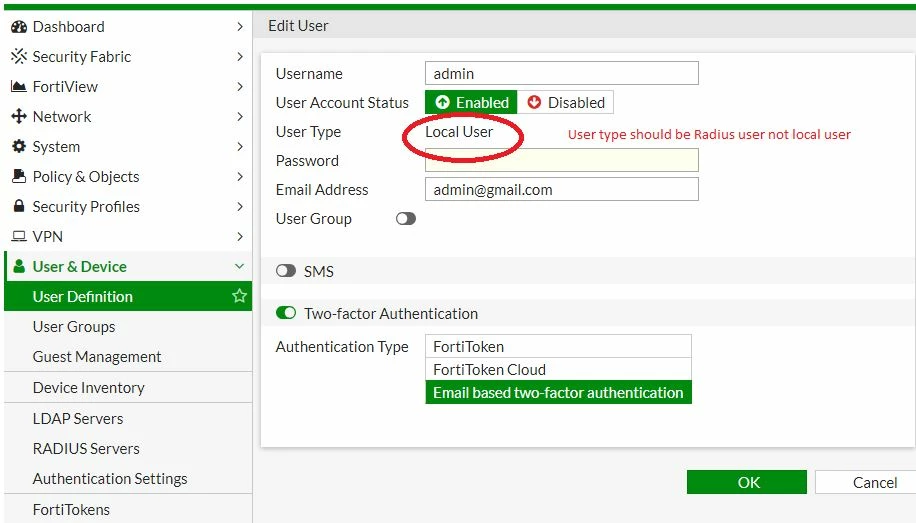
I want, the user type must be Radius user not Local user.

User must be authenticate using Radius server.local.JPG
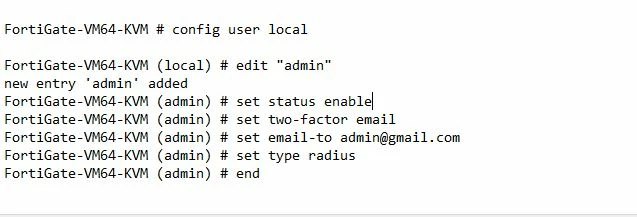
Can anyone guide how can I achieve this things.

Please refer the snapshot.


local user.JPG


Best answer by npariyar

Hi Umesh,


To enable 2FA for the radius users or any remote authentication server, the user must be preset on the fortigate as a User Type radius/tacacs+ /ldap. Once the user is preset on the FortiGate you can enable 2 FA as the below configuration:

config user local
edit "admin"
set type radius
set two-factor email
set email-to "admin@gmail.com"
set radius-server "RAD-TEST"
next
end


Here "RAD-TEST" is a radius server


Regards

15 replies

Contributor III
July 19, 2023

Hi Umesh,


Greetings of the day!


To enable MFA for the radius user first add the user locally and then enabled email as two-factor authentication. For reference check the below screen-shot

radius.PNG

usercalled.png


MFA.PNG


Regards

Priyanka

Umesh
UmeshAuthor
Explorer II
July 20, 2023

Hi Priyanka,


Thanks for sharing this snapshot, but the problem is how can we configure 2F email based authentication under authentication type.


Regards,

umesh

ebilcari
Staff
Staff
July 20, 2023

The email field there is used to send the token activation procedure and not to do the 2FA via email for that user.

Emirjon
npariyar
Staff
npariyarAnswer
Staff
July 21, 2023

Hi Umesh,


To enable 2FA for the radius users or any remote authentication server, the user must be preset on the fortigate as a User Type radius/tacacs+ /ldap. Once the user is preset on the FortiGate you can enable 2 FA as the below configuration:

config user local
edit "admin"
set type radius
set two-factor email
set email-to "admin@gmail.com"
set radius-server "RAD-TEST"
next
end


Here "RAD-TEST" is a radius server


Regards

Umesh
UmeshAuthor
Explorer II
July 21, 2023

Hi Niroj,


I have one query like when user will try to access network then will it authenticate using local password or radius server.


Thanks

Umesh
UmeshAuthor
Explorer II
July 21, 2023

Hi Niroj,


I am sending snapshot, hope you will understand how I want to configure two factor email based authentication using radius server.

1.JPG2.JPG

pminarik
Staff
Staff
July 21, 2023

I see various contradictory, or semi-contradictory, statements in here, so let's clear things once and for all.


1, email 2FA

FortiGate supports email 2FA for locally defined users (=explicitly listed in config user local). Their type is irrelevant - can be local/LDAP/RADIUS/...

The only catch is that email-type 2FA must first be configured via CLI. Once you do this, the option will become visible in the GUI, for that user.
Of course, do not forget to configure an email server and make sure that the FortiGate is able to send emails. Follow this KB article for the initial email 2FA setup - https://community.fortinet.com/t5/FortiGate/Technical-Tip-Email-Two-Factor-Authentication-on-FortiGate/ta-p/194890


2, RADIUS-type users

If the user is of RADIUS type, then indeed their password will be checked for validity against the RADIUS server, not compared with anything local on the FortiGate itself. As a matter of fact you cannot even configure a local password for a RADIUS user. (but compare this with individual admin users, who do have a configurable "backup password", which is used exclusively only when the RADIUS server isn't responding)

A RADIUS user will show as "User Type Remote RADIUS User" in the GUI, or set type radius in the CLI.

Note that you cannot switch an existing user from one type to another. If you already have a local-type "user-x", in order to change them to RADIUS type you will need to first delete the existing user and then recreate it as a remote RADIUS user.

Umesh
UmeshAuthor
Explorer II
July 25, 2023

Thanks for making me clarify.


Thought Leadership Security Summit. Outpace New Threats with AI - enhanced defense. Tuesday, Septmeber 15, 8:30 AM - 2:30 PM PT. The Golf Club at Newcastle, WA.
Fortinet Flag the Hack. Wednesday, August 26, 9:00 AM - 5:00 PM ET, COSM, Atlanta, GA.
Virtual event | September 2026. SASE summit. The age of autonomous trust. Register here!


