
HS08
Visitor III
March 16, 2026
Solved

EAP-TLS

  • March 16, 2026
  • 1 reply
  • 221 views

I try to follow guide from 1. Generate TLS certificate for Microsoft Entra ID to do authentication | FortiNAC-F 7.6.5 | Fortinet Document Library to generate EAP-TLS from intune.

In Method 2 Step 2 why i got error when Subject Name Format i fill to CN={{UserPrincipleName}} and the other attribut also have same error.

Also whay i must fill in certification authority and certification authority name?
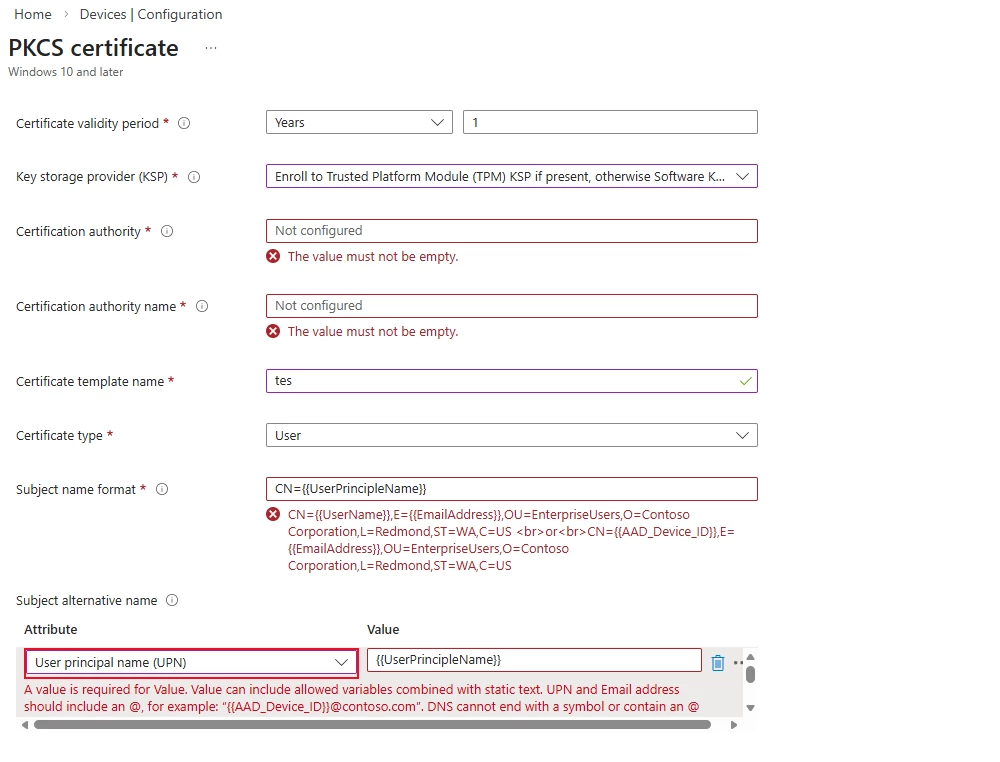
Screenshot 2026-03-16 091747.png


Best answer by funkylicious

its not CN={{UserPrincipleName}} but CN={{UserPrincipalName}} .

as for the CA, i guess you need a valid and trusted CA on the computers which signs it and then gets validated.

1 reply

funkylicious
SuperUser
SuperUser
March 16, 2026

its not CN={{UserPrincipleName}} but CN={{UserPrincipalName}} .

as for the CA, i guess you need a valid and trusted CA on the computers which signs it and then gets validated.

"jack of all trades, master of none"
HS08
HS08Author
Visitor III
March 16, 2026

yes seem the documentation is wrong, the doc say CN={{UserPrincipleName}}

funkylicious
SuperUser
SuperUser
March 16, 2026

it appears to be a typo in the documentation but in the picture it's correct.

"jack of all trades, master of none"