qnpf943h
New Member
September 4, 2024
Solved

Cannot choose any imported certificate for https server

  • September 4, 2024
  • 1 reply
  • 1503 views

I have successfully imported my certificate which is signed by my CA. 

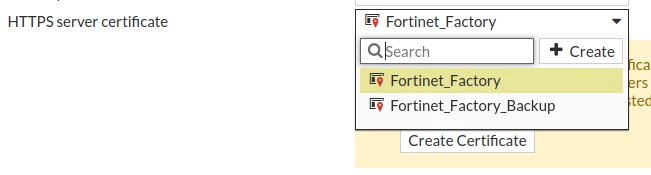
The problem is I cannot choose it as HTTP server certificate. I see only two options, even though I have many more certificates in System -> Settings -> Certificates

Screenshot from 2024-09-04 11-37-44.png

I 've tried also via command line but again I only see these two options.

Thanks in advance.


Edit: I have also imported both Root CA and Sub CA certificates.

Best answer by ozkanaltas

Hello @qnpf943h ,


This is interesting. Maybe Fortigate is not showing this because of the type of certificate you created. You created a web server certificate, right?

1 reply

ozkanaltas
Valued Contributor III
September 4, 2024

Hello @qnpf943h ,


If you just upload the .cer file to FortiGate, this will not be enough. You need to install certificate as .cer and .key file or pkcs12 format. You can export the certificate on pkcs12 format(pfx) from your local CA. 


https://community.fortinet.com/t5/FortiGate/Technical-Tip-FortiGate-HTTPS-SSL-Certificate-Installation-PFX/ta-p/248447


qnpf943h
qnpf943hAuthor
New Member
September 4, 2024

No, I imported the .pfx file that includes the private key but still can't see it as option.


I also tried to export the private key and fullchain cert in .pem format and import this pair. The import was successful but still can't select it as https server cert.

ozkanaltas
Valued Contributor III
September 4, 2024

Hello @qnpf943h ,


This is interesting. Maybe Fortigate is not showing this because of the type of certificate you created. You created a web server certificate, right?