

KenjiKang
Explorer III
August 22, 2025
Solved

Cannnot Hardware Switch Interface Type

  • August 22, 2025
  • 3 replies
  • 591 views

Hi,
When I add new interface, I cannnot Hardware Switch Interface Type.
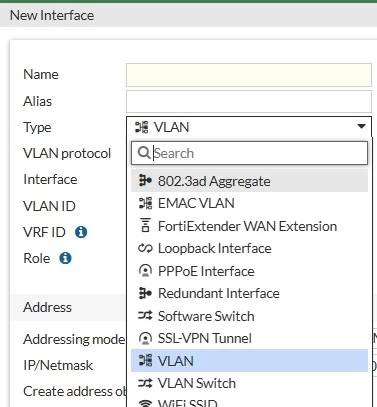
01.jpg


CLI too,
======================
XXX(test2) # set type
vlan VLAN interface.
aggregate Aggregate interface.
redundant Redundant interface.
loopback Loopback interface.
wl-mesh WLAN mesh interface.
fext-wan FortiExtender interface.
emac-vlan EMAC VLAN interface.
ssl SSL VPN client interface.


CLI too
==========================
# set type
vlan VLAN interface.
aggregate Aggregate interface.
redundant Redundant interface.
loopback Loopback interface.
wl-mesh WLAN mesh interface.
fext-wan FortiExtender interface.
emac-vlan EMAC VLAN interface.
ssl SSL VPN client interface.

Would anyone be kind enough to tell me the solution?

Model:
FortiGate-120G
OS:v7.4.8 build2795 (Mature)

Thank you
Kenji,

Best answer by Toshi_Esumi

And, you wouldn't experience any difference in VLAN switch from hardware switch unless you setup L2 network and configure specifically to utilize the features VLAN switch has added. Otherwise, VLAN switch works in exactly the same way hardware switch works. No need to change the mode.


Toshi
 

3 replies

funkylicious
SuperUser
SuperUser
August 23, 2025

hi,

i assume that right now you have a default VLAN switch interface composed of some ports or it was deleted at some point.

in System > Settings > disable vlan-switch mode and that will be changed to hardware switch and it should solve your issue.

"jack of all trades, master of none"
Toshi_Esumi
SuperUser
SuperUser
August 23, 2025

And, you wouldn't experience any difference in VLAN switch from hardware switch unless you setup L2 network and configure specifically to utilize the features VLAN switch has added. Otherwise, VLAN switch works in exactly the same way hardware switch works. No need to change the mode.


Toshi
 

KenjiKang
KenjiKangAuthor
Explorer III
August 26, 2025

Thank you for your kind advices.
