MIsmail
New Member
May 1, 2023
Solved

Blocked HTTPS Traffic

  • May 1, 2023
  • 2 replies
  • 10378 views

Hii
Could someone help me please to identify the problem 
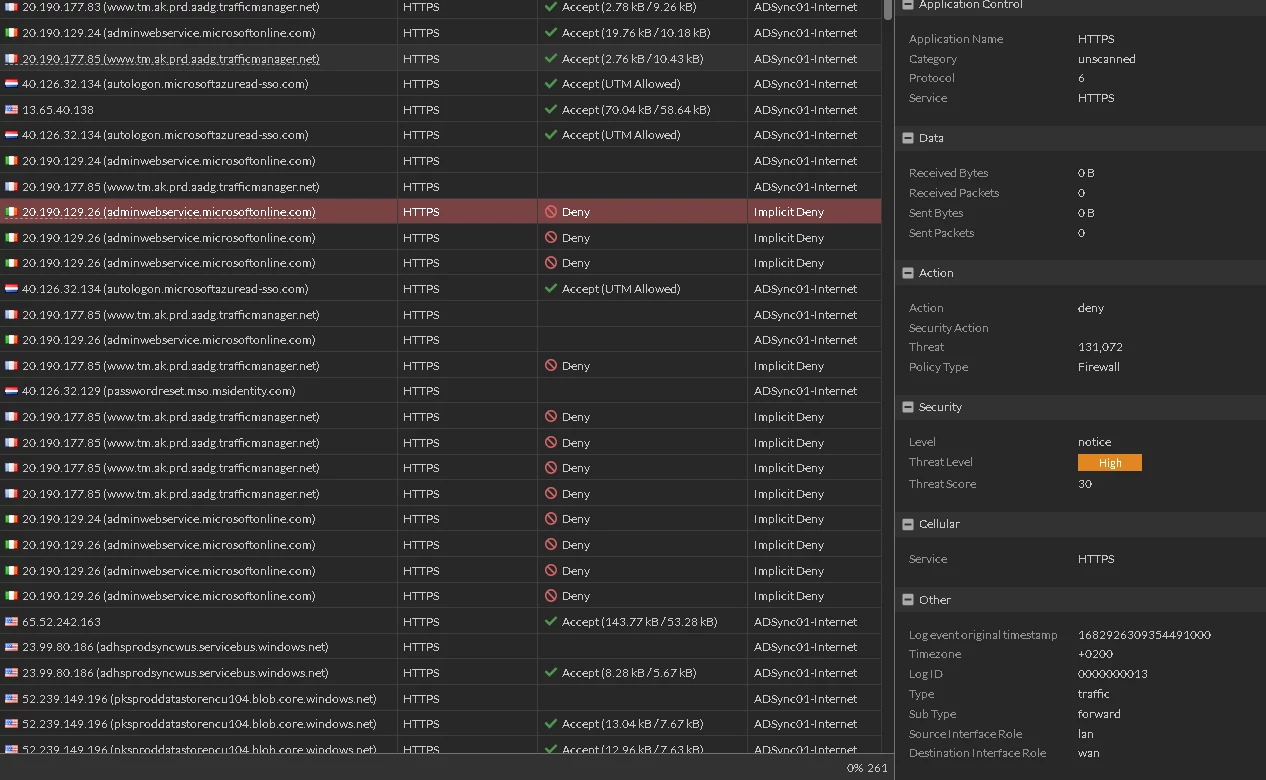
I don't know why this traffic is blocked and it affects our ADSync Server online syncronization 


Screenshott.png

Best answer by Markus_M

First remove the webfilter from the policy to see if it starts working in the first place. Based on the policy view there is no web filter applied at this time. Just to make sure.

If it fails working, there is no point troubleshooting anything on the webfilter since it has no direct affect. The traffic is blocked BEFORE the webfilter will be applied.

When the traffic is working fine, then apply webfilter etc. to the traffic. You will also need minimum certificate inspection, better a deep inspection as FortiGate can only block what it can read. Encrypted traffic cannot be read.


Next is that your initial screenshot show a different source interface (port1 vs port2). See if that is the pattern on the failure.

Check if the interface group/zone called "outside" contains both port1 and port2 - I would suspect that is not the case, based on the logs.


Best regards,


Markus

2 replies

funkylicious
SuperUser
SuperUser
May 1, 2023

Hi,

Implicit deny means it's hitting the default implicit firewall rule, that denies all traffic.

Is your ADSync fw rule based on ISDB, IP ranges or FQDN wildcard ? Because it appears that some domains/IPs have not been whitelisted.

You could either add those IPs/fqdn to the explicit rule that has been created to permit the traffic.

"jack of all trades, master of none"
MIsmail
MIsmailAuthor
New Member
May 1, 2023

Hi geek
Thanks for reply, I tried to whitelist some domains on web filter but the blocking traffic still happening, actually i'm not an expert on fortigate so could you please explain how to start over to troubleshoot this issue.
Thanks

Screenshottt.png

kvimaladevi
Staff
Staff
May 1, 2023

Hi,


Please check the policy that this traffic is hitting. If it is hitting the policy which has the web filter profile that you have shown in the previous reply, you can try to allow *.microsoftonline.com as a wildcard type, clear the sessions or try to access from an incognito window to check if the traffic is allowed. 

You can also, try to create a policy for a single source without any UTM and keep it on top of the current policy to check if the traffic is allowed, this is to isolate if the issue is because of the UTM or any ISP blocking.


Regards,

Vimala

sw2090
SuperUser
SuperUser
May 2, 2023

He is getting "implicit deny" as one of the first repliers already wrote.

This means that traffic did not hit ANY policy but policy #0 ("implicit deny") and thus got denied.

So it is of no use to try to disable Filters on policies because they are not hit.

I would suggest to check why this traffic doesn't hit any policy.