AliAllafzadeh
New Member
April 3, 2024
Solved

Add test

  • April 3, 2024
  • 1 reply
  • 3706 views

test

Best answer by ozkanaltas

Hello @AliAllafzadeh ,


You need to configure 2 routes. 


First, configure the route on the route table like this,


Address Prefix: 0.0.0.0/0.0.0.0

Next hop type: Virtual Appliance

Next hop IP: 172.16.136.68


Second, configure the route on Fortigate like this,


Destination : 192.168.0.0/24

Gateway: 172.16.136.65

Device: Port2 


Example for azure side
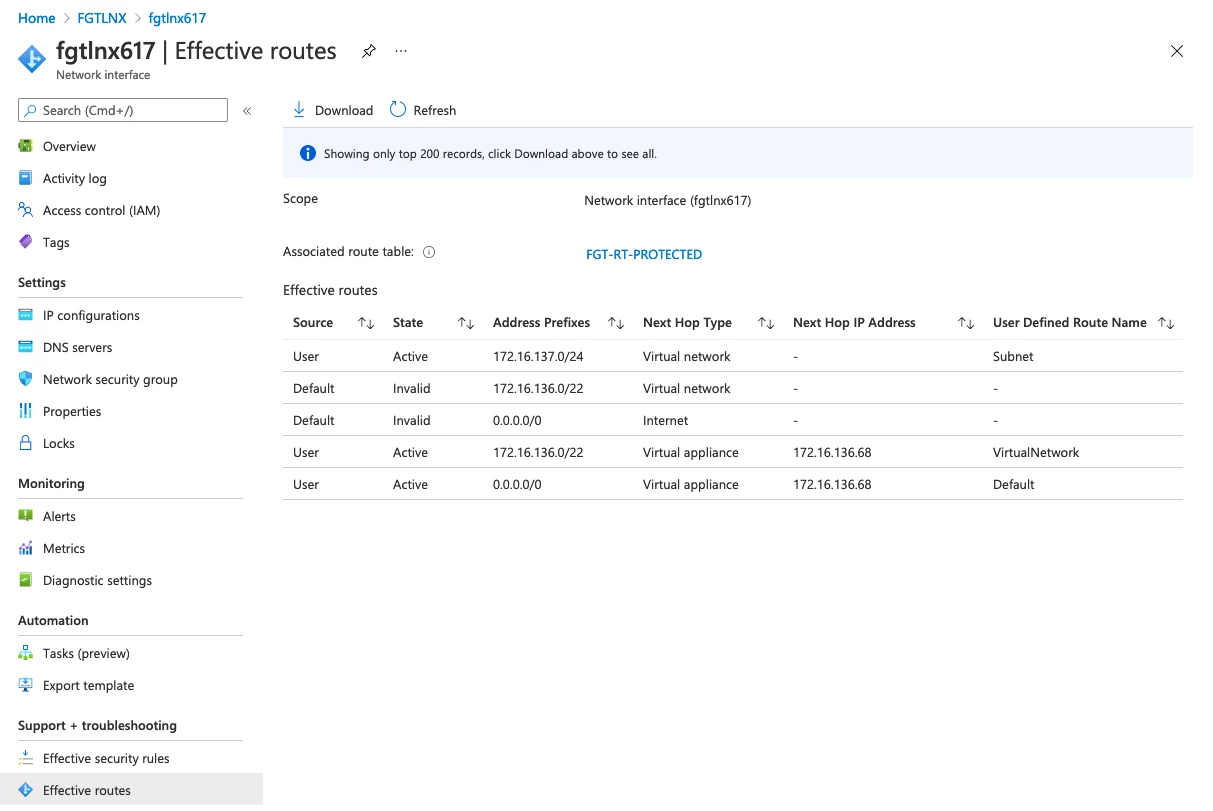
image.png

1 reply

ozkanaltas
Valued Contributor III
April 3, 2024

Hello @AliAllafzadeh ,


No need to vnet peering for this case.  Did you configure a static route for the new subnet on FortiGate? 


Also, can you check the traffic flow on Fortigate with this command?  With this command, we can ensure whether traffic reaches Fortigate or not. 


diagnose sniffer packet any 'host 192.168.0.x' 4 a  ( "x" should be changed with client IP)


After running this command can you try to reach somewhere?

AliAllafzadeh
New Member
April 3, 2024

Delete it please

ozkanaltas
Valued Contributor III
April 3, 2024

Hello @AliAllafzadeh ,


No need to configure the interface for each new network. 


But you should configure the gateway IP address with your ILB IP address. When I look at the screenshot you sent. You need to change the gateway IP address to 10.2.8.65. 


And you say we added a new network with 192.168.0.0/24 prefix. You need to configure a static route like this. 


Destination : 192.168.0.0/24

Gateway: 10.2.8.65 or your ILB floating IP address

Interface: Port2


Also, 168.63.129.16 is the IP address used for ha communication. You should not do any changes to this IP address like a configure static route.


For traffic consistency, I suggest, you configure source-IP-based persistence on Azure ILB/ELB. 


https://learn.microsoft.com/en-us/azure/load-balancer/distribution-mode-concepts


