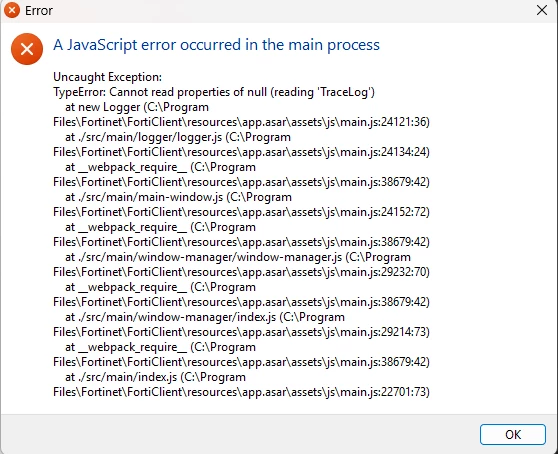
A JavaScript error occurred in the main process
Hi everyone,
We are experiencing an issue with FortiClient VPN 7.4.3.1790 on some PCs belonging to one of our customers.
After Windows starts, the following error message is displayed:
“A JavaScript error occurred in the main process”
The VPN itself continues to work correctly despite the error.
We have searched online and found a possible workaround that seems to resolve the issue:
-
Uninstall the existing FortiClient installation using Revo Uninstaller.
-
Remove any old Microsoft Visual C++ Redistributable packages (e.g. 2008, 2013) using Revo Uninstaller.
-
Restart the PC.
-
Install the latest Microsoft Visual C++ Redistributable.
-
Reinstall FortiClient.
This procedure worked on some of the affected PCs.
However, we now have a different limitation: FortiClient can no longer be installed manually using the installer. It must be deployed through Microsoft Company Portal, and the issue has started occurring again on the affected PCs.
The environment is also EMS-managed.
Has anyone experienced the same “A JavaScript error occurred in the main process” issue with FortiClient 7.4.3.1790?
Is there a recommended or supported way to resolve this when FortiClient is deployed through Company Portal and managed by EMS?
Any suggestions, logs to check, or troubleshooting steps would be greatly appreciated.
Thanks in advance!