
george_omondi
Explorer
May 14, 2024
Solved

Custom Parser Error
  • May 14, 2024
  • 5 replies
  • 3390 views

custom app.pngHello Team,

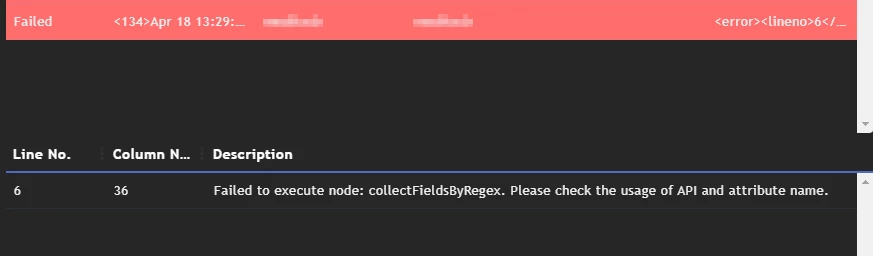
I am new to FortiSIEM and i could be making some obvious mistake but kindly help. We onboarded a custom application onto FSM and wanted to build custom parser so that we can get notified of failed logins. I tried building one and i Keep running into the same issue "Failed to execute node: collectFieldsByRegex. Please check the usage of API and attribute name." Not sure why.. My xml is as below:

<eventFormatRecognizer><![CDATA[SOE: BAD\s+]]></eventFormatRecognizer> <parsingInstructions> <collectFieldsByRegex src="$_rawmsg"> <regex><![CDATA[<:gPatSyslogPRI><_mon:gPatMon>\s+<_day:gPatDay>\s+<_time:gPatTime>\s+<reptDevName:gPatHostName>\s+SOE:\s+<_body:gPatMesgBody>]]></regex> </collectFieldsByRegex> <collectFieldsByRegex src="$_body"> <regex><![CDATA[?:SIGN-ON <srcIpAddr:gPatIpAddr>\s+\(<:gPatStr>\)\s+<:gPatStr>\s+-\s+d+\s+<:gPatStr>\.<:gPatStr>:\s+<:gPatStr>\s+<:gPatStr>]]></regex> </collectFieldsByRegex> <setEventAttribute attr="eventType">Custom App: Failed Login</setEventAttribute> <setEventAttribute attr="eventSeverity">1</setEventAttribute> </parsingInstructions>


The Logs am trying to Parse are as below. Changed a few things due to privacy reasons

<134>Apr 20 19:53:14 computerA SOE: BAD SIGN-ON 0T2.2.2.2.1 (CAP34.2.1) CAP34.2 - 1 APP1.MIS: APP1    USERNAME1 <134>Apr 20 19:05:22 computerA SOE: BAD SIGN-ON 9N0T2.3.3.3.1 (THOR1.3.1) THOR1.3 - 1 MICRO PC APP2.MIS: APP2  USERNAME3 USERNAME3 USERNAME3 <134>Apr 19 19:24:29 computerC SOE: BAD SIGN-ON 9N0T1.1.14.1.1 (SPI2.1.1) SPI2.1 - 1 APP3.MIS: APP3  USERNAME44 USERNAME44 USERNAME44 <134>Apr 19 16:42:45 computerD SOE: BAD SIGN-ON 7N0T4.1.4.1.2 (IRN22.1.2) IRN22.1 - 2 APP3.MIS: APP3  USERNAME55 USERNAME55 USERNAME55


    Best answer by cdurkin_FTNT

    Hard to say .. but the line -1 seems ominous.


    Try clearing the parser window completely.. save ..
    Re add the parser and try again

    5 replies

    cdurkin_FTNT
    Staff
    Staff
    May 14, 2024

    To keep it simple, try this to get you started...


    <eventFormatRecognizer><![CDATA[SOE: BAD\s+]]></eventFormatRecognizer>
    <parsingInstructions>


    <!-- Sample Events
    <134>Apr 20 19:53:14 computerA SOE: BAD SIGN-ON 0T2.2.2.2.1 (CAP34.2.1) CAP34.2 - 1 APP1.MIS: APP1 USERNAME1
    <134>Apr 20 19:05:22 computerA SOE: BAD SIGN-ON 9N0T2.3.3.3.1 (THOR1.3.1) THOR1.3 - 1 MICRO PC APP2.MIS: APP2 USERNAME3 USERNAME3 USERNAME3
    <134>Apr 19 19:24:29 computerC SOE: BAD SIGN-ON 9N0T1.1.14.1.1 (SPI2.1.1) SPI2.1 - 1 APP3.MIS: APP3 USERNAME44 USERNAME44 USERNAME44
    <134>Apr 19 16:42:45 computerD SOE: BAD SIGN-ON 7N0T4.1.4.1.2 (IRN22.1.2) IRN22.1 - 2 APP3.MIS: APP3 USERNAME55 USERNAME55 USERNAME55
    -->


    <collectFieldsByRegex src="$_rawmsg">
    <regex><![CDATA[<:gPatSyslogPRI><_mon:gPatMon>\s+<_day:gPatDay>\s+<_time:gPatTime>\s+<reptDevName:gPatHostName>\s+SOE:\s+<_body:gPatMesgBody>]]></regex>
    </collectFieldsByRegex>


    <collectFieldsByRegex src="$_body">
    <regex><![CDATA[BAD SIGN-ON .*<srcIpAddr:gPatIpAddr>\s+<_body2:gPatMesgBody>]]></regex>
    </collectFieldsByRegex>


    <setEventAttribute attr="eventType">Custom App: Failed Login</setEventAttribute>
    <setEventAttribute attr="eventSeverity">1</setEventAttribute>

    </parsingInstructions>


    george_omondi
    Explorer
    May 15, 2024

    Thank You @cdurkin_FTNT  for the response. Not sure if its my Side but now i am running into the below error:


    2024-05-15 03_56_01-FortiSIEM.png

    cdurkin_FTNT
    Staff
    Staff
    May 15, 2024

    Hard to say .. but the line -1 seems ominous.


    Try clearing the parser window completely.. save ..
    Re add the parser and try again

    Thought Leadership. Security Summit. Thursday, November 12th, PGA National Resort, Palm Beach Gardens, FL.
    Thought Leadership. Security Summit. Thursday, October 8th. Disney's Grand Californian Hotel & SPA, Anaheim, CA.
    Security Operations Summit: Modernize SecOps. Operate AI-Native.AMER: November 4 | 9:00 AM PST. India and SAARC: November 5 | 10:00 AM IST. EMEA: November 5 | 10:30 AM CET. APAC: November 5 | 11:00 AM SGT

