
adem_netsys
Explorer III
February 14, 2025
Question

502 Proxy Error

  • February 14, 2025
  • 4 replies
  • 3223 views

Hi guys,


GUI > Analytics I got a 502 proxy error error while searching on Analytics, when I examined the phoenix log content, I saw failed logs. Has anyone encountered this before?
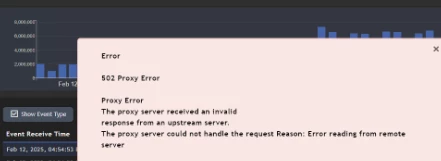



Ekran görüntüsü 2025-02-14 223441.png

    4 replies

    MonXbebe
    Explorer
    February 17, 2025

    Hi,


    @adem_netsys any solution on this?


    My team an I are facing the same problem, but when testing parser. 

    adriatikb
    Visitor III
    February 17, 2025

    This is a "normal" error for us now. When we move a device from pending to approved or vice versa, when we delete a device etc.. 


    adriatikb
    Visitor III
    February 17, 2025

    thank you,


    Goutham_FTNT
    Staff
    Staff
    February 17, 2025

    Hi @adem_netsys ,

    502 Proxy error indicates there is either timeout or exception during this operation 

    Do you notice this issue when you do adhoc queries or noticed for any queries (reports) ?
    Storage that you are using and the version ?

    We should see the exception on glassfish logs. Can you please open TAC ticket and attach logs after running phziplogs /tmp/502_proxy 1 ?

    Regards,
    Goutham

    adem_netsys
    Explorer III
    February 18, 2025

    Hi @Goutham_FTNT 


    We got this error while searching, we are not using an external storage. SIEM version 7.2.4

    Secusaurus
    Contributor III
    February 21, 2025

    Hello everyone,


    Just some help for anyone reading this now or in future:

    For our system (speaking on behalf of MonXbebe), we figured out the issue:

    As this was our testing setup, we installed the FSM workers and supervisor on an ESXi hypervisor that had a lot of other machines running parallel to the FSM cluster. As soon as we took down the other VMs, the 502 error magically disappeared.

    Although we did not see high CPU, RAM or hard disk usage from the systems, we believe that the hypervisor did not spend enough resources to the cluster.

    The issue was not dependent to FSM version, ESXi or Proxmox or sizing of vRAM/vCPUs. But on both our hypervisors, ESXi and Proxmox, a lot of other VMs were running in parallel when the issue appeared and less were running when the issue was gone.


    As this is (unfortunately) not the universal solution, some troubleshooting tips:

    A 502 proxy error is a very generic error that only states that the backend system (suppose we're talking about phoenix here) is not able to respond "fast enough" to the web server (which should be apache here). There are millions of reasons why the backend is not responding: worker connection issues, database issues, phoenix crashes. You might narrow down the issue by investigating what exactly causes the error. If it's something related to events, it might be database issues (check the health/load status and do some very basic storage operations (in admin settings, you could check for consumed disk space of databases or in the ClickHouse settings just press test for the current deployment). If it's related to rules (create/edit), it might be the connection to workers (check health, SSH to workers and check their logs). If it's related to the CMDB (create/edit parsers, objects,...), it  might be something on the supervisor (check its health, logs).


    If it's nothing obvious and you are sure, the cluster has enough resources, a TAC ticket is the best way to follow up. As @Goutham_FTNT mentioned, attach the phoenix logs (for all cluster members) right away.


    Best,

    Christian

    NSE8 | Fortinet Advanced MSSP Partner