
Technical Tip: Firewall objects use as metadata variable
| Description | This article describes how to use firewall objects as metadata variables in FortiManager. |
| Scope | FortiManager v7.2. |
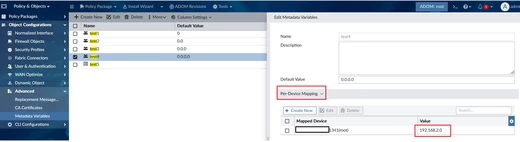
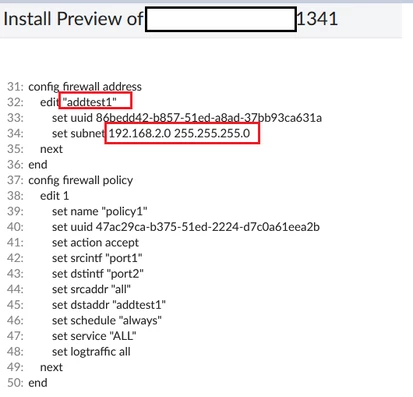
| Solution | Starting from FortiManager 7.2.0, firewall objects are now able to be used as metadata variables.
The firewall objects are:
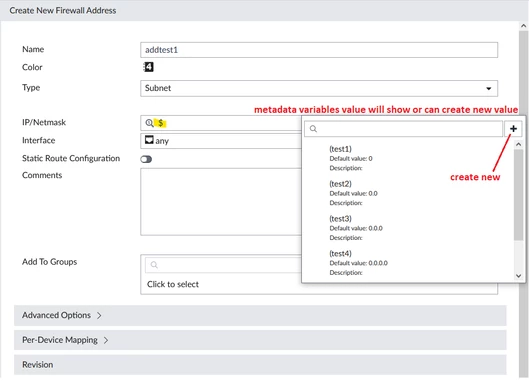
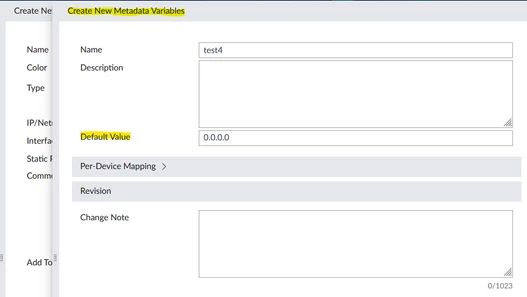
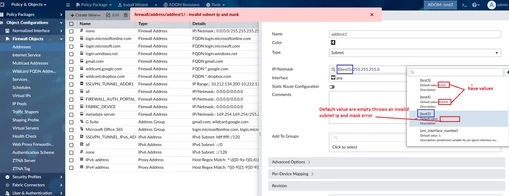
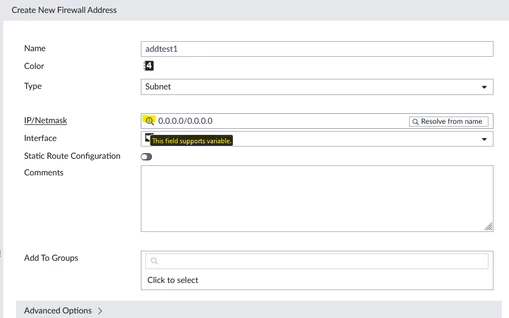
From the GUI, this can be identified when it shows a '$' (sign in magnifying glass) symbol, and when hovering near (this field supports variable) it will display:
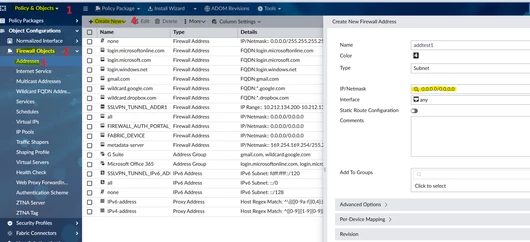
The firewall address will be used as an example:
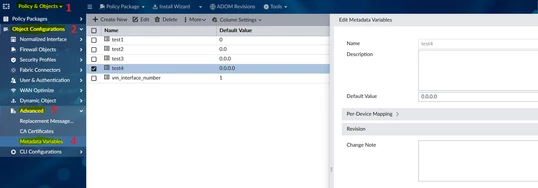
Policy & Objects -> Firewall Objects -> Addresses and select 'Create New'.
Related documents: Technical Tip: New Meta Variables and their usage including Jinja scripting Docs: Jinja Filters and Functions Docs: Jinja2 template sample scripts Docs: Create Jinja templates and a CLI template group Docs: FortiManager meta variables in Jinja Docs: Preview Jinja script on device or device group Docs: Perform installation to apply Jinja template configurations to branches |