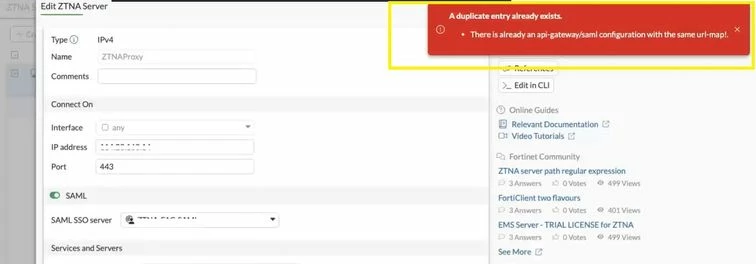

Troubleshooting Tip: ZTNA HTTPS proxy GUI duplicate entry error when adding server mapping (a duplicate entry already exists)
| Description | This article describes the error 'A duplicate entry already exists' on a ZTNA HTTPS proxy GUI rule with multiple server mappings. This behavior prevents successful configuration through the GUI and can result in unintended modification of existing entries. |
| Scope | FortiGate. |
| Solution | FortiGate devices which are configured with ZTNA HTTPS Proxy rules may experience this error where they have multiple FQDN-based server mappings defined under a single ZTNA server object.
The error in question looks like this:
When manually configuring the same setup in the CLI, the error does not occur and the configuration changes go through without any problems. Try using this method to work around the issue.
end next
After adding or deleting on CLI no errors will appear but while on GUI the above error will interrupt the config change. This issue is caused by an internal GUI validation and state-handling defect in specific FortiOS versions, where the ZTNA server mapping form incorrectly detects duplicate url-map entries and improperly updates cached configuration data when exiting the edit page without saving. The workaround is to perform the change on configuration with CLI.
|