Reproduction scenario: Select Network -> Interfaces -> Create New. This applies to both the global VDOM and any VDOM. The GUI displays the following error: 'Failed to load data.'.
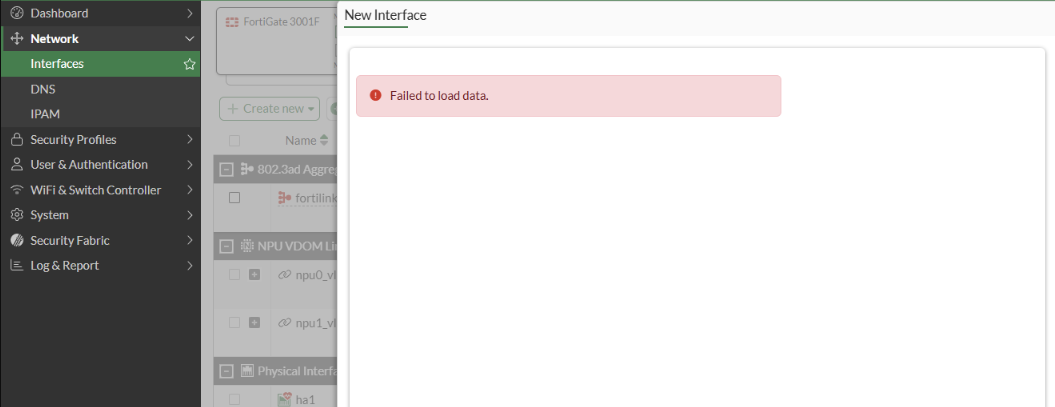
Verify whether the httpsd crash is recorded in the crash log. Run the following command:
diagnose debug crashlog read
Affected FortiGates display output similar to the following:
FGT# diagnose debug crashlog read

16327: 2026-05-12 10:18:35 <02903> firmware FortiGate-121G v8.0.0,build0167b0167,260418 (interim)
16328: 2026-05-12 10:18:35 (Release)
16329: 2026-05-12 10:18:35 <02903> application httpsd
16330: 2026-05-12 10:18:35 <02903> *** signal 11 (Segmentation fault) received ***
16331: 2026-05-12 10:18:35 <02903> Register dump:
16332: 2026-05-12 10:18:35 <02903> R0: 0000007f906c839d R1: 0000000000000000 R2: 000000000000000c
16333: 2026-05-12 10:18:35 <02903> R3: 0000000000000070 R4: 0000000000000000 R5: 0000007f997812e8
16334: 2026-05-12 10:18:35 <02903> R6: 0000000000000299 R7: 0000007f9977f000 XR: 0000007f906c839c
16335: 2026-05-12 10:18:35 <02903> R9: 0000007f90605fc0 R10: 0000000000001400 R11: 0101010101010101
16336: 2026-05-12 10:18:35 <02903> R12: 0000000000367708 R13: 0000000000000004 R14: 0000007f93967000
16337: 2026-05-12 10:18:35 <02903> R15: 000000000000001d IP0: 000000000040b2c0 IP1: 0000007f93b7b350
16338: 2026-05-12 10:18:35 <02903> PR: 0000000000000057 R19: 0000007f906c83b0 R20: 0000000000000000
16339: 2026-05-12 10:18:35 <02903> R21: 0000007f906c83b0 R22: 0000000000000000 R23: 0000000000000001
16340: 2026-05-12 10:18:35 <02903> R24: 0000007f933e1be4 R25: 000000559471fdb0 R26: 0000007fd76e49c0
16341: 2026-05-12 10:18:35 <02903> R27: 0000007f99781240 R28: 0000007fd76e52b8 FP: 0000007fd76e4850
16342: 2026-05-12 10:18:35 <02903> fault_address: 0000000000000000 sp: 0000007fd76e4850
16343: 2026-05-12 10:18:35 <02903> pc: 0000007f933e1cfc lr: 00000055917d50d4
16344: 2026-05-12 10:18:35 <02903> pstate: 60000000 (nZCv daif -PAN -UAO)
16345: 2026-05-12 10:18:35 <02903> Backtrace:
16346: 2026-05-12 10:18:35 <02903> [0x7f933e1cfc] => /lib/libc.so.6 {0x7f93340000}
16347: 2026-05-12 10:18:35 <02903> [0x55917d50d4] => /bin/httpsd {0x55909a9000}
16348: 2026-05-12 10:18:35 <02903> [0x55917d1db0] => /bin/httpsd {0x55909a9000}
16349: 2026-05-12 10:18:35 <02903> [0x55917d1f84] => /bin/httpsd {0x55909a9000}
16350: 2026-05-12 10:18:35 <02903> [0x55917d2084] => /bin/httpsd {0x55909a9000}
16351: 2026-05-12 10:18:35 <02903> [0x559183d9e4] => /bin/httpsd {0x55909a9000}
16352: 2026-05-12 10:18:35 <02903> [0x559180253c] => /bin/httpsd {0x55909a9000}
16353: 2026-05-12 10:18:35 <02903> [0x559180326c] => /bin/httpsd {0x55909a9000}
16354: 2026-05-12 10:18:35 <02903> [0x5591805534] => /bin/httpsd {0x55909a9000}
16355: 2026-05-12 10:18:35 <02903> [0x5591806a58] => /bin/httpsd {0x55909a9000}
16356: 2026-05-12 10:18:35 <02903> [0x55917c24d0] => /bin/httpsd {0x55909a9000}
16357: 2026-05-12 10:18:35 <02903> [0x5591a4134c] => /bin/httpsd {0x55909a9000}
16358: 2026-05-12 10:18:35 <02903> [0x5591a41de8] => /bin/httpsd {0x55909a9000}
16359: 2026-05-12 10:18:35 <02903> [0x5591a93e2c] => /bin/httpsd {0x55909a9000}
16360: 2026-05-12 10:18:35 <02903> [0x5591a93fe4] => /bin/httpsd {0x55909a9000}
16361: 2026-05-12 10:18:35 <02903> [0x5591a8b10c] => /bin/httpsd {0x55909a9000}
16362: 2026-05-12 10:18:35 <02903> [0x5591a46784] => /bin/httpsd {0x55909a9000}
16363: 2026-05-12 10:18:35 <02903> [0x5591a6098c] => /bin/httpsd {0x55909a9000}
16364: 2026-05-12 10:18:35 <02903> [0x5591a60cdc] => /bin/httpsd {0x55909a9000}
16365: 2026-05-12 10:18:35 <02903> [0x5591a60f70] => /bin/httpsd {0x55909a9000}
16366: 2026-05-12 10:18:35 <02903> [0x5591a616ec] => /bin/httpsd {0x55909a9000}
16367: 2026-05-12 10:18:35 <02903> [0x5591a5b32c] => /bin/httpsd {0x55909a9000}
16368: 2026-05-12 10:18:35 <02903> [0x5591a5ab98] => /bin/httpsd {0x55909a9000}
16369: 2026-05-12 10:18:35 <02903> [0x5590d5a964] => /bin/httpsd {0x55909a9000}
16370: 2026-05-12 10:18:35 <02903> [0x5590d5f0dc] => /bin/httpsd {0x55909a9000}
16371: 2026-05-12 10:18:35 <02903> [0x5590d5f6c4] => /bin/httpsd {0x55909a9000}
16372: 2026-05-12 10:18:35 <02903> [0x5590d63984] => /bin/httpsd {0x55909a9000}
16373: 2026-05-12 10:18:35 <02903> [0x5590d648b0] => /bin/httpsd {0x55909a9000}
16374: 2026-05-12 10:18:35 <02903> [0x7f93370544] => /lib/libc.so.6 {0x7f93340000}
16375: 2026-05-12 10:18:35 <02903> [0x7f93370618] => /lib/libc.so.6 {0x7f93340000}
16376: 2026-05-12 10:18:35 <02903> fortidev 7.0.0.0006
16377: 2026-05-12 10:18:35 secappdomain=SEGMENTATION secappdomainid=30 acl=read msg="Fortinet Secure
16378: 2026-05-12 10:18:35 Module Violation: process-[httpsd] pid-[2903] api-[open_r()]
16379: 2026-05-12 10:18:35 path-[/var/run/httpd.pid]"
16380: 2026-05-12 10:18:35 secappdomain=SEGMENTATION secappdomainid=30 acl=unlink msg="Fortinet Secure
16381: 2026-05-12 10:18:35 Module Violation: process-[httpsd] pid-[2903] api-[unlink()]
16382: 2026-05-12 10:18:35 path-[/var/run/httpd.pid]"
The presence of the 'httpsd signal 11 crash' together with the 'Failed to load data' error is consistent with this issue.
Note: Interface creation remains available from the CLI. For example, a VLAN interface can be created with the following configuration:
config system interface
    edit "v999"
        set vdom "prod"
        set ip 192.168.99.111 255.255.255.0
        set allowaccess ping
        set interface "port26"
        set vlanid 999
    next
end
Verify the interface configuration with the following command:
show system interface v999
Workaround:
Create new interfaces from the CLI instead of the GUI when the FortiGates are affected by this issue. The CLI configuration is applied successfully even when interface creation from the GUI returns the 'Failed to load data' error.
Resolution:
The issue is resolved in FortiOS version 8.0.1. Therefore, the solution is to upgrade the affected cluster of FortiGates to FortiOS version 8.0.1
Related documents:
Technical Tip: FortiGate HA upgrade procedure and the status during the upgrade Upgrading FortiGates in an HA cluster Known issues Upgrade information | 


