Troubleshooting Tip: BGP Error logs 'Down Interface Flap'
| Description | This article describes the solution for the error 'Down Interface Flap' when performing BGP debugging. |
| Scope | FortiGate. |
| Solution |
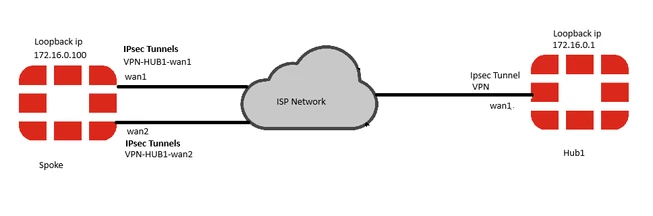
hub1 Configuration config system interface edit "Loopback-BGP" set vdom "root" set ip 172.16.0.1 255.255.255.255 set allowaccess ping set type loopback set snmp-index 42 next show router bgp config router bgp set as 65000 set router-id 172.16.0.1 set keepalive-timer 30 set holdtime-timer 90 set ibgp-multipath enable set recursive-next-hop enable config neighbor-group edit "VPN" set advertisement-interval 10 set link-down-failover enable <-------- set next-hop-self enable set interface "Loopback-BGP" set remote-as 65000 set connect-timer 10 set update-source "Loopback-BGP" set route-reflector-client enable next end config neighbor-range edit 1 set prefix 172.16.0.0 255.255.0.0 set neighbor-group "VPN" next end The hub's IPsec tunnel is configured as dynamic (set type dynamic). The net-device setting is disabled on hub(set net-device disable). Spoke Configuration: config system interface edit "Loopback-BGP" set vdom "root" set ip 172.16.0.100 255.255.255.255 set allowaccess ping set type loopback set snmp-index 42 next end spoke # show router bgp config router bgp set as 65000 set router-id 172.16.0.100 set keepalive-timer 30 set holdtime-timer 90 set ibgp-multipath enable set recursive-next-hop enable config neighbor-group edit "VPN" set advertisement-interval 10 set link-down-failover enable <-------- set next-hop-self enable set interface "Loopback-BGP" set remote-as 65000 set connect-timer 10 set update-source "Loopback-BGP" set route-reflector-client enable next end config neighbor-range edit 1 set prefix 172.16.0.0 255.255.0.0 set neighbor-group "VPN" next end Spoke Routing Information: S* 0.0.0.0/0 [1/0] via 172.17.0.1, wan1, [10/0] [1/0] via 172.18.0.1, wan2, [20/0] [1/0] via VPN-HUB1-wan1 tunnel 192.168.100.1, [30/0] [1/0] via VPN-HUB1-wan2 tunnel 192.168.101.1, [40/0] get router info bgp summary VRF 0 BGP router identifier 172.16.0.100, local AS number 65000 BGP table version is 1 1 BGP AS-PATH entries 2 BGP community entries Neighbor V AS MsgRcvd MsgSent TblVer InQ OutQ Up/Down State/PfxRcd 172.16.0.1 4 65000 3959 3958 0 0 0 02:11:52 0 The BGP connection is established over VPN-HUB1-wan1, as this route is preferred. This can be confirmed by checking the session details: diagnose sys session filter dport 179 diagnose sys session list
The intended behavior is as follows: If the primary link (wan1) fails, the associated tunnel (VPN-HUB1-wan1) will go down, and the BGP connection will automatically reestablish over the backup tunnel (VPN-HUB1-wan2). If the secondary link (wan2) fails, its associated tunnel (VPN-HUB1-wan2) should go down without affecting the primary BGP session over VPN-HUB1-wan1, as wan2 is a backup route. Issue: When the wan2 interface on the spoke goes down, the associated tunnel (VPN-HUB1-wan2) also goes down. However, this causes unexpected behavior at the hub: the established BGP session over VPN-HUB1-wan1 is reestablished unnecessarily, disrupting connectivity. The issue arises when enabling the command "set link-down-failover enable" in the hub BGP configuration. How Link-Down-Failover Works: When link-down-failover is enabled, the FortiGate will dynamically monitor the outgoing interface used for each BGP neighborship. If the FortiGate detects that the outgoing interface has been brought down for some reason (e.g. physical link disconnection, administrative shutdown, VPN dead-peer detection, etc.,) then it will immediately bring down the BGP neighborships associated with that outgoing interface. The BGP routes corresponding to that remote peer will also be immediately removed from the routing table. More information about link-down-failover feature is available in Troubleshooting Tip:link-down-failover. The following shows the hub1 routing table to the spoke loopback IP: S 172.16.0.1 [15/0] via VPN tunnel 172.17.0.1, [1/0] [15/0] via VPN tunnel 100.64.0.7, [1/0] When the IKE daemon detects a tunnel down event towards the destination IP 172.16.0.100, it notifies the BGP daemon to immediately bring down the BGP neighborship to 172.16.0.100. However, the BGP daemon is unable to determine whether the event pertains to the primary or secondary tunnel interface. This leads to unexpected behavior in BGP. BGP debug on hub1: 2025-01-13 11:10:30 BGP: ike event received (424 - 424) <-------- 2025-01-13 11:10:30 BGP: ike event type 1, vf 0, VPN, VPN, VPN_1, 172.16.0.100 <-------- 2025-01-13 11:10:30 BGP: ike event neighbor found 0x7fe123017000 <-------- 2025-01-13 11:10:30 BGP: 172.16.0.100-Outgoing [FSM] State: Established Event: 35 2025-01-13 11:10:30 BGP: 172.16.0.100-Outgoing [ENCODE] Msg-Hdr: Type 3 2025-01-13 11:10:30 BGP: %BGP-3-NOTIFICATION: sending to 172.16.0.100 6/0 (CeaseUnspecified Error Subcode) 0 data-bytes [] 2025-01-13 11:10:30 BGP: [GRST] Timer Announce Defer: Check 2025-01-13 11:10:30 BGP: NSM Message Header 2025-01-13 11:10:30 BGP: VR ID: 0 2025-01-13 11:10:30 BGP: VRF ID: 0 2025-01-13 11:10:30 BGP: Message type: Address Delete (13) 2025-01-13 11:10:30 BGP: Message length: 33 2025-01-13 11:10:30 BGP: Message ID: 0x00000000 2025-01-13 11:10:30 BGP: NSM Address 2025-01-13 11:10:30 BGP: Interface index: 50 2025-01-13 11:10:30 BGP: Flags: 0 2025-01-13 11:10:30 BGP: Prefixlen: 0 2025-01-13 11:10:30 BGP: Destination prefixlen: 32 2025-01-13 11:10:30 BGP: AFI: 1 2025-01-13 11:10:30 BGP: Interface Address(SRC): 0.0.0.0 2025-01-13 11:10:30 BGP: Interface Address(DST): 172.16.0.100 2025-01-13 11:10:30 id=20300 msg="BGP: %BGP-5-ADJCHANGE: VRF 0 neighbor 172.16.0.100 Down Interface Flap" <-------- 2025-01-13 11:10:30 id=20300 msg="BGP: %BGP-5-ADJCHANGE: VRF 0 neighbor 172.16.0.100 Down BGP Notification CEASE" <-------- 2025-01-13 11:10:30 id=20300 msg="BGP: %BGP-5-ADJCHANGE: VRF 0 neighbor 172.16.0.100 Down User reset" 2025-01-13 11:10:34 BGP: [NETWORK] Accept Thread: Incoming conn from host 172.16.0.100 (FD=27 VRF=0) 2025-01-13 11:10:34 BGP: 172.16.0.100-Outgoing [FSM] State: Idle Event: 14 2025-01-13 11:10:34 BGP: 172.16.0.100-Outgoing [FSM] InConnReq: Accepting... 2025-01-13 11:10:34 BGP: 172.16.0.100-Outgoing [NETWORK] FD=27, Sock Status: 0-Success 2025-01-13 11:10:34 BGP: 172.16.0.100-Outgoing [FSM] State: Active Event: 17 2025-01-13 11:10:34 BGP: 172.16.0.100-Outgoing [ENCODE] Msg-Hdr: Type 1 2025-01-13 11:10:34 BGP: 172.16.0.100-Outgoing [ENCODE] Open: Ver 4 MyAS 65500 Holdtime 90 2025-01-13 11:10:34 BGP: 172.16.0.100-Outgoing [ENCODE] Open: Msg-Size 61 There are two potential solutions to address this issue, both of which should be configured on the hub: set net-device enable set link-down-failover disable
|