


Technical Tip: Web Filter authentication for Youtube access
Description
This article describes how to require an authentication user portal using Web Filter to access YouTube.
Scope
FortiGate, Web Filter, Authentication, YouTube.
Solution
Solution 1: Local Category:
Create a new Web filter Custom Category named 'Youtube' and override all URLs:
    config webfilter ftgd-local-cat
        edit "Youtube"
            set id 148
        next
    end
    config webfilter ftgd-local-rating
        edit "Youtube"
            set rating 148
        next
        edit "rr1---sn-njaeyn7z.googlevideo.com"
            set rating 148
        next
        edit "googlevideo.com"
            set rating 148
        next
        edit "i.ytimg.com"
            set rating 148
        next
        edit "video.flim6-3.fna.fbcdn.net"
            set rating 148
        next
        edit "youtube-ui.l.google.com"
            set rating 148
        next
        edit "www.youtube.com"
            set rating 148
        next
        edit "play.google.com"
            set rating 148
        next
        edit "www.youtube.com/api/stats"
            set rating 148
        next
        edit "rr1---sn-8pxuuxa2xg0-aphl.googlevideo.com"
            set rating 148
        next
        edit "www.youtube.com/youtubei/v1"
            set rating 148
        next
        edit "www.youtube.com/embed"
            set rating 148
        next
        edit "rr2---sn-5hne6nz6.googlevideo.com"
            set rating 148
        next
        edit "safebrowsing.google.com"
            set rating 148
        next
        edit "sb-ssl.google.com"
            set rating 148
        next
        edit "www.youtube.com/sw.js"
            set rating 148
        next
        edit "sb.l.google.com"
            set rating 148
        next
        edit "google.video.com"
            set rating 148
        next
        edit "ad.doubleclick.net"
            set rating 148
        next
        edit "youtube-nocookie.com"
            set rating 148
        next
        edit "www.youtube.com:8010"
            set rating 148
        next
        edit "yt3.ggpht.com"
            set rating 148
       next
       edit "www.youtube.com/?hl=es&gl=MX" <----- Spanish, Mexico.
           set rating 148
       next
       edit "www.youtube.com/?hl=en&gl=GB" <----- English, Great Britain.
           set rating 148
       next
       edit "www.youtube.com/?hl=po&gl=BR" -> Portuguese, Brazil
           set rating 148
       next
       edit "www.youtube.com/?hl=de&gl=DE" -> Deutsche, Deutschland
           set rating 148
       next
    end
Users and groups:
Configure new user and user group, refer to point 1 of the following article:
Technical Tip: Creating a Web Filter profile with user authentication
Web Filter Profile:
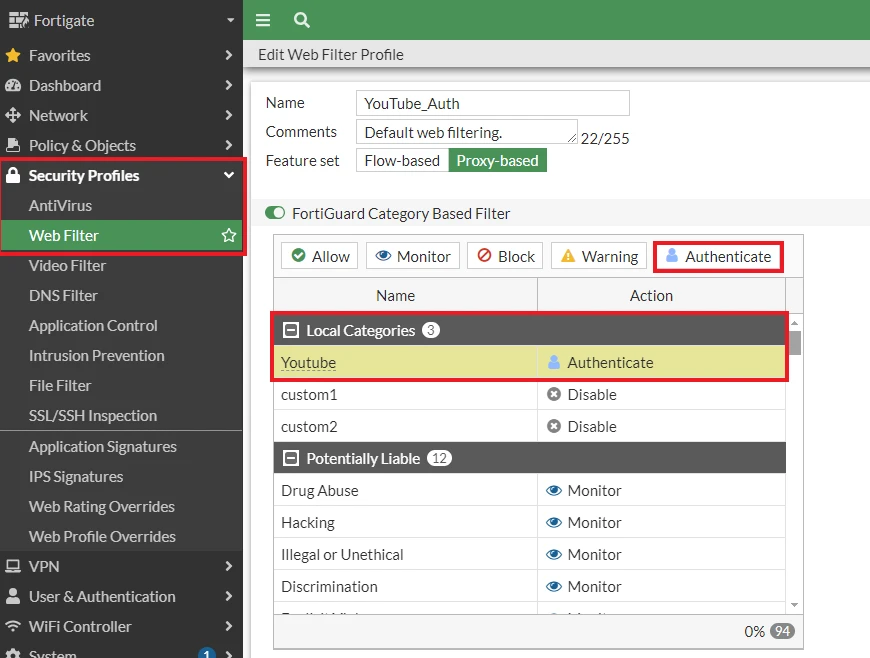
Create a new Web Filter profile and configure user authentication for the local category 'Youtube'.
Go to Security Profiles -> Web Filter -> Create New -> Name, FortiGuard Category Based Filter -> Local Categories, select 'Youtube' then Authenticate.
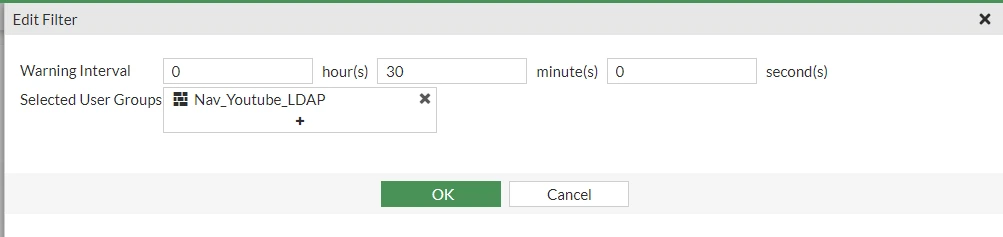
Select User Groups, then select OK.
Firewall Policy:
Create a firewall policy as follows:
Name: YoutubeAuthentication.
Incoming Interface: LAN.
Outgoing Interface: WAN.
Source: all.
Destination: all.
Service: all.
NAT: Enabled.
Web Filter: YouTubeAuth.
SSL Inspection: Certificate Inspection.
Solution 2:
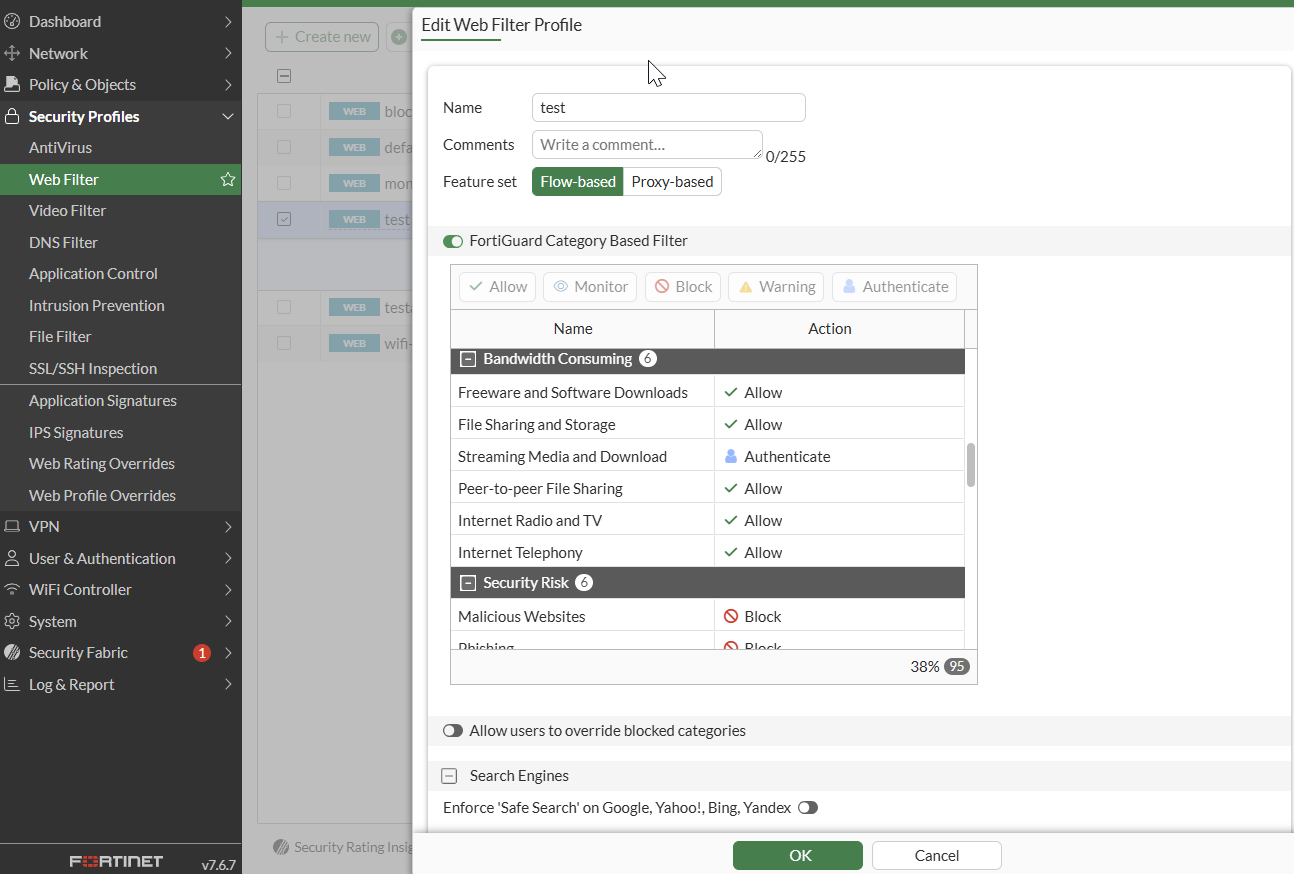
Re-categorize the sites under the Web Filter profile 'Streaming Media and Downloads' category and configure the category to Authenticate.
This will allow users to access the sites after successfully authenticating through the web filter.
Re-categorize the specified websites for YouTube to work with Authenticate.
  config webfilter ftgd-local-rating
      edit "googlevideo.com"
          set rating 25 -> Streaming Media and Downloads
      next
      edit "ytimg.com"
          set rating 25
      next
      edit "youtube.i.googleapis.com"
          set rating 25
      next
      edit "ggpht.com"
          set rating 25
      next
      edit "googleapis.com"
          set rating 25
      next
      edit "googleadservices.com"
          set rating 25
      next
      edit "doubleclick.net"
          set rating 25
      next
      edit "accounts.google.com"
          set rating 25
      next
      edit "ogads-pa.clients6.google.com"
          set rating 25
      next
      edit "update.googleapis.com"
          set rating 25
      next
      edit "mtalk.google.com"
          set rating 25
      next
      edit "play.google.com"
          set rating 25
      next
      edit "ns1.google.com"
          set rating 25
      next
      edit "www.youtube-ui.1.com"
          set rating 25
      next
      edit "mobile-gtalk.1.google.com"
          set rating 25
      next
      edit "content-autofill.googleapis.com"
          set rating 25
      next
      edit "contentfill.googleapis.com"
          set rating 25
      next
      edit "googleads.g.doubleclick.net"
          set rating 25
      next
      edit "static.doubleclick.net"
          set rating 25
      next
      edit "fonts.googleapis.com"
          set rating 25
      next
      edit "i.ytmg.com"
          set rating 25
      next
      edit "clientservices.googleapis.com"
          set rating 25
      next
      edit "android.clients.google.com"
          set rating 25
      next
      edit "lcyyzb-in-f149.1e100.net"
          set rating 25
      next
      edit "optimizationguide-pa.googlapis.com"
          set rating 25
      next
      edit "optimizationguide-pa.googleapis.com"
          set rating 25
      next
      edit "usvideoquery.fortinet.net"
          set rating 25
      next
      edit "www.doubleclick.net"
          set rating 25
      next
      edit "www.gstatic.com"
          set rating 25
      next
      edit "youtube.googleapis.com"
          set rating 25
      next
      edit "lh3.google.com"
          set rating 25
      next
      edit "self.events.data.microsoft.com"
          set rating 25
      next
      edit "apis.google.com"
          set rating 25
      next
      edit "csp.withgoogle.com"
          set rating 25
      next
      edit "oauth2.googleapis.com"
          set rating 25
      next
      edit "fd.api.iris.microsoft.com"
          set rating 25
      next
      edit "www.google.ca"
          set rating 25
      next
      edit "dns.google"
          set rating 25
      next
      edit "checkappexec.microsoft.com"
           set rating 25
      next
      edit "www.google.com"
           set rating 25
      next
      edit "www.accounts,google.com"
           set rating 25
      next
      edit "www.googletagmanager.com"
           set rating 25
      next
   end
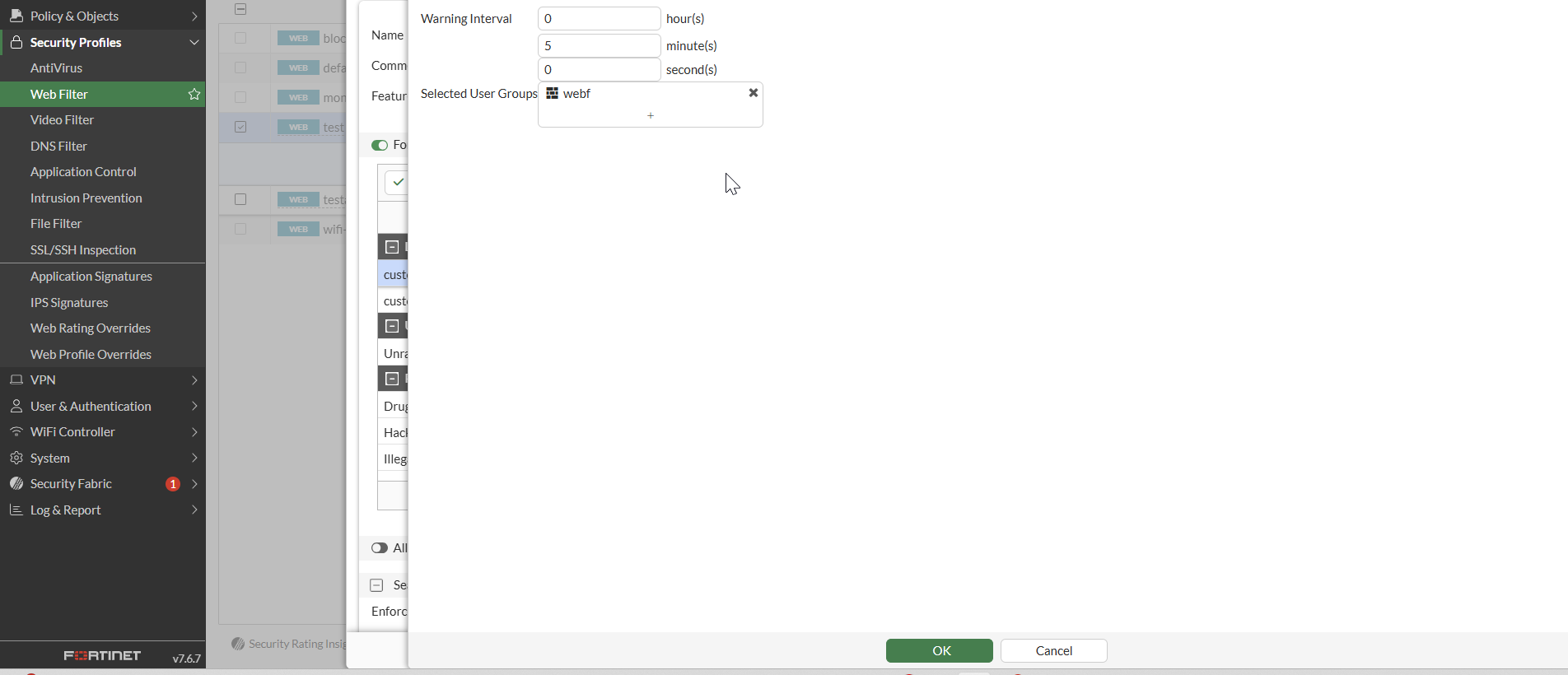
Apply a User group to the Web Filter profile for the 'Streaming Media and Download' category.
CLI configuration example:
config webfilter profile
    edit "test"
    config ftgd-wf
        unset options
        config filters
            edit 1
              set action warning
            next
            edit 2
              set category 1
            next
            edit 3
              set category 3
            next
            edit 4
              set category 4
            next
            edit 5
              set category 5
            next
            edit 6
              set category 6
            next
            edit 7
              set category 12
            next
            edit 8
              set category 59
            next
            edit 9
              set category 62
            next
            edit 10
              set category 83
              set action block
            next
            edit 11
              set category 96
              set action block
            next
            edit 12
              set category 98
              set action block
            next
            edit 13
              set category 99
              set action block
            next
            edit 14
              set category 2
              set action warning
            next
            edit 15
              set category 7
              set action warning
            next
            edit 16
              set category 8
              set action warning
            next
            edit 17
              set category 9
              set action warning
            next
            edit 18
              set category 11
              set action warning
            next
            edit 19
              set category 13
              set action warning
            next
            edit 20
              set category 14
              set action warning
            next
            edit 21
              set category 15
              set action warning
            next
            edit 22
              set category 16
              set action warning
            next
            edit 23
              set category 57
              set action warning
            next
            edit 24
              set category 63
              set action warning
            next
            edit 25
              set category 64
              set action warning
            next
            edit 26
              set category 65
              set action warning
            next
            edit 27
              set category 66
              set action warning
            next
            edit 28
              set category 67
              set action warning
            next
            edit 29
              set category 26
              set action block
            next
            edit 30
              set category 61
              set action block
            next
            edit 31
              set category 86
              set action block
            next
            edit 32
              set category 88
              set action block
            next
            edit 33
              set category 90
              set action block
            next
            edit 34
              set category 91
              set action block
            next
            edit 35
              set category 25
              set action authenticate
              set warn-duration 2m
              set auth-usr-grp "webf"
            next
            edit 36
              set category 140
              set action authenticate
              set auth-usr-grp "webf"
            next
            edit 37
              set category 41
            next
         end
      end
   next
en
Apply the Web Filter profile into the firewall policy:
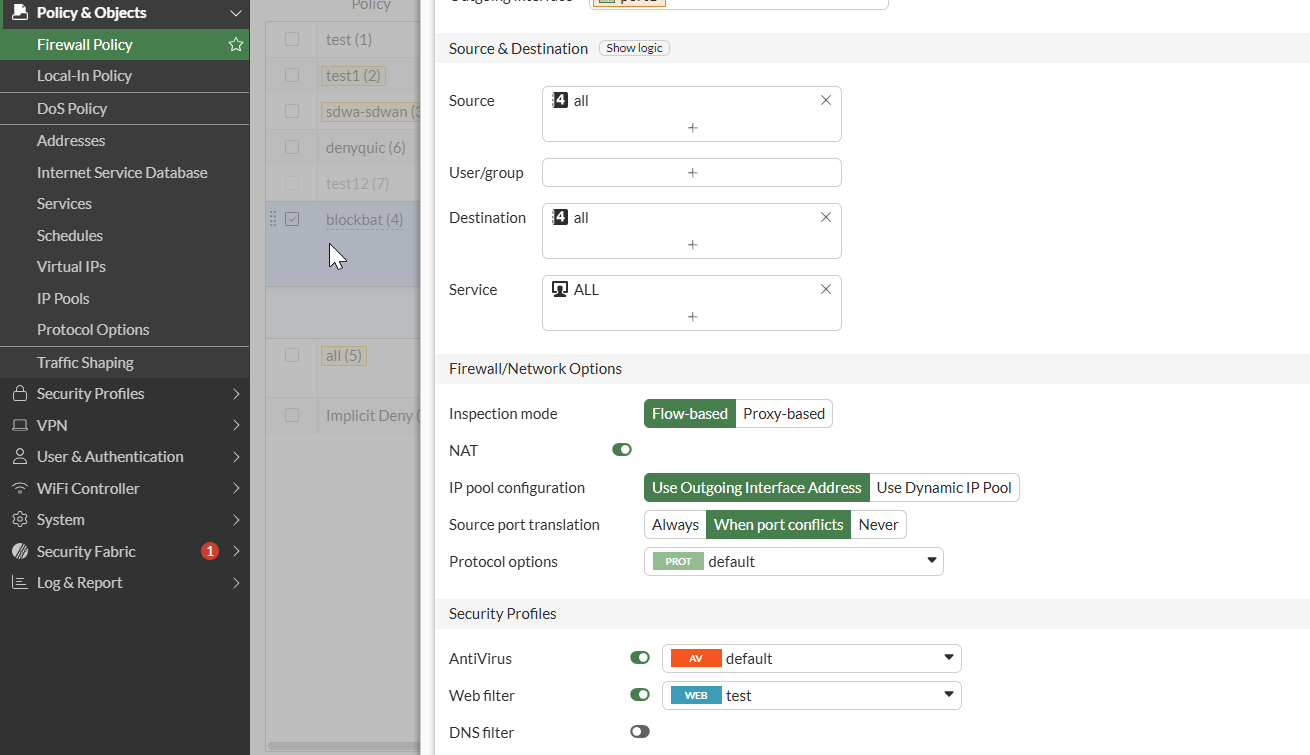
CLI configuration example:
config firewall policy
    edit 4
        set name "blockbat"
        set uuid 3eaff220-3ced-51f1-6a96-7d66e0806bf9
        set srcintf "port2"
        set dstintf "port1"
        set action accept
        set srcaddr "all"
        set dstaddr "all"
        set schedule "always"
        set service "ALL"
        set utm-status enable
        set ssl-ssh-profile "test"
        set av-profile "default"
        set webfilter-profile "test"
        set nat enable
    next
end
Related documents:
Technical Tip: Web Filter Authentication for local categories
Technical Tip: Creating a Web Filter profile with user authentication
Video: Flow Mode Webfilter Support (Warning/Authenticate/Override)
