nradia_FTNT
Staff
Staff
Jul 31, 2024 12:45 PM UTC

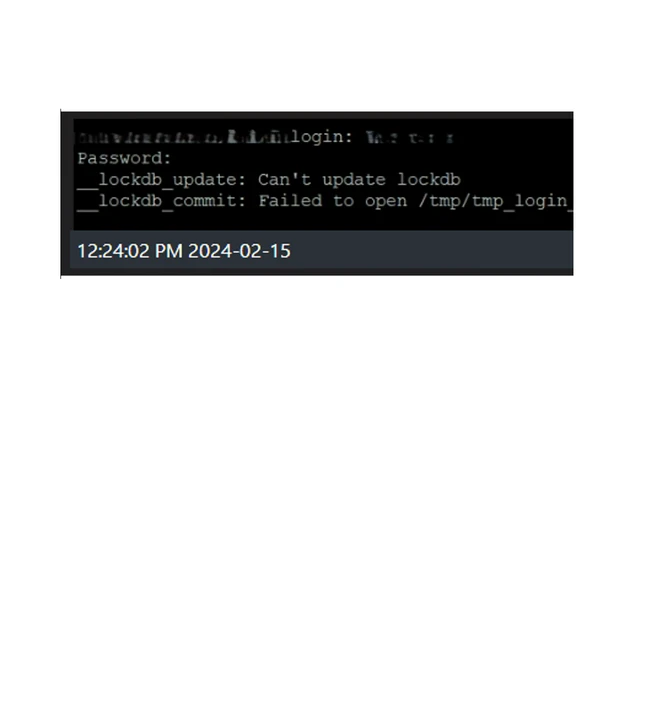
Technical Tip: lockdb_update and lockdb_commit errors after logging into firewall via console connection

  • Apr 16, 2026 12:07 PM UTC
  • 0 replies
  • 437 views
  • Translate All
Description This article describes the reasons behind the lockdb errors and how to remediate them.
Scope

FortiGate v6.X and v7.X.

Solution

lockdb error screenshot.png


The errors lockdb_update and lockdb_commit can be observed when logging into the FortiGate via GUI or serial console:


  • These errors can result due to space issues on the firewall.
  • Do a backup of the config file and do a simple reboot of the firewall in the maintenance period to see if it helps as a workaround.
  • It is possible to backup the required logs and then delete those that are not required as describes in the following KB article: Technical Tip: How to delete FortiGate log entries stored in memory or local disk.
  • Verify the space with the following debug commands:


fnsysctl du -i /tmp
fnsysctl df -h
fnsysctl df -k
diag sys flash list
fnsysctl cat /proc/slabinfo
fnsysctl du -i /tmp
fnsysctl du -i /dev/shm
fnsysctl du -i /dev/cmdb


Note:

'fnsysctl' requires Super_admin (administrator account with super_admin permission profile) access to execute.

FortiGate will produce an error otherwise. For further information, see this KB article: Technical Tip: fnsysctl command returns Unknown action 0


  • If logs are not required, it is possible to delete them or format the log disk.


execute log delete-all


Or:


exec formatlogdisk --> Requires reboot.


After these steps, the errors should disappear.

Risk and Resilience in the Age of AI. An OT Thought Leadership Summit for Houston's Critical Infrastructure Leaders. Date: Thursday, December 3, 2026. Time: 8:30 am - 1:30 pm (CT). Location: The Westin Houston, Memorial City | 945 Gessner Road, Houston, TX 77024