
Technical Tip: How to restrict HTTPS access to an HTTPS custom port and specific country
| Description | This article describes how to restrict HTTPS access to an HTTPS custom port and a specific country. |
| Scope | FortiGate. |
| Solution | Prerequisites:
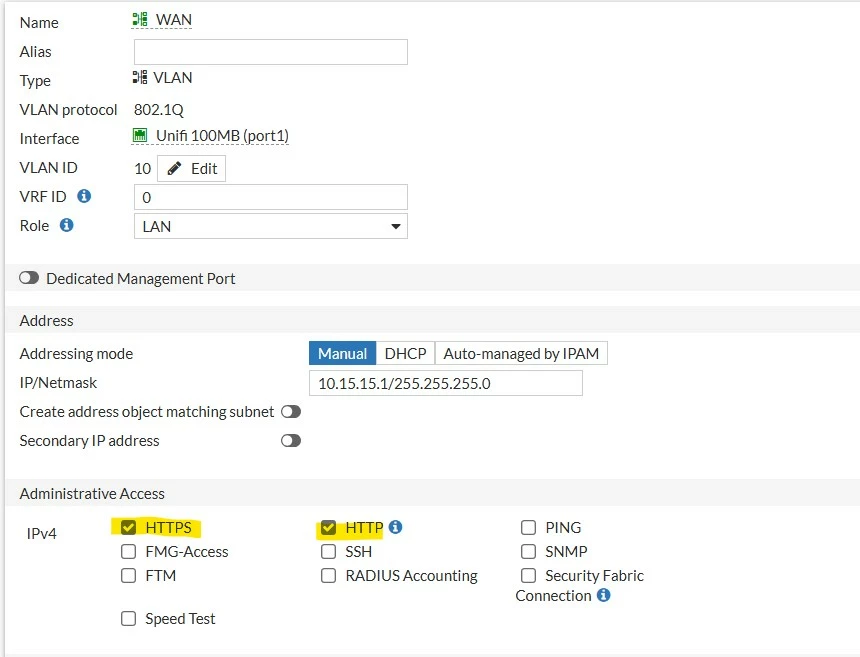
config system interface
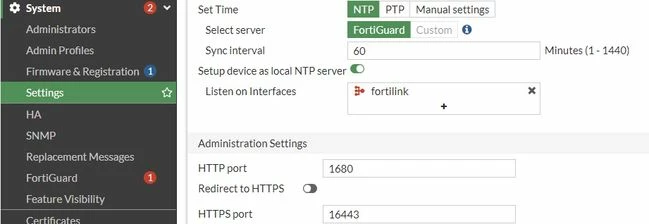
In the GUI: Go to System -> Settings -> Administration Settings -> HTTPS port.
On CLI:
config system global set admin-sport 16443 end show full system global | grep admin-sport set admin-sport 16443
How to configure:
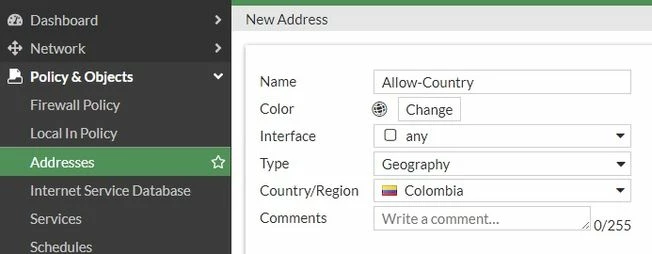
In the GUI: Go to Policy & Objects -> Addresses -> Create new:
Select the Geography type and select OK.
In the CLI:
config firewall address
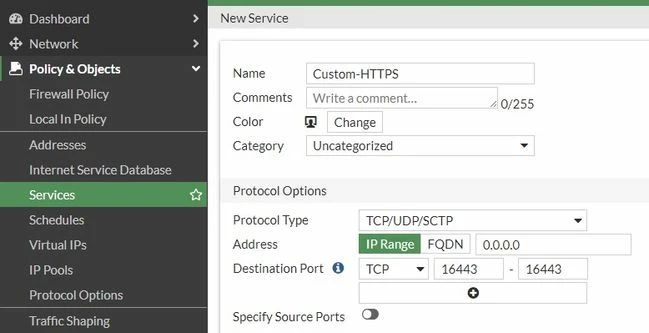
In the GUI: Go to Policy & Objects -> Services -> Create new:
On CLI:
config firewall service custom
Starting in v7.6, local-in policies can be configured in the Web GUI or via the CLI (refer to Technical Tip: Creating a Local-In policy (IPv4 and IPv6). In v7.4 and earlier, local-in policies can only be configured via the CLI.
For CLI config, use the following commands: config firewall local-in-policy end
Note: Instead of allowing countries, a similar approach can be followed to allow certain subnets or IP addresses. Refer to: |