Technical Tip: HA session failover (session pickup)
Description
This article describes the session failover (session pickup) feature used on the FortiGate High Availability (HA) cluster.
Scope
FortiGate.
Solution
Session failover means that after the primary unit fails/reboots/power off, communications sessions resume on the new primary unit with minimal or no interruption. If session pickup is not enabled, all sessions are briefly interrupted after a device or link failover, and must be re-established at the application level after the cluster renegotiates.
With session failover (also called session pickup) enabled, the primary unit informs the subordinate units of changes to the primary unit connection and state tables, keeping the subordinate units up-to-date with the traffic currently being processed by the HA cluster.
This helps new primary units resume communication sessions with minimal loss of data, avoiding the need to restart active sessions.
All synchronization activity takes place over the HA heartbeat link using TCP/703 and UDP/703 packets.
Two categories of sessions need to be resumed after a failover:
- Sessions pass through the cluster.
- Sessions terminated by the cluster.
CLI Command to change enable the session Pickup:
config system ha
set session-pickup enable
end
If the customer has VDOMs then this will be done from global VDOM:
config system global
config system ha
set session-pickup enable
end
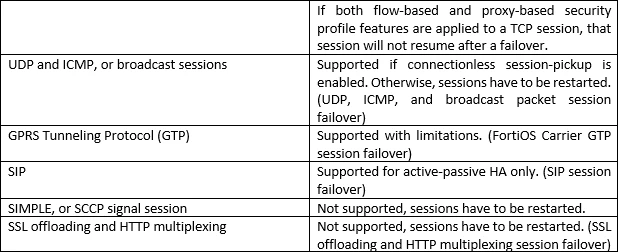
By default, only TCP sessions will failover when 'session-pickup' is enabled.
Below are commands to enable other session failover:
config system ha
set session-pickup-connectionless enable/disable => UDP and ICMP session sync.
set session-pickup-expectation enable/disable => session helper expectation session sync for FGSP.
set session-pickup-nat enable/disable => NAT session sync for FGSP.
end
Sessions pass through the cluster.
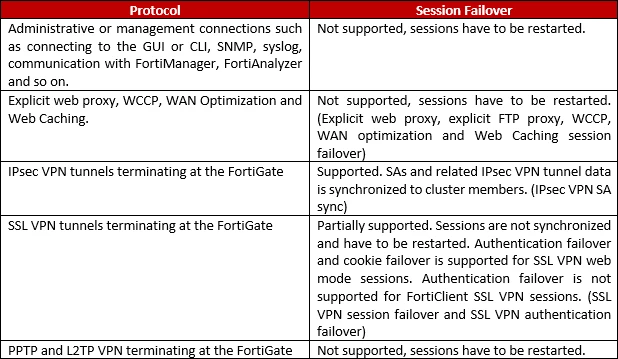
Session failover is supported for sessions scanned by flow-based security profiles; however, flow-based sessions that failover are not inspected after they fail over.
Session failover is not supported for sessions being scanned by proxy-based security profiles.
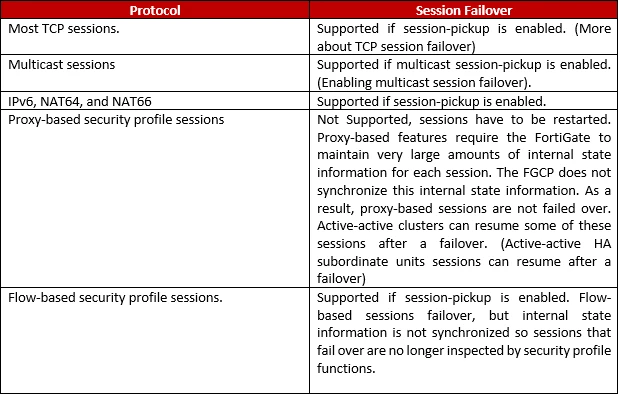
Session terminated by the cluster include management sessions (such as HTTPS connections to the FortiGate GUI or SSH connection to the CLI as well as SNMP and logging and so on).
Session pick debug:
diagnose debug disable
diagnose debug reset
diagnose debug console timestamp enable
diagnose debug flow filter addr <IP_address>
diagnose debug flow show console enable
diagnose debug flow trace start 100
diagnose debug enable
Note: Look for messages related to session synchronization and failover, such as 'session-pickup' or 'local-out traffic, blocked by HA'.