



Technical Tip: FortiOS debug flow reference example: Basic ICMP exchanges with IPsec and NAT
Description
This article describes reference examples of FortiOS Debug Flow output taken in basic sample scenarios, with the purpose being to provide a basic but in-depth starting point for administrators to understand the actual contents of the debug flow output.
Scope
FortiGate, Debug Flow.
Solution
Note that this article assumes that the reader is already familiar with initiating the debug flow output, but wants to better understand the output that has been produced. For initial guidance on using the debug flow tool, review the following first:
- Debugging the packet flow
- Using the debug flow tool
- Technical Tip: Debug flow tool
- Technical Tip: Collecting debug flow output for troubleshooting
For this article, consider the following example topology:
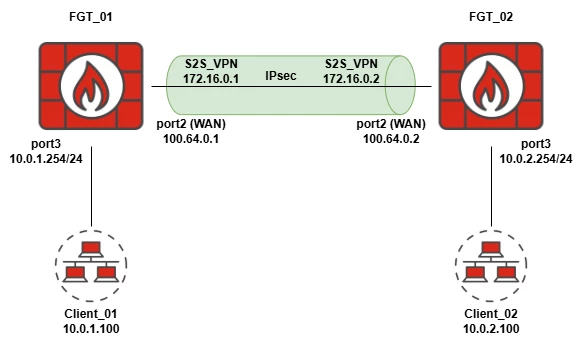
In this example, traffic will be transmitted between Client_01 (10.0.1.100) and Client_02 (10.0.2.100) with debug flow output captured on FGT_01 for both directions. Notably, both FortiGates in this example are FortiGate-VMs, which means that there is no hardware acceleration occurring in these example scenarios.
Example Scenario: ICMP ping, Client_01 initiating to Client_02 and reply.
Debug Flow Filters applied:
diagnose debug flow filter proto 1 <--- Capture all traffic with IP Proto 1 (ICMP).
diagnose debug flow show function-name enable <--- Display function names associated with each line of output**.
diagnose debug flow show iprope enable <--- Display hidden iprope rule checks where applicable (highlighted below)***.
diagnose debug flow trace start 100 <--- Display up to 100 packets of output.
diagnose debug enable <--- Enable debug output to be printed to console.
** Function names appear to be produced regardless of this setting being enabled or disabled, but it is still suggested to explicitly enable this option.
*** iprope is an internal table of the various policies/rules that traffic can be matched against, including forward traffic rules (AKA Firewall Policies, local-in policies, etc.). See here for more information: Technical Tip: iPrope policies group.
Overview Screenshot, Packets 1 and 2 (no previous session established):
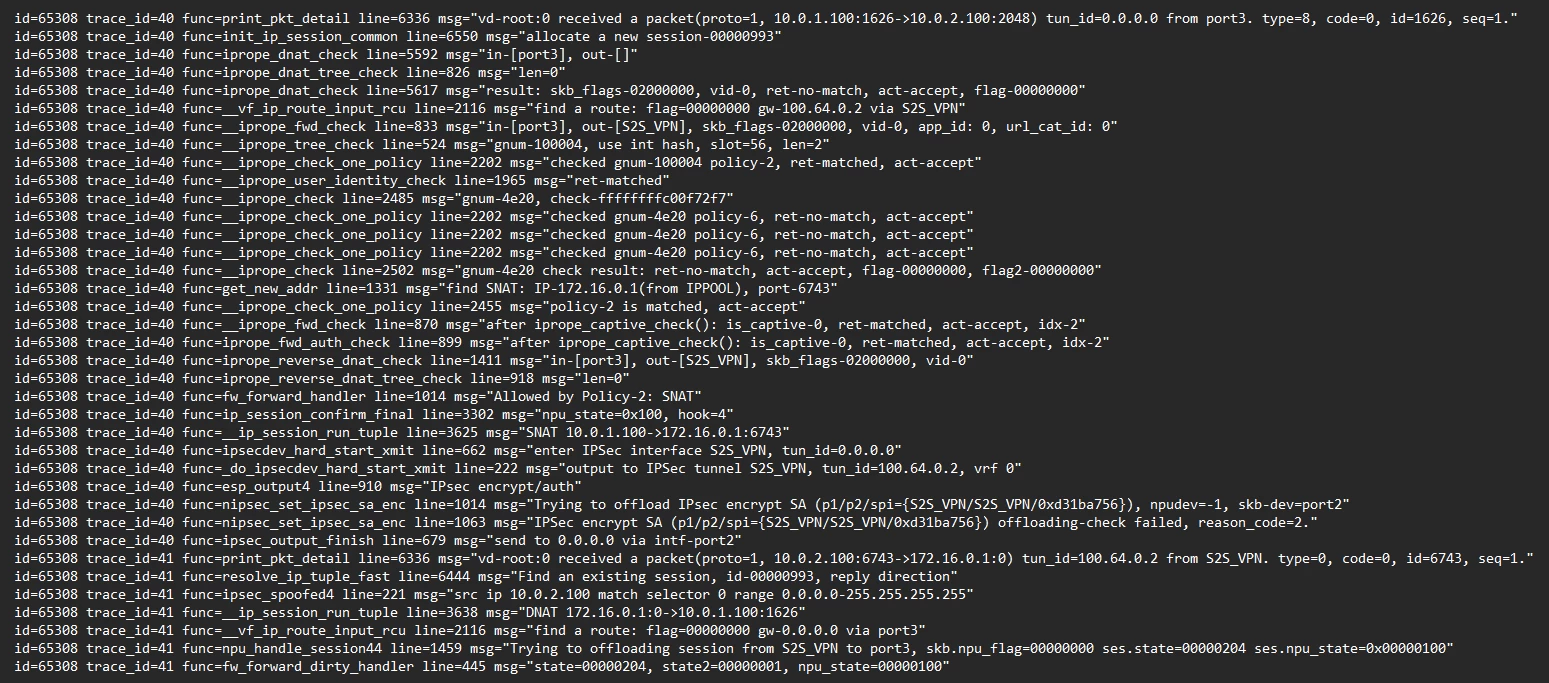
Line-by-line breakdown:
id=65308 trace_id=40 func=print_pkt_detail line=6336 msg="vd-root:0 received a packet(proto=1, 10.0.1.100:1626->10.0.2.100:2048) tun_id=0.0.0.0 from port3. type=8, code=0, id=1626, seq=1."
FGT_01 receives a packet of IP protocol 1 (ICMP) sourced from 10.0.1.100 and destined to 10.0.2.100 (ICMP does not have port numbers, and so the: ### numbers may be ignored here). The packet was received on port3 and is ICMP Type 8 (Echo Request).
id=65308 trace_id=40 func=init_ip_session_common line=6550 msg="allocate a new session-00000993"
FGT_01 allocates a new session for this connection (in this case with ID 00000993). The session will appear in later debug flow output for any packets that are a part of the same session (based on the Source/Destination IP addresses, ports, and protocol tuple).
id=65308 trace_id=40 func=iprope_dnat_check line=5592 msg="in-[port3], out-[]"
id=65308 trace_id=40 func=iprope_dnat_tree_check line=826 msg="len=0"
id=65308 trace_id=40 func=iprope_dnat_check line=5617 msg="result: skb_flags-02000000, vid-0, ret-no-match, act-accept, flag-00000000"
Output specific to iprope. As per the Packet flow: NGFW Profile mode with no NP offloading, the FortiGate kernel will first check the incoming traffic to see if it matches any Destination NAT rules (DNAT using Virtual IPs or Virtual Servers). No VIPs have been configured in this case, and so no DNAT iprope entries are matched.
id=65308 trace_id=40 func=__vf_ip_route_input_rcu line=2116 msg="find a route: flag=00000000 gw-100.64.0.2 via S2S_VPN"
id=65308 trace_id=40 func=__iprope_fwd_check line=833 msg="in-[port3], out-[S2S_VPN], skb_flags-02000000, vid-0, app_id: 0, url_cat_id: 0"
FGT_01 checks the Kernel routing table (AKA the Forward Information Base, or FIB) to determine the best-match route to reach destination 10.0.2.100, and in this case, it is via the S2S_VPN IPsec tunnel interface. Note that this example does not utilize SD-WAN, and so no policy route lookups are present in this output.
id=65308 trace_id=40 func=__iprope_tree_check line=524 msg="gnum-100004, use int hash, slot=56, len=2"
id=65308 trace_id=40 func=__iprope_check_one_policy line=2202 msg="checked gnum-100004 policy-2, ret-matched, act-accept"
id=65308 trace_id=40 func=__iprope_user_identity_check line=1965 msg="ret-matched"
id=65308 trace_id=40 func=__iprope_check line=2485 msg="gnum-4e20, check-ffffffffc00f72f7"
id=65308 trace_id=40 func=__iprope_check_one_policy line=2202 msg="checked gnum-4e20 policy-6, ret-no-match, act-accept"
id=65308 trace_id=40 func=__iprope_check_one_policy line=2202 msg="checked gnum-4e20 policy-6, ret-no-match, act-accept"
id=65308 trace_id=40 func=__iprope_check_one_policy line=2202 msg="checked gnum-4e20 policy-6, ret-no-match, act-accept"
id=65308 trace_id=40 func=__iprope_check line=2502 msg="gnum-4e20 check result: ret-no-match, act-accept, flag-00000000, flag2-00000000"
Now that FGT_01 knows the incoming and outgoing interface (as well as the aforementioned tuple information), it can scan through the iprope policy table to see if traffic should be allowed/denied. The iprope group 4e20 corresponds to session-helper related traffic (such as SIP and SCCP VoIP traffic), which is irrelevant for this traffic type ('ret-no-match'), whereas group 100004 corresponds to forward traffic Firewall Policies (policy 2 is matched, which can also be seen in the non-iprope output further below).
id=65308 trace_id=40 func=get_new_addr line=1331 msg="find SNAT: IP-172.16.0.1(from IPPOOL), port-6743"
id=65308 trace_id=40 func=__iprope_check_one_policy line=2455 msg="policy-2 is matched, act-accept"
id=65308 trace_id=40 func=__iprope_fwd_check line=870 msg="after iprope_captive_check(): is_captive-0, ret-matched, act-accept, idx-2"
id=65308 trace_id=40 func=iprope_fwd_auth_check line=899 msg="after iprope_captive_check(): is_captive-0, ret-matched, act-accept, idx-2"
id=65308 trace_id=40 func=iprope_reverse_dnat_check line=1411 msg="in-[port3], out-[S2S_VPN], skb_flags-02000000, vid-0"
id=65308 trace_id=40 func=iprope_reverse_dnat_tree_check line=918 msg="len=0"
id=65308 trace_id=40 func=fw_forward_handler line=1014 msg="Allowed by Policy-2: SNAT"
id=65308 trace_id=40 func=ip_session_confirm_final line=3302 msg="npu_state=0x100, hook=4"
id=65308 trace_id=40 func=__ip_session_run_tuple line=3625 msg="SNAT 10.0.1.100->172.16.0.1:6743"
FGT_01 finds that Firewall Policy 2 is matched, and that outgoing Source NAT is enabled within that policy. FGT_01 performs SNAT, translating source IP 10.0.1.100 to NAT source IP 172.16.0.1 (the IP address assigned to the S2S_VPN tunnel interface).
id=65308 trace_id=40 func=ipsecdev_hard_start_xmit line=662 msg="enter IPSec interface S2S_VPN, tun_id=0.0.0.0"
id=65308 trace_id=40 func=_do_ipsecdev_hard_start_xmit line=222 msg="output to IPSec tunnel S2S_VPN, tun_id=100.64.0.2, vrf 0"
id=65308 trace_id=40 func=esp_output4 line=910 msg="IPsec encrypt/auth"
id=65308 trace_id=40 func=nipsec_set_ipsec_sa_enc line=1014 msg="Trying to offload IPsec encrypt SA (p1/p2/spi={S2S_VPN/S2S_VPN/0xd31ba756}), npudev=-1, skb-dev=port2"
id=65308 trace_id=40 func=nipsec_set_ipsec_sa_enc line=1063 msg="IPSec encrypt SA (p1/p2/spi={S2S_VPN/S2S_VPN/0xd31ba756}) offloading-check failed, reason_code=2."
id=65308 trace_id=40 func=ipsec_output_finish line=679 msg="send to 0.0.0.0 via intf-port2"
Traffic is then forwarded to the IPsec tunnel, which encrypts and encapsulates the traffic before sending it out via port2 towards FGT_02. Notably, the FortiGate attempts to offload the IPsec encryption Security Association (SA) to hardware, but since this is a FortiGate-VM, there is no NPU hardware available for offloading (see also: Troubleshooting Tip: The debug flow shows an offloading-check failed for IPsec traffic).
Additionally, note the '0.0.0.0'; this is typically the next-hop gateway that IPsec will use to reach the remote IPsec VPN peer, but in this case, FGT_01 and FGT_02 share a connected subnet, so no gateway address is required.
id=65308 trace_id=41 func=print_pkt_detail line=6336 msg="vd-root:0 received a packet(proto=1, 10.0.2.100:6743->172.16.0.1:0) tun_id=100.64.0.2 from S2S_VPN. type=0, code=0, id=6743, seq=1."
id=65308 trace_id=41 func=resolve_ip_tuple_fast line=6444 msg="Find an existing session, id-00000993, reply direction"
FGT_01 receives a reply packet from FGT_02 via S2S_VPN (ICMP code 0: Echo Reply). The incoming packet's tuple (based on Source/Destination IP addresses, ports, and protocol) has been matched to existing session 00000993, and so the packet is automatically allowed through as reply traffic. Note how the destination is 172.16.0.1, the NAT source IP address from earlier.
id=65308 trace_id=41 func=ipsec_spoofed4 line=221 msg="src ip 10.0.2.100 match selector 0 range 0.0.0.0-255.255.255.255"
IPsec anti-spoof checks validate that the incoming traffic matches the correct Phase 2 selector (see also: Technical Tip: IPsec VPN traffic dropped as 'anti-spoof check failed, drop' after the upgrade to v7.4.2+).
id=65308 trace_id=41 func=__ip_session_run_tuple line=3638 msg="DNAT 172.16.0.1:0->10.0.1.100:1626"
id=65308 trace_id=41 func=__vf_ip_route_input_rcu line=2116 msg="find a route: flag=00000000 gw-0.0.0.0 via port3"
id=65308 trace_id=41 func=npu_handle_session44 line=1459 msg="Trying to offloading session from S2S_VPN to port3, skb.npu_flag=00000000 ses.state=00000204 ses.npu_state=0x00000100"
id=65308 trace_id=41 func=fw_forward_dirty_handler line=445 msg="state=00000204, state2=00000001, npu_state=00000100"
FGT_01 checks the session and determines that SNAT was previously performed, and so it performs Destination NAT to translate 172.16.0.1 back into the original address of 10.0.1.100, then performs a route-lookup and determines that 10.0.1.100 is accessible locally via port3. FGT_01 attempts to begin offloading the session to NPU hardware, but in this case, this is a VM platform that does not have any session hardware acceleration.
After this point, any subsequent ICMP pings shown in the debug flow will appear as follows. Note that the output is near-identical to the above, but with fewer overall lines of output. This is because the session creation has been completed in the initial packet exchange, and subsequent packets are simply handled as part of the established session.
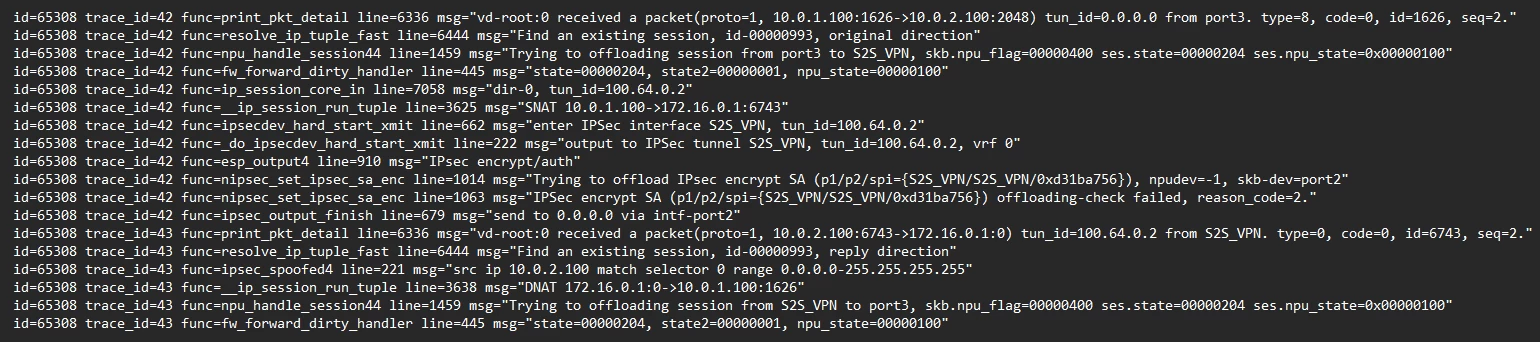
This completes the initial baseline output for an ICMP-based debug flow capture. Review the related documents below for several scenarios related to deviations from this general expected flow, as well as additional suggestions for further refining debug flow captures.
Related documents:
Troubleshooting Tip: Enable Policy Trace in Debug Flow
Troubleshooting Tip: Debug flow show - policy is not active
Technical Tip: How to filter for IP addresses and address ranges in debug flow
Technical Tip: How to use debug flow and sniffer to capture IPv6 traffic
Troubleshooting Tip: 'local-out traffic, blocked by HA' debug flow message

