Technical Tip: Disabling IPv6 on the FortiGate using the CLI
| Description | This article describes how to disable IPv6 on the FortiGate using the CLI. |
| Scope | FortiGate. |
| Solution | By default, the FortiGate generally has little to no pre-existing IPv6 configuration, but it may still be necessary to outright disable it where the option exists (e.g. to meet business or regulatory requirements). Consider implementing the following changes to disable IPv6 functionality or reduce its presence on the FortiGate:
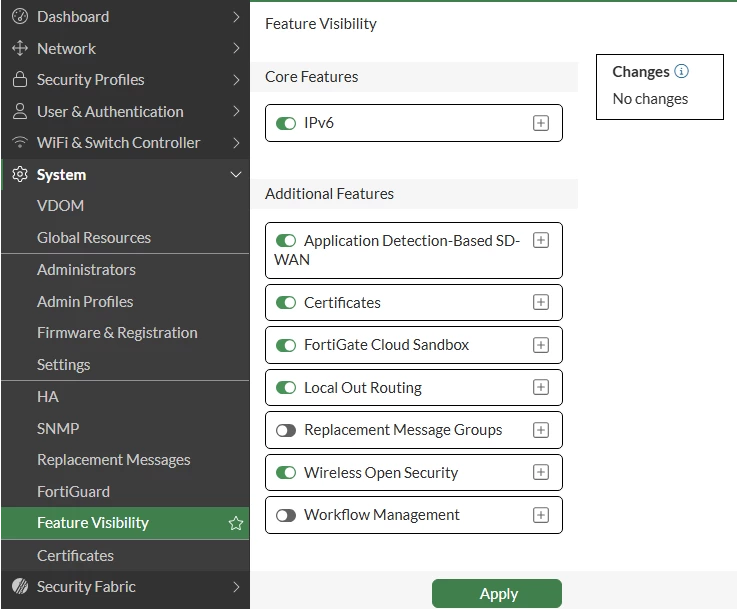
To enable/disable IPv6 visibility in the FortiGate GUI, navigate to System -> Feature Visibility (in the Global VDOM, if using VDOMs) and toggle the IPv6 option. This can also be done in the CLI by changing the gui-ipv6 option under config system global:
GUI:
CLI:
config system global set gui-ipv6 disable end
To remove IPv6 unicast addresses assigned to the FortiGate's interfaces, navigate to config system interface and modify each interface to remove all IPv6 related configurations. Administrators can also use the purge command in some of the IPv6 config sub-sections to clear the configuration more quickly:
config system interface edit <name> config ipv6 unset ip6-address unset ip6-send-adv config ip6-extra-addr purge config ip6-prefix-list purge end end next end
Note: FortiGates with kernel 4.x (such as NP7-based FortiGates and FortiGate-VMs) may still auto-assign IPv6 link-local addresses on interfaces, even when no IPv6 unicast addresses have been assigned. This is expected behavior.
To disable IPv6 under Explicit Web-Proxy, navigate to Network -> Explicit Proxy and then disable the IPv6 Explicit Proxy toggle under Explicit Web Proxy, or navigate to config web-proxy explicit and disable ipv6-status in the CLI:
config web-proxy explicit set ipv6-status disable end
config vpn ssl web portal edit <portal-name> set ipv6-tunnel-mode disable next end
To further block/drop incoming IPv6 packets destined for the FortiGate, it is possible to add a Local-In Policy that denies all IPv6 traffic coming to the FortiGate on any interface. This can be useful as an additional precaution to ensure that all IPv6 traffic destined for the FortiGate is ignored, even if an IPv6 address is associated with the FortiGate's interfaces (default action is deny). Note that user traffic not destined for the FortiGate itself (i.e., 'through' traffic) is governed by Firewall Policies and will be implicit-denied if no Firewall Policy exists to allow it.
config firewall local-in-policy6 set service "ALL"
Related documents: |