



Technical Tip: Configuring per-VDOM administrators
Description
This article describes how to configure per-VDOM administrators.
Scope
FortiGate.
Solution
Per-VDOM administrators can be created to access only the management or traffic VDOM.
These administrators have to use either the prof_admin administrator profile, or a custom profile.
A per-VDOM administrator can only access the FortiGate through a network interface that is assigned to the VDOM that they are assigned to.
The interface has also to be configured to allow management access.
It can also connect to the FortiGate using the console port.
To assign an administrator to multiple VDOMs, it has to be created at the global level.
When creating an administrator at the VDOM level, the super_admin administrator profile cannot be used.
To create a per-VDOM administrator From GUI:
- On the FortiGate, connect to the management VDOM.
- Go to Global -> System -> Administrators and select 'Create New' -> Administrator.
- Fill in the required information, setting the Type as Local User.
- In the Virtual Domains field, add the VDOM that the administrator will be assigned to, and if necessary, remove the other VDOM from the list.
- If a specific user account, it is necessary to access the FortiGate GUI with the Specific VDOM only, with the same WAN interface it will not work, the user needs to add one more WAN Interface and move the root VDOM to the Specific VDOM.
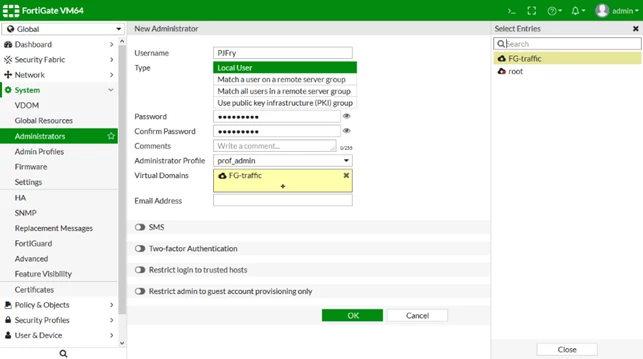
- Select 'OK'.
Note:
If a specific user account needs to access the FortiGate GUI with Specific VDOM only, with the same WAN interface it will not work, the user needs to add one more WAN Interface and move root VDOM to Specific VDOM.

To create a per-VDOM administrator from CLI: