


Technical Tip: Configuring multiple Syslog servers
Description
This article describes the Syslog server configuration information on FortiGate.
Scope
FortiGate.
Solution
FortiGate can send syslog messages to up to 4 syslog servers.
Separate SYSLOG servers can be configured per VDOM.
CLI command to configure Syslog:
config log {syslogd|syslogd2|syslogd3|syslogd4} setting
    set certificate {string}
    config custom-field-name
        Description: Custom field name for CEF format logging.
        edit <id>
            set custom {string}
            set name {string}
        next
    end
    set custom-log-format {string}
    set enc-algorithm [high-medium|high|...]
    set facility [kernel|user|...]
    set format [default|csv|cef|rfc5424|json]
    set interface {string}
    set interface-select-method [auto|sdwan|specify]
    set max-log-rate {integer}
    set mode [udp|legacy-reliable|...]
    set port {integer}
    set priority [default|low]
    set server {<ip_address>|<FQDN>}
    set source-ip {<ip_address>}
    set source-ip-interface <interface_name>
    set ssl-min-proto-version [default|SSLv3|...]
    set status [enable|disable]
    set vrf-select {integer}
end
Some of the configuration parameters listed above are introduced in later firmware versions. Refer to the FortiOS CLI reference matching the device's current firmware for available parameters.
Value descriptions:
status {enable | disable}: Enter 'enable' to enable logging to a remote syslog server.
facility { kernel | user | mail | daemon | auth | syslog | lpr | news | uucp | cron | authpriv | ftp | ntp | audit | alert | clock | local0 | local1 | local2 | local3 | local4 | local5 | local6 | local7 }
kernel Kernel messages.
user Random user-level messages.
mail Mail system.
daemon System daemons.
auth Security/authorization messages.
syslog Messages generated internally by syslog.
lpr Line printer subsystem.
news Network news subsystem.
uucp Network news subsystem.
cron Clock daemon.
authpriv Security/authorization messages (private).
ftp FTP daemon.
ntp NTP daemon.
audit Log audit.
alert Log alert.
clock Clock daemon.
local0 Reserved for local use.
local1 Reserved for local use.
local2 Reserved for local use.
local3 Reserved for local use.
local4 Reserved for local use.
local5 Reserved for local use.
local6 Reserved for local use.
local7 Reserved for local use.
port <port_integer>: Enter the port number for communication with the syslog server.
reliable {enable | disable}: Enable reliable delivery of syslog messages to the syslog server. When enabled, the FortiGate unit implements the RAW profile of RFC 3195 for reliable delivery of log messages to the syslog server. Reliable syslog protects log information through authentication and data encryption and ensures that the log messages are reliably delivered in the correct order.
server <address_ipv4 | FQDN>: Enter the IP address of the syslog server that stores the logs.
source-ip <address_ipv4>: Enter the source IP address for syslogd, syslog2, syslog3 and syslog4.
source-ip-interface: Alternative to source-ip. Enter an interface to use that interface's primary IP address as the source IP address for syslog traffic.
mode {udp | legacy-reliable | reliable}: In FortiOS v6.0 and higher, 'mode' replaces the legacy 'set reliable {enable | disable}' setting.
udp - Enable syslogging over UDP.
legacy-reliable - Enable legacy reliable syslogging by RFC3195 (Reliable Delivery for Syslog). Equivalent to the 'set reliable enable' setting available in v5.6 and lower.
reliable - Enable reliable syslogging by RFC6587 (Transmission of Syslog Messages over TCP).priority {default | low}
default - Set Syslog transmission priority to default.
low - Set Syslog transmission priority to low.max-log-rate: syslog maximum log rate in MBps.
interface-select-method
auto Set outgoing interface automatically.
sdwan Set outgoing interface by SD-WAN or policy routing rules.
specify Set outgoing interface manually.
Syslog filter settings:
CLI command to check Syslog filter settings:
show full-configuration log {syslogd|syslogd2|syslogd3|syslogd4} filter
FortiGate syslogd filters let the administrator choose which log categories are sent to a remote syslog server. Logs can be forwarded:
Traffic logs (forward, local, multicast, sniffer).
Security/UTM logs (via free-style category filters).
System/event logs.
Anomaly/DoS logs.
VoIP logs.
GTP logs.
HTTP transaction logs.
ZTNA logs.
FortiSwitch logs.
Debug logs (very verbose).
It is also possible to set severity levels and create custom include/exclude filters for more granular control. For free-style filters, see Technical Tip: Configuring advanced syslog free-style filters.
Configuring syslog in the GUI:
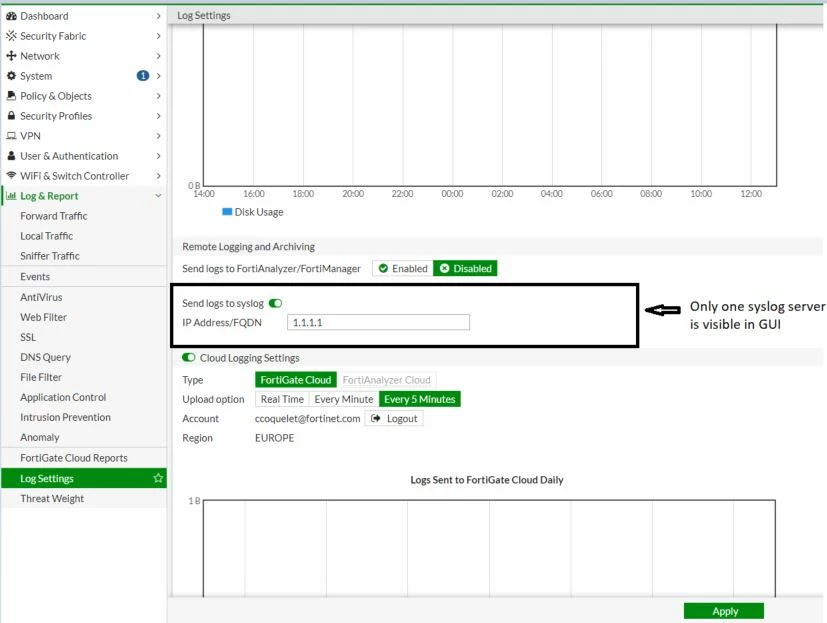
For instructions on configuring separate syslog servers per VDOM, refer to the article below:
Technical Tip: Setting up syslog in a Multi-VDOM setup
To send logs to a different syslog server than the one specified in the global settings for a specific VDOM, refer to the article below:
To perform a syslog and log test on the FortiGate, refer to the article below:
Technical Tip: How to perform a syslog and log test
Note:
Configuring multiple syslog server connections consumes system resources on the firewall. If there are multiple syslog servers configured, it may result in increased resource usage, including CPU and memory. This could potentially impact the overall performance of the firewall, especially if it is already operating at maximum capacity.
Each Syslog server connection generates network traffic from the firewall to the servers. If there are multiple syslog servers configured, it can result in higher network utilization and increased bandwidth consumption. This might be a concern, especially in environments where network resources are limited or bandwidth is a critical factor.
It is recommended to carefully assess the need for multiple syslog servers and consider the potential impact on the firewall's performance and network resources.
Related documents:

