Technical Tip: Configuring global security profiles
Description
This article describes how in FortiOS v6 onwards security Profiles can be configured globally across multiple VDOMs, some or all profiles may be commonly-shared across VDOMS
Solution
Global profiles are configured under Global > Security Profiles in the GUI or
under the following config global commands in the CLI:
• antivirus profile
• application list
• dlp sensor
• ips sensor
• webfilter profile
Global profiles are available for above security features only.
- The name for any global profile must start with "g-" for identification.
- Global profiles are available as read-only for VDOM-level administrators and can only be edited or deleted from within the global settings.
- Each security feature has at least one default global profile, available for all VDOMs.
Some security profile features, such as URL filters, are not available for use in a global profile.
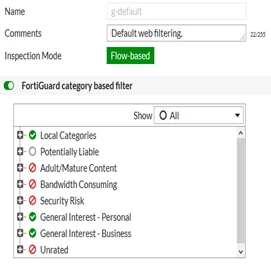
1. To edit the default global web filter, go to Global > Security Profiles > Web Filter and edit g-default.
2. Right-click the Bandwidth Consuming category and select Block