



Technical Tip: Configuration file save mode for configuration changes
Description
This article describes the configuration file save mode for configuration changes.
Scope
FortiGate.
Solution
Configuration file save mode is a temporary configuration mode in which changes made to the FortiGate are not automatically written to the saved configuration. This allows configuration changes to be tested or implemented while retaining the option to revert to the previously saved configuration if issues occur.
Note: Configuration file save mode is recommended when implementing new or potentially disruptive configuration changes.
Back up the FortiGate configuration before using this feature. Reverting to the saved configuration may result in the loss of any unsaved configuration changes.
The commands related to the configuration file save mode are:
config  system  global
# set cfg-save ?
automatic    Automatically save config.
manual       Manually save config.
revert       Manually save config and revert the config when timeout.

# execute cfg ?
reload    Reboot to reload the configs.
save      Save configs.
The default setting for cfg-save is automatic mode, where configuration changes become part of the saved unit configuration as soon as they are executed by entering either next or end. When configuring revert mode, an additional global parameter is required, which is the timeout in seconds: 'set cfg-revert-timeout' (default = 600 sec). The revert mode allows the operator to restore the system to its previous configuration state in case any issues occur, such as a lost connection to the FortiGate.
In manual mode, commands take effect but do not become part of the saved configuration unless the 'execute cfg save/reload' command is executed.
When the FortiGate unit restarts, it loads the saved configuration. Configuration changes that were not saved are lost. This makes it possible to test commands before saving them and revert to a working configuration if required.
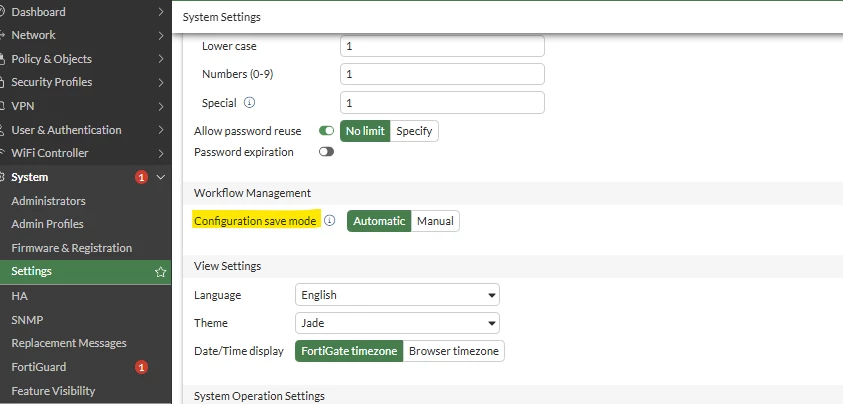
Starting from v7.0.2, this option is available on the GUI named 'Configuration save mode':
Note: If a user with the 'super_admin_readonly' profile attempts to make configuration changes (for example, adding a dashboard), the 'cfg-save revert' timer is triggered. Any unsaved changes are automatically reverted when the timer expires unless they are saved using the 'execute cfg save' command.
Related articles: