


Technical Tip: Changing the firewall admin password
Description
This article describes how to change the firewall 'admin' account password.
Scope
FortiGate.
Solution
To change the admin administrator password from the GUI.
- Go to System -> Admin -> Administrators.
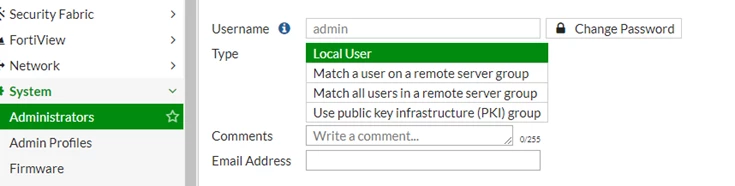
- In the row corresponding to the admin administrator account, mark its check box.
- Select 'Change Password'.
- In the old Password field, do not enter anything. (In its default state, there is no password for the admin account).
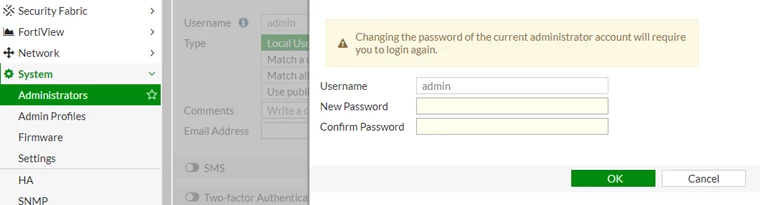
- In the New Password field, enter a password with sufficient complexity and number of characters to deter brute force and other attacks.
- In the Confirm Password field, enter the new password again to confirm its spelling.
- Select 'OK'.
- Select 'Logout'.
The FortiGate appliance logs the user out. To continue using the GUI, log in again.
The new password takes effect the next time that the administrator account logs in.
To change the admin administrator password via the CLI
Enter the following command:
To change the admin administrator password via the CLI
Enter the following command:
config system admin
edit admin
set password <new-password_str> <old-password>
end
exit
Or:
config system admin
edit admin
unset password <old-password>
edit admin
unset password <old-password>
set password <new-password>
end
exit
end
exit
Where <new-password_str> is the new password for the administrator account named admin, and <old-password) is the password the current password that will be changed
The FortiGate appliance logs the user out. To continue working in the CLI, log in again using the new password. The new password will take effect only for newly initiated sessions in the CLI or GUI.
Note:
The FortiGate appliance logs the user out. To continue working in the CLI, log in again using the new password. The new password will take effect only for newly initiated sessions in the CLI or GUI.
Note:
Starting from v7.2.x and above, it is now mandatory to provide the old password to update the admin's password. The password can still be changed without the old password by changing the user account profile type from super_admin to prof_admin. However, it will require to recreate of another super_admin account to do the changes. See the detailed guide to resetting the password here: Reset another super admin’s password (Lost/Forgotten)
Related article:

