


Troubleshooting Tip: Unable to import configuration
Description
This article describes how to configure import fails on the controller due to secondary interface configuration in backup file.
Scope
For example: there is a backup of a controller which has 2nd interface configured and VLANs are mapped to 2nd interface.
Now, it is necessary to import this backup file to new controller.
For doing that, first create 2nd interface on the new controller and then import the configuration.
Solution
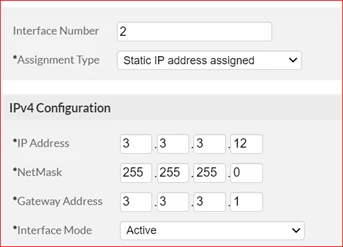
Create second interface from GUI.
Go to Configuration -> Devices -> System settings -> Management interfaces -> Physical interface -> Add.
Add the same configuration as on the Original / Production controller.
This article describes how to configure import fails on the controller due to secondary interface configuration in backup file.
Scope
For example: there is a backup of a controller which has 2nd interface configured and VLANs are mapped to 2nd interface.
Now, it is necessary to import this backup file to new controller.
For doing that, first create 2nd interface on the new controller and then import the configuration.
Solution
Create second interface from GUI.
Go to Configuration -> Devices -> System settings -> Management interfaces -> Physical interface -> Add.
Add the same configuration as on the Original / Production controller.
Commands to configure second interface from CLI.
default# configure terminalAfter creating the second interface, reboot the controller and then import the backup on controller using GUI option.
default(config) interface FastEthernet (interface FastEthernet controller interface-index)
default(config‐if‐FastEth) ip address x.x.x.x y.y.y.y.y (Configure the same value as original controller)
default(config‐if‐FastEth) gw z.z.z.z (Configure the same value as on original controller)
default(config‐if‐FastEth) type (Configure the same value as on original controller)
default(config‐if‐FastEth) exit
default(config)# exit
Maintainance -> File Management -> Configuration -> Import.
Note.
Do not insert an Ethernet cable into the second Ethernet port until it has been configured.
Note.
Do not insert an Ethernet cable into the second Ethernet port until it has been configured.

