


Technical Tip: WIPS Configuration
Description
This article describes configuration required for WIPS.
Related links.
https://docs.fortinet.com/product/wireless-controller/8.5
Page# 502 'capturing packets and Page# 185 WIPS': https://fortinetweb.s3.amazonaws.com/docs.fortinet.com/v2/attachments/f8902d66-dfb2-11e9-8977-00505692583a/Fortiwlc-sd-v8.5.1-userguide.pdf
Solution
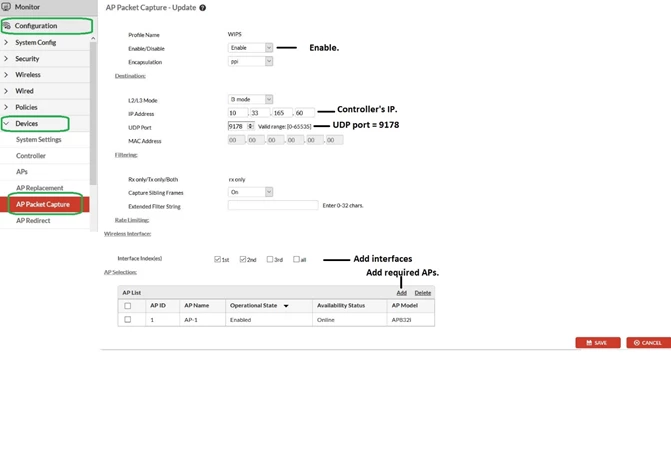
WIPS on the Controller needs to have a packet-capture profile configured with UDP.PORT==9178.
Go to Configuration -> Devices -> AP Packet-Capture and select 'Add'.
- L2/L3 Mode: L3 Mode.
- Controller’s IP.
- UDP PORT == 9178.
- Add required FortiAP and the desired radio interfaces.
This article describes configuration required for WIPS.
Related links.
https://docs.fortinet.com/product/wireless-controller/8.5
Page# 502 'capturing packets and Page# 185 WIPS': https://fortinetweb.s3.amazonaws.com/docs.fortinet.com/v2/attachments/f8902d66-dfb2-11e9-8977-00505692583a/Fortiwlc-sd-v8.5.1-userguide.pdf
Solution
WIPS on the Controller needs to have a packet-capture profile configured with UDP.PORT==9178.
Go to Configuration -> Devices -> AP Packet-Capture and select 'Add'.
- L2/L3 Mode: L3 Mode.
- Controller’s IP.
- UDP PORT == 9178.
- Add required FortiAP and the desired radio interfaces.
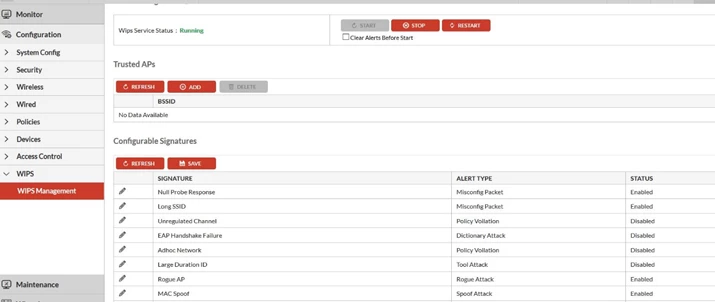
Starting WIPS on the Controller:
Go to Configuration -> WIPS -> WIPS Management, select required Signatures from the available list -> START:
Go to Configuration -> WIPS -> WIPS Management, select required Signatures from the available list -> START:
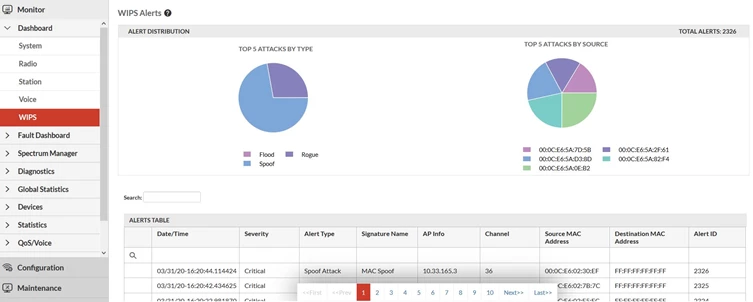
WIPS Alerts: Monitor -> Dashboard -> WIPS:

