


Technical Note: All aps removed from ess ap table after enabling ARRP
Description
Scope
Solution
This article provides the correct steps to enable ARRP during migration from virtual cell to native cell.
If the SSID is in virtual cell and ARRP is enabled, all aps will be removed from ess ap table.
If the SSID is in virtual cell and ARRP is enabled, all aps will be removed from ess ap table.
Scope
Version 8.1 and above.
Solution
During the process to enable ARRP the APs will reboot.
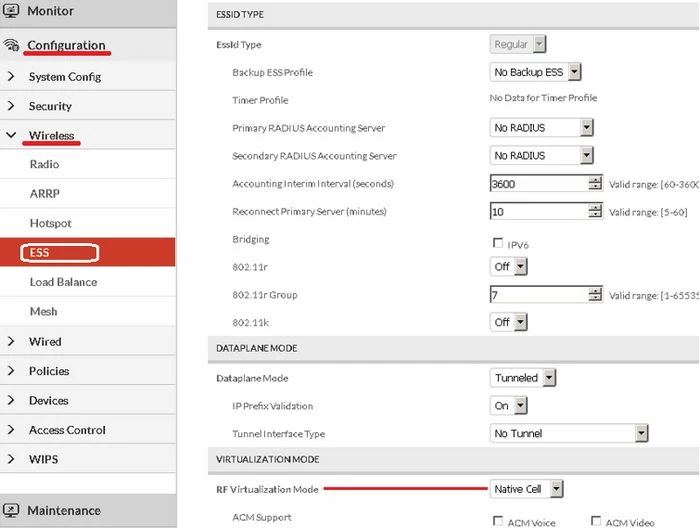
1) Move ESSID profile RF virtualization mode to “Native cell”.
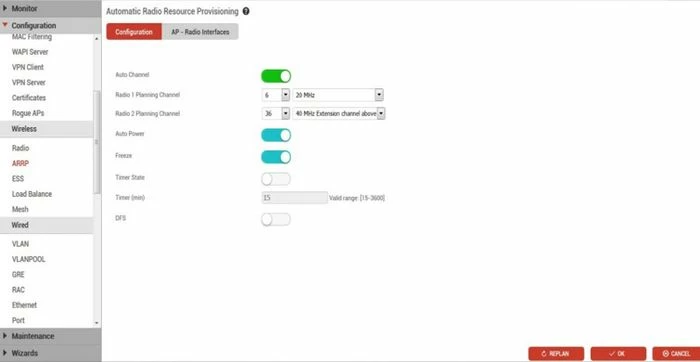
2) Turn ON “auto channel” option in ARRP and click "Ok". The options auto power and freeze can be kept on.
When "Ok" is clicked the following message will be displayed:
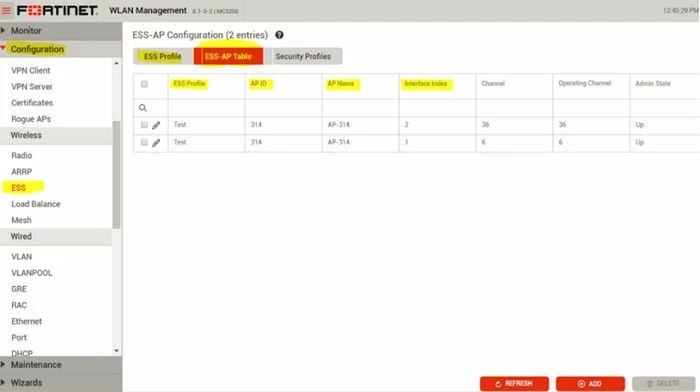
3) Verify the ess-ap-table.
For more details on ARRP, refer to the System Director (SD) 8.1.0 Configuration Guide available in the Fortinet Document Library.
1) Move ESSID profile RF virtualization mode to “Native cell”.
2) Turn ON “auto channel” option in ARRP and click "Ok". The options auto power and freeze can be kept on.
When "Ok" is clicked the following message will be displayed:
Enabling auto-channel feature will affect existing virtual cell profiles and also cause network outage for a few minutes. Do you want to continue? [OK][Cancel]
3) Verify the ess-ap-table.
For more details on ARRP, refer to the System Director (SD) 8.1.0 Configuration Guide available in the Fortinet Document Library.

