
Troubleshooting Tip: How to Monitor Incoming (RX) and Outgoing (TX) Packets Per Second (PPS) on FortiGate Interfaces
Description
This article describes how to monitor the Incoming(RX) and Outgoing(TX) Packets Per Second(PPS) on FortiGate Interfaces.
Scope
FortiGate.
Solution
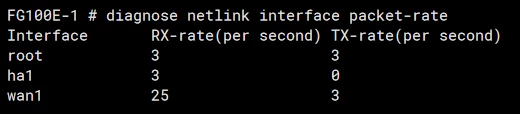
On FortiGate, the command 'diagnose netlink interface packet-rate' is used to monitor the incoming (RX) and outgoing (TX) packets per second (PPS) across all interfaces.
This aids in diagnosing and troubleshooting network performance issues, such as high traffic volumes or unusual packet transmission rates. It is also useful for detecting bottlenecks or packet drops.