


Technical Tip: Understanding FortiGate configuration file format
Description
This article describes the structure and key elements of FortiGate configuration files, including unencrypted, encrypted, and VDOM-specific configurations. It also explains the information contained in the config-version header and key considerations when restoring or sharing a configuration file.
Scope
FortiGate.
Solution
A FortiGate configuration file contains non-default settings and selected default settings that are required to preserve important configuration information while minimizing the backup size.
The first line of the configuration file contains the config-version information, including the FortiGate model, firmware version, and build number. This information can be used to confirm the firmware and model associated with the configuration file before restoring it.
Best practice: When a configuration file is shared with a third party, enable password masking to prevent passwords and secrets from being unintentionally disclosed. With password masking enabled, passwords and secrets are replaced with FortinetPasswordMask. Password masking is different from configuration encryption, which protects the configuration file and requires a password when the file is restored.
Unencrypted configuration file.

To restore an unencrypted configuration file, the FortiGate model and firmware version should match the configuration file. If the firmware version is different, FortiGate may attempt to upgrade the configuration, which can result in configuration changes.
Encrypted configuration file.
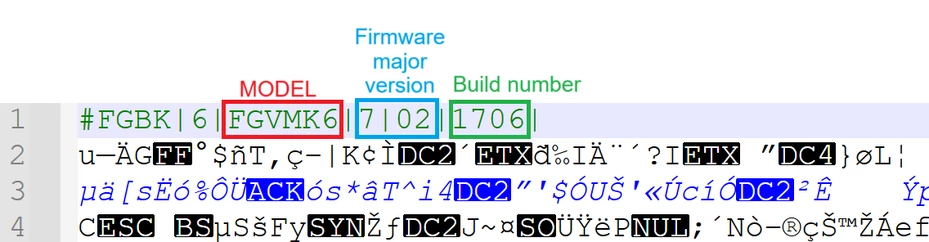
To restore an encrypted configuration file, the FortiGate model and firmware version must match the configuration file, and the password used to encrypt the file must be provided. If the model, firmware version, or password does not match, the configuration file cannot be restored.
VDOM configuration file.

A VDOM configuration file contains the configuration settings for a specific VDOM rather than the complete FortiGate configuration. The vd_name entry identifies the VDOM associated with the configuration file. The user=admin entry identifies the administrator account associated with the configuration file and corresponds to the username displayed in the upper-right corner of the FortiGate GUI. To download a VDOM-only configuration, go to Username -> Configuration -> Backup, select VDOM as the scope, select the required VDOM name, and select OK.
Related articles:
Technical Tip: How to download FortiGate configuration file & debug log from GUI and CLI
