shafiq23
Staff & Editor
Staff & Editor
Dec 17, 2025 8:35 AM UTC

Technical Tip: Logdisk format does not remove WAD backup files

Description This article describes how to verify the removal of Web Anti-Defacement backup files.
Scope FortiWeb.
Solution

Web Anti-Defacement(WAD) monitored sites' files are stored in FortiWeb logdisk. The files are saved under the directory /var/log/wad/site/<site-id>.


FortiWeb # diagnose system mount list
Filesystem 1M-blocks Used Available Use% Mounted on
/dev/ram0 768 654 114 85% /
none 1475 35 1441 2% /tmp
none 4918 7 4911 0% /dev/shm
/dev/vda1 362 312 30 91% /data
/dev/vda3 91 0 86 0% /home
/dev/vdb1 30066 2456 26058 8% /var/log
//XX.XX.XX.XX/htdocs 39986 24082 15904 60% /var/log/wad/site/1   <- WAD site utilized in logdisk.


In a normal case, an administrator uses 'execute formatlogdisk' to clear logdisk utilization; however, this will be ineffective for WAD backup files.


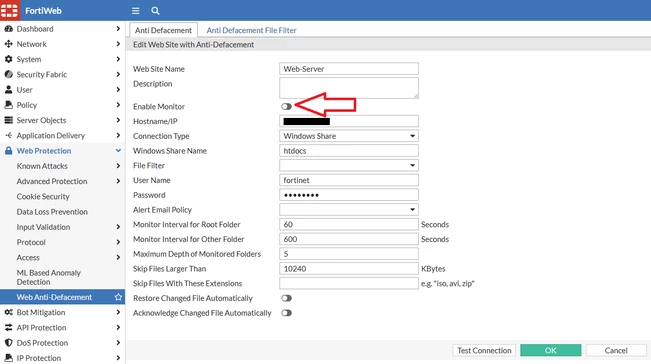
To clear WAD backup files, simply disable the monitor (in each monitored website) in the WAD site configuration.


In GUI: 


1.png


In CLI:


config wad website

    edit 1

        set name Web-Server

        set monitor disable

    next

end


Verify logdisk mount.


FortiWeb # diagnose system mount list
Filesystem 1M-blocks Used Available Use% Mounted on
/dev/ram0 768 654 114 85% /
none 1475 35 1441 2% /tmp
none 4918 7 4911 0% /dev/shm
/dev/vda1 362 312 30 91% /data
/dev/vda3 91 0 86 0% /home
/dev/vdb1 30066 2456 26058 8% /var/log


Related document:

Anti-defacement

Risk and Resilience in the Age of AI. An OT Thought Leadership Summit for Houston's Critical Infrastructure Leaders. Date: Thursday, December 3, 2026. Time: 8:30 am - 1:30 pm (CT). Location: The Westin Houston, Memorial City | 945 Gessner Road, Houston, TX 77024