Khidzir_MN
Staff
Staff
December 23, 2024

Technical Tip: How to setup User Tracking feature for Microsoft IIS Basic Authentication

  • December 23, 2024
  • 0 replies
  • 314 views
Description

This article describes how to set up the User Tracking feature for Microsoft IIS Basic Authentication. It is ONLY focusing on the needed setup for the User Tracking feature for Microsoft IIS Basic Authentication.
It may necessary to preconfigure other respective Server Policy and Web Protection Profile setup and refer to the documentation at the end of this article for more information on the setup.

Scope FortiWeb and FortiWeb VM.
Solution

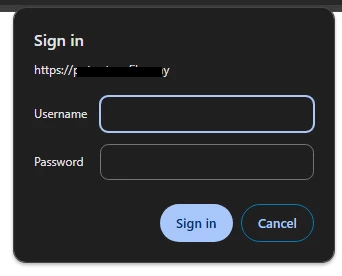
For Microsoft Internet Information Services (IIS) web application that uses its Basic Authentication, FortiWeb's User Tracking feature can be used to track users who have logged in successfully.


basic_authentication_prompt.png

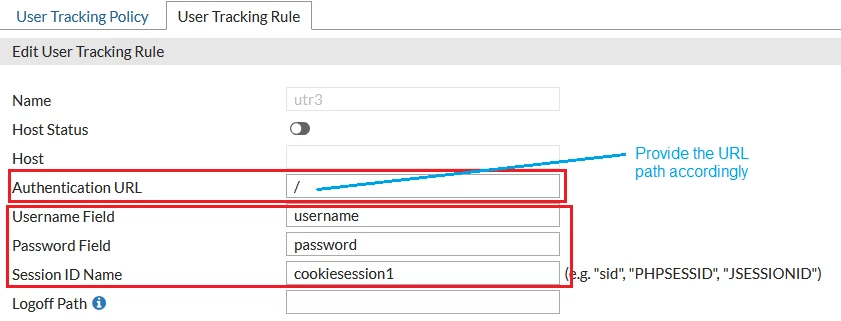
User Tracking Rule example:


user_tracking_rule.png


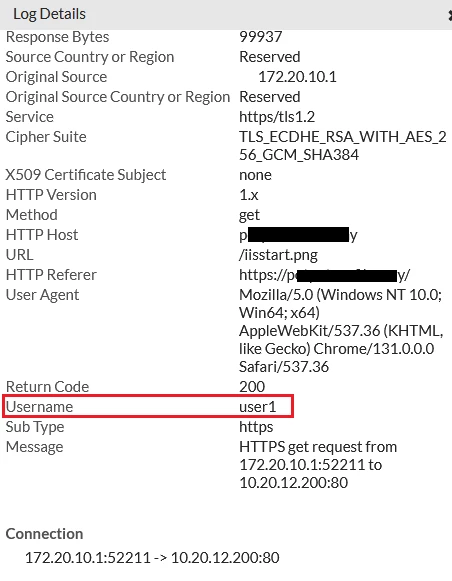
Traffic Log example:


tlog_username.png


Related documents:

Tracking

Configuring an HTTP server policy

Configuring a protection profile for inline topologies

Thought Leadership. Security Summit. Thursday, November 12th, PGA National Resort, Palm Beach Gardens, FL.
Thought Leadership. Security Summit. Thursday, October 8th. Disney's Grand Californian Hotel & SPA, Anaheim, CA.
Security Operations Summit: Modernize SecOps. Operate AI-Native.AMER: November 4 | 9:00 AM PST. India and SAARC: November 5 | 10:00 AM IST. EMEA: November 5 | 10:30 AM CET. APAC: November 5 | 11:00 AM SGT