| Solution | To address the issue of a short timeout between keypresses, follow these steps to extend the digit map pause timer in the phone system: Profile -> Phone -> Digit map pause timer. - Access Phone Profile Settings: Navigate to the phone system's settings.
- Locate Phone Profile Settings: Within the phone system settings, locate and access the Phone Profile settings.
- Adjust Digit Map Pause Timer: Look for the 'Digit map pause timer' option within the Phone Profile settings.
- Increase Timeout Duration: By default, the timeout duration may be set to 3 seconds. To provide users with more time between keypresses, increase the value. This can extend the timeout duration to a maximum of 20 seconds. 0 means disabled.
- Save Changes: After making the desired adjustment to the digit map pause timer, save the changes to apply the new timeout duration.
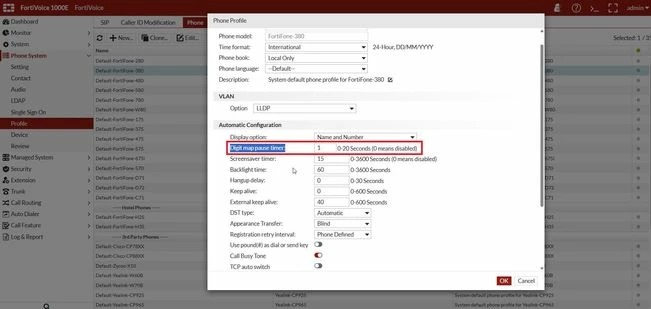
This adjustment allows users more time between keypresses when entering phone numbers, reducing the likelihood of errors and ensuring a smoother dialing experience.
|



