Technical Tip: DHCP snooping client database entry duration
| Description | This article demonstrates how long it takes for a FortiSwitch to delete an entry on a DHCP snooping client database. |
| Scope | FortiLink, FortiSwitch 7.4 |
| Solution | When DHCP snooping is enabled on a VLAN, there is a limit to how many entries FortiSwitch can have .
See this related article.
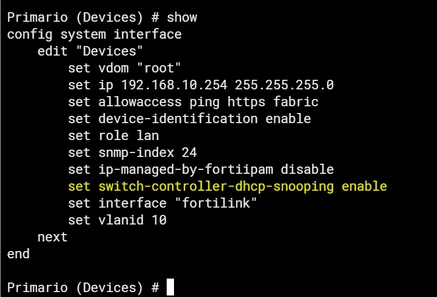
To demonstrate how long it takes for an entry to be deleted on the DHCP snooping database, DHCP snooping was enabled on Vlan10 and a host was connected on port3 of FortiSwitch.
DHCP snooping enabled on Vlan10:
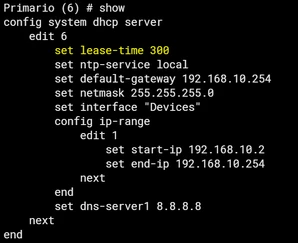
The DHCP service was configured with a lease timeout of 5 minutes:
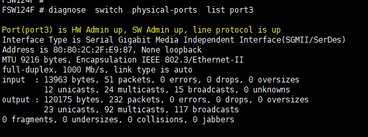
Port 3 connected:
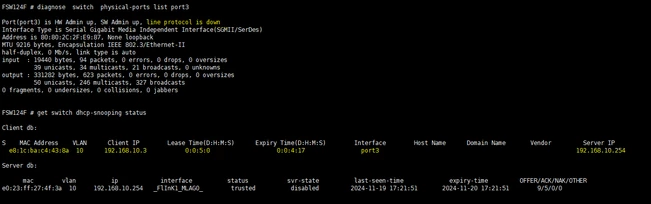
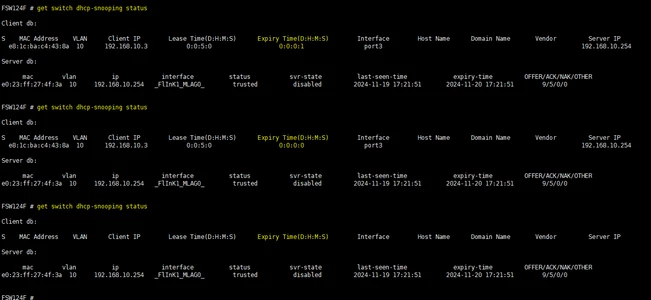
The 'get switch dhcp-snooping status' command will show the client and server database on FortiSwitch.
Even when port3 was disconnected, the entry on the DHCP snooping client database was not deleted. This entry will be deleted when the DHCP lease time expires.
Once the DHCP lease timeout has expired, the entry is deleted.
The DHCP lease timeout has to be considered when enabling DHCP snooping, so the FortiSwitch DHCP snooping database does not fall into an excess of entries unused. |