
ehamud
Staff
Staff
May 29, 2026 5:49 AM UTC

Technical Tip: Configuring Access VLANs with switch-controller mode

  • Jun 29, 2026 9:58 AM UTC
  • 0 replies
  • 386 views
  • Translate All

Description

This article describes how to implement Access VLANs in FortiOS to prevent intra-VLAN traffic.

Scope

FortiSwitch.

Solution

In standard networking, devices residing within the same Virtual Local Area Network (VLAN) can communicate directly with one another at Layer 2 without involving a gateway. While this default behavior is convenient, it poses significant security risks in modern enterprise networks. If a single host is compromised, lateral movement and malware propagation can easily occur across the entire subnet.
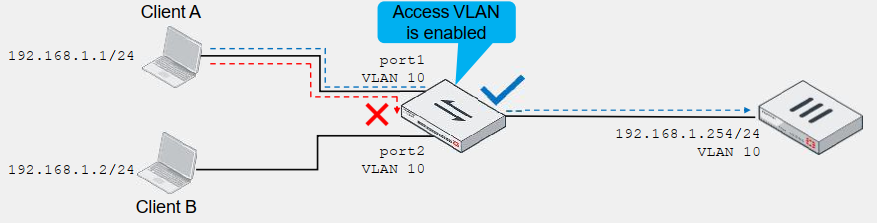

To mitigate these internal threats, Access VLANs can be used to provide the following advantages:


  1. Devices can communicate only with FortiGate.

  2. Can be used for isolating devices before authentication or detection is completed.

  3. FortiGate CLI setting (enabled on the quarantine and onboarding VLANs by default):


config system interface
    edit vlan
        set switch-controller-access-vlan enable | disable
    next
end 


9888b774.png


Note: FortiSwitch 1XX series has a limit on VLANs that can be enabled for the feature described in this article. Review the FortiSwitch feature matrix before implementing this feature: Feature Matrix for FortiSwitchOS 7.6.0.

    Risk and Resilience in the Age of AI. An OT Thought Leadership Summit for Houston's Critical Infrastructure Leaders. Date: Thursday, December 3, 2026. Time: 8:30 am - 1:30 pm (CT). Location: The Westin Houston, Memorial City | 945 Gessner Road, Houston, TX 77024
