magliano
Staff
Staff
February 1, 2026

Technical Tip: Restrict GUI access using trusted hosts

  • February 1, 2026
  • 0 replies
  • 272 views
Description This article describes how to restrict GUI login access by configuring trusted hosts.
Scope FortiSIEM.
Solution

GUI login access can be restricted by defining trusted host entries. After trusted hosts are configured:

  • GUI logins are only allowed from the defined IP addresses or CIDR ranges.
  • New login attempts from IP addresses outside the defined range are denied.
  • Existing active sessions are not affected by this change.


To forcibly terminate an active session:

  • Navigate to Admin -> User Activity.
  • Select the user.
  • Select log out or log out and lock out.


Note: When Trusted Hosts are configured, IP addresses for Collectors and Agents must be included. Otherwise, registration from those components will fail.


Configuration steps:

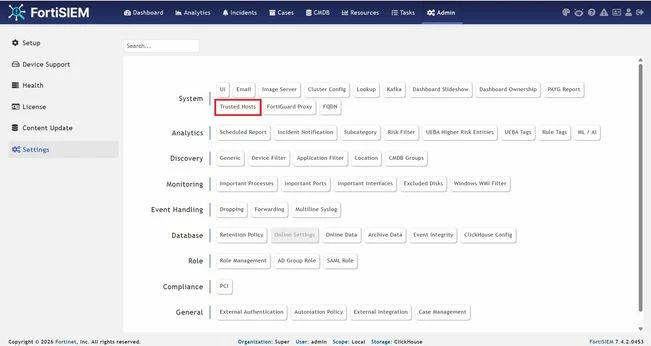
  1. Navigate to Admin -> Settings -> System -> Trusted Hosts.
                                                    
    1.jpg

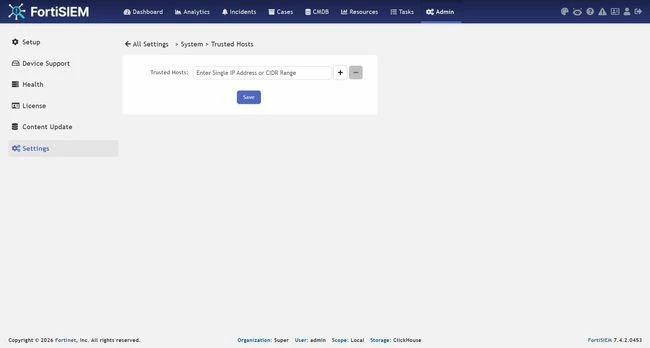
  2. In the trusted hosts field, enter:

    • A single IP address.

    • Or, a CIDR range (for example: 172.0.20.1/24).

  3. Select + to add additional Trusted Hosts entries if required.

    Select - to remove an existing entry.
                                               
    2.jpg                                   
  4. Select save to apply the configuration.

Thought Leadership Security Summit. Outpace New Threats with AI - enhanced defense. Tuesday, Septmeber 15, 8:30 AM - 2:30 PM PT. The Golf Club at Newcastle, WA.
Fortinet Flag the Hack. Wednesday, August 26, 9:00 AM - 5:00 PM ET, COSM, Atlanta, GA.