| BGP on loopback is a new routing design introduced in v7.0.4 that simplifies the configuration and reduces the number of routes advertised across the network.
- Review the Prerequisites for the SPA configuration. See Product integration and support
- Identify the following subnets and IPs for the SPA configuration:
- BGP Router ID Subnet: This network is used for FortiSASE points of presence (POP) for the loopback interface and for establishing IBGP communication with the hubs. It must be at least a /28 subnet.
- IP for Health Check: FortiSASE POPs use the health check IP address to periodically measure jitter, latency, and packet loss to the hub.
- BGP loopback summary: It is recommended to allocate a single subnet that summarizes all the loopback addresses. This summary will be advertised by the hubs (FortiGate) to all the spokes (FortiSASE POPs). The size of this network will depend on the number of spokes in the network.
- BGP Peer IP: This will be the IP address for the loopback interface on the hub and should be within the BGP loopback summary.
- Network Overlay ID: It is best practice to assign a unique network ID for each hub IPsec tunnel. This ensures that if one active hub creates a shortcut between two spokes and fails over to another hub that also creates a shortcut between the same spokes, the new shortcut will work. Ensure this value is the same on both FortiGate and FortiSASE.
Example values used in this configuration: | Network Configuration settings | Value | | BGP Router ID Subnet | 192.168.240.16/28 | | IP for Health Check | 192.168.254.1 | | BGP loopback summary | 192.168.240.0/24 | | BGP Peer IP | 192.168.240.253 | | BGP AS | 65001 | | Network Overlay ID | 11 | - FortiSASE Configuration: Configure the FortiSASE Network Configuration. Navigate to the FortiSASE admin portal → Network → Network Configuration.
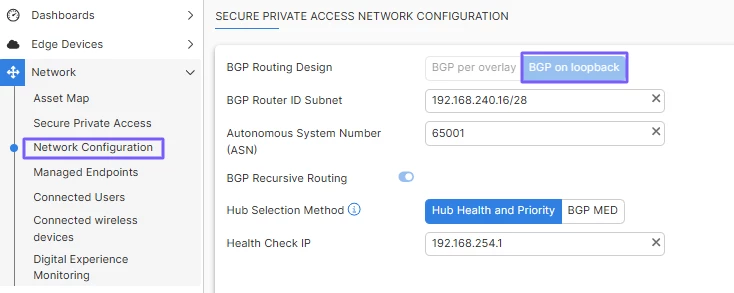
Note: - The network configuration will be the same for all service connections used on FortiSASE.
- For the health check IP, it is recommended to use a loopback interface on the hub. This interface should have the same IP on all hubs.
- The hub selection method is used by FortiSASE to select the preferred hub for sending traffic over SPA. By default, FortiSASE uses hub health and priority. See Configuring network configuration | FortiSASE | Fortinet Document Library
Configure the FortiSASE service connections (SPA). Navigate to FortiSASE admin portal → Network → Secure Private Access → Create. 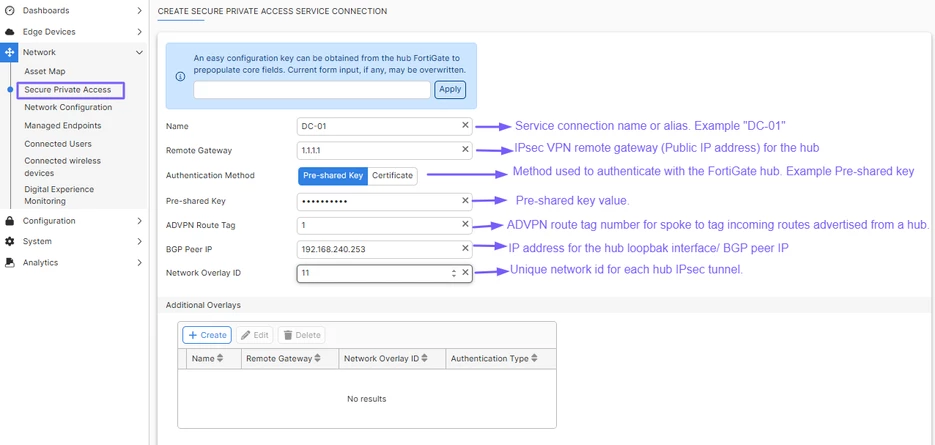
- FortiGate (hub) Configuration: Configure the Loopback interface for BGP communication using CLI.
config system interface edit "Lo" --->Name for the loopback interface set vdom "root" set type loopback set ip 192.168.240.253/32 --->BGP Peer IP configured on FortiSASE set allowaccess ping next end Configure a unique Location ID using CLI: config system settings set location-id 192.168.240.253 --->BGP Peer IP configured on FortiSASE end
Configure the IPsec Tunnel for the FortiSASE connection using CLI: config vpn ipsec phase1-interface edit "VPN1" -------> Name for the IPsec tunnel set type dynamic set interface "port1" ---> WAN interface where the IPsec tunnel will be terminated set ike-version 2 set peertype any set net-device disable set exchange-ip-addr4 192.168.240.253 ---> BGP Peer ID used on FortiSASE and the loopback interface set proposal aes128-sha256 aes256-sha256 aes128gcm-prfsha256 aes256gcm-prfsha384 chacha20poly1305-prfsha256 set add-route disable set dpd on-idle set auto-discovery-sender enable set network-overlay enable set network-id 11 ----> Value used on FortiSASE network ID set psksecret ENC .....> Pre-share key used on FortiSASE next end config vpn ipsec phase2-interface edit "VPN1" -------> Name for the IPsec tunnel set phase1name "VPN1" -->Must be the name defined on the phase1 set proposal aes128-sha256 aes256-sha256 aes128gcm-prfsha256 aes256gcm-prfsha384 chacha20poly1305-prfsha256 set keepalive enable next end
Note: - set auto-discovery-sender enable is required for ADVPN support between spokes. Hub will offer dynamic shortcut creation when there is communication between spokes, for example, FortiSASE POPs and another spoke (site).
- set exchange-ip-addr4allows IKE to automatically inject a static route to reach the Loopback on all the Dial-Up phase1-interfaces towards the Spokes. This value must be the same used on the Loopback interface and FortiSASE BGP peer IP.
BGP configuration: Configure a Route-Map to prevent advertising the loopback summary outside of IBGP. config router route-map edit "LOCAL_REGION" config rule edit 1 set set-community "no-export" next end next end
Configure the BGP settings using CLI. Note: config router bgp set as 65001 --->Typically, this should be the same as the FortiSASE BGP AS set router-id 192.168.240.253 --->Use the loopback interface IP if not configured yet set keepalive-timer 15 set holdtime-timer 45 set ebgp-multipath enable set ibgp-multipath enable set recursive-next-hop enable set graceful-restart enable config neighbor-group edit "EDGE" ---> Name for the neighbor group set soft-reconfiguration enable set advertisement-interval 1 set next-hop-self enable set remote-as 65001 ---> FortiSASE BGP AS set interface "Lo" ---> Loopback interface name set update-source "Lo" ---> Loopback interface name set route-reflector-client enable set next-hop-self-rr enable next end config neighbor-range edit 1 set prefix 192.168.240.16/28 --> This must be the BGP Router ID Subnet configured on FortiSASE set neighbor-group "EDGE" --->Name for the neighbour group configured early. next end config network edit 1 set prefix 192.168.240.0 255.255.255.0 ---> BGP Loopback Summary set route-map "LOCAL_REGION" ---> Route-map configured in step 4.4.1 next edit 2 set prefix 192.168.16.0 255.255.255.0 ---> Local Network to be advertised over BGP next end end
Configure the Health Check Loopback interface: config system interface edit "Lo-HC" set vdom "root" set ip 192.168.254.1 255.255.255.255 --> IP for Health Check configured on SASE set allowaccess ping set type loopback next end
Note: The Health Check IP address must differ from the Loopback IP used for BGP communication. Firewall policies configuration. Policy to allow the BGP peering: 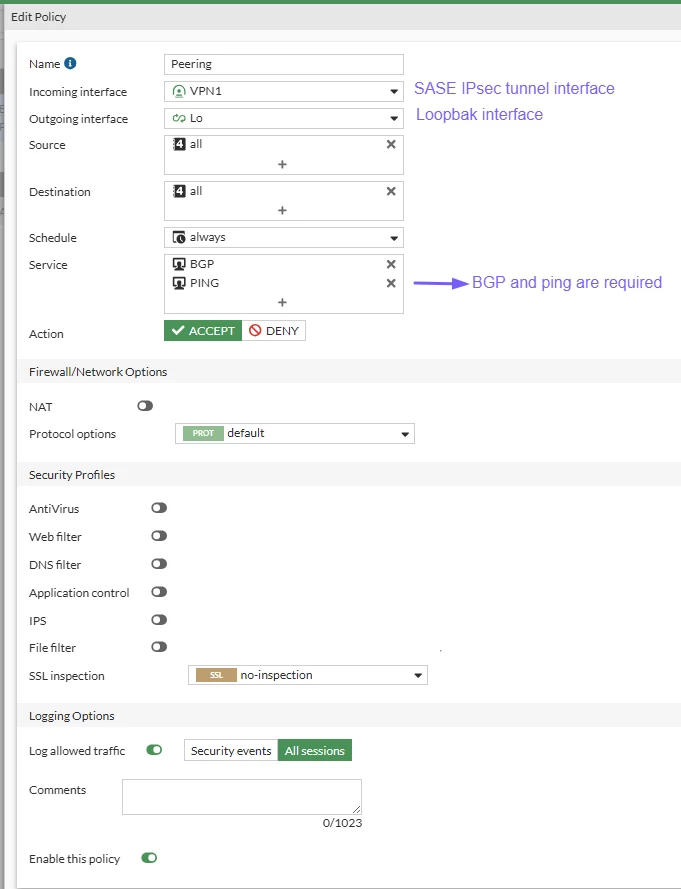
Policy to allow the Spoke-to-Hub communication. 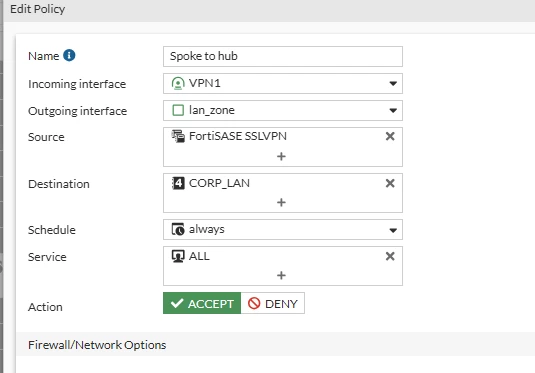
Policy to allow the Spoke-to-Spoke communication. 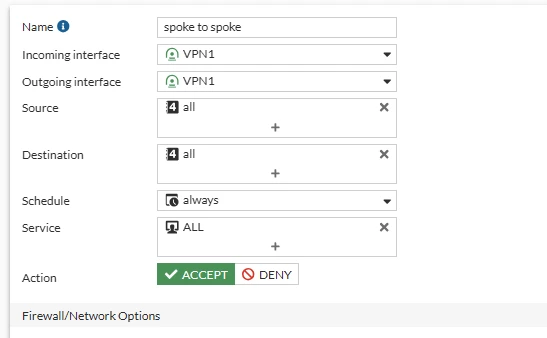
Policy to allow the Health Check communication: 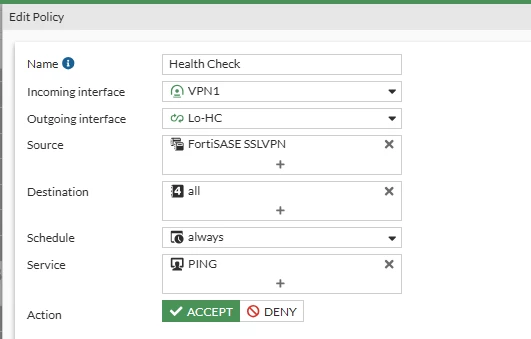
Related documents: SPA | FortiSASE | Fortinet Document Library BGP on loopback (Dual-Hub region) | FortiGate / FortiOS 7.2.0 | Fortinet Document Library BGP on loopback | FortiGate / FortiOS | Fortinet Document Library | 


