Technical Tip: How to dynamic scan Python file type in Optional VM
| Description | This article describes how to dynamic scan Python file type in FortiSandbox by using Optional VM images published by Fortinet. |
| Scope | FortiSandbox. |
| Solution | Optional VM are image published by Fortinet and can be download from FortiSandbox device to be use for dynamic scanning.
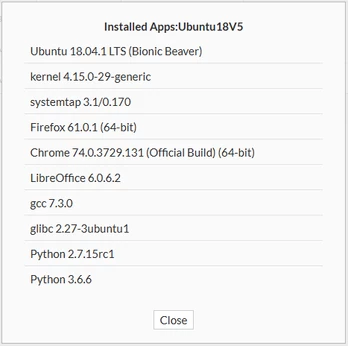
Fortinet published Ubuntu VM images such as 'Ubuntu18V5' and 'Ubuntu20V1'. Both of these Ubuntu VM images had a Python application installed by default. See Viewing applications installed on a VM for more information.
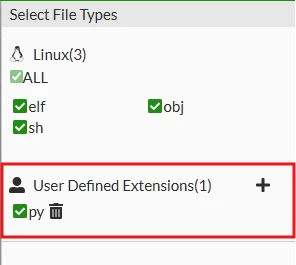
By default, only 'ELF, OBJ, and SH' file types are allowed to be scanned inside the Ubuntu VM. To do a dynamic scan for Python file type in the Ubuntu guest VM, add the user-defined extensions for the Ubuntu VM in the VM Association: Go to Scan Policy & Object -> Scan Profile -> VM Association and edit the selected VM. Select the '+' sign and enter a new extension. Select 'Apply' after adding the user defined extensions to save the settings.
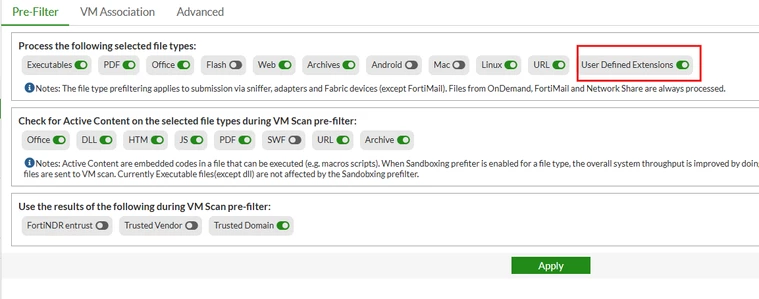
On the Scan Policy and Object -> Scan Profile -> Pre-Filter, enable the 'User Defined Extensions'.
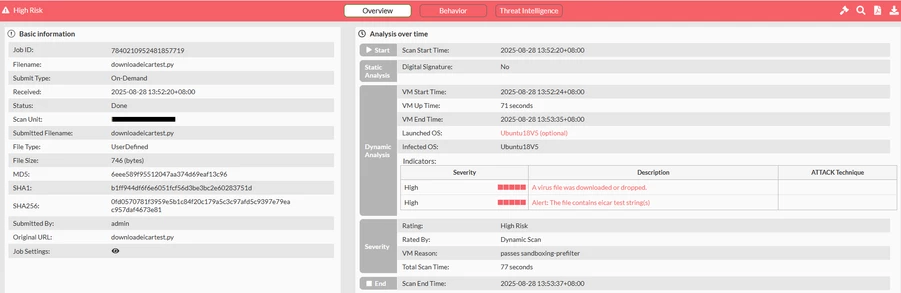
For this example, the Python file '.py' extension will be able to dynamically scan inside the Ubuntu VM. The job details will show the file type as 'User Defined'.
|