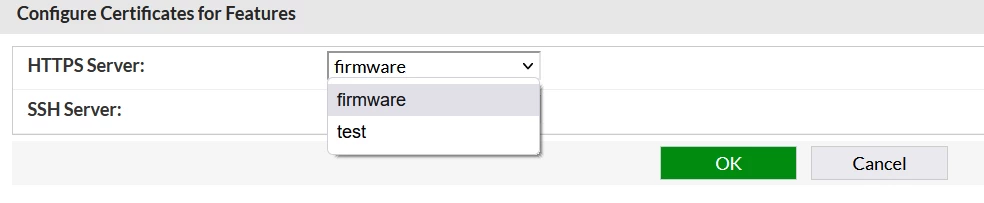
Technical Tip: FortiSandbox, uploaded a certificate for HTTPS/SSH
Description
This article describes the situation when uploading a certificate to use it for HTTPS and SSH but when selecting 'Service' it is not possible to see the Firmware.
Solution
FortiSandbox does not support generating certificates 'CSR', but importing certificates for SSH and HTTPS access to FSA .crt, PKCS12, and .pem formats are supported.
So if uploading only .crt file without key, FortiSandbox will consider it as a CA certificate.
FortiSandbox will not have the private key to use it for HTTPS and SSH encryption/decryption.
In this case, follow the below steps:
1) Use a third-party tool or internal service so that it is possible to generate CSR with a private key.
2) While generating the CSR, add all the information of FortiSandbox.
3) Then sign this CSR from your CA 'public or private'.
4) Then go to System -> Certificates, then 'Import'.
5) Import .crt and .key files.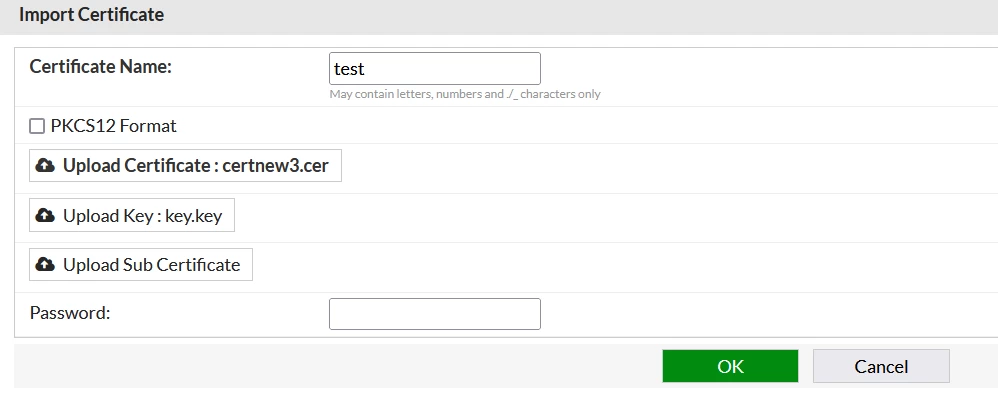
6) Once it is imported successfully, select 'Service' and it will be displaying Firmware.