


Technical Tip: How to force HTTP to HTTPS for a specific website
| Description | This article describes a configuration example to force a specific HTTP access traffic to HTTPS URL redirections. |
| Scope | FortiProxy. |
| Solution | 1) To create an FQDN object from GUI: - Go to Policy & Objects -> Addresses and select Create New -> Address. - Specify a Name, select FQDN type and enter an FQDN address.
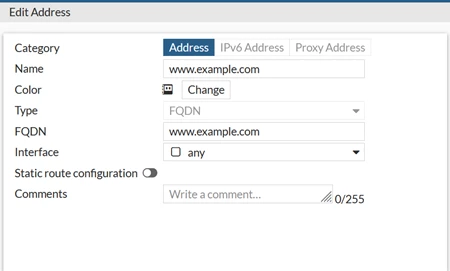
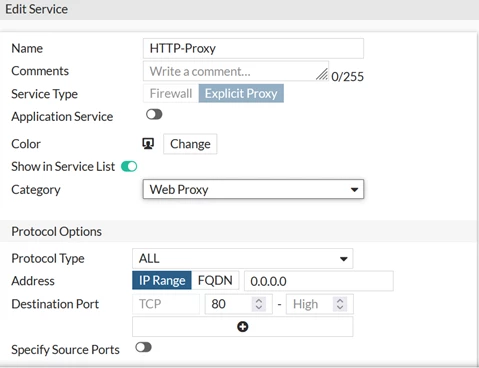
2) To create a proxy service object. - Go to Policy & Objects -> Services and select Create New -> Service. - Specify a Name, Service Type, and Destination Port.
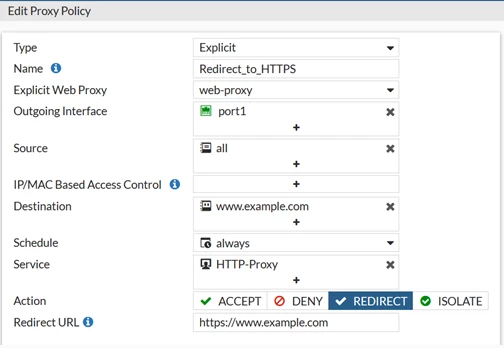
3) To create a policy to match specific HTTP access traffic then force with HTTPS URL redirection.
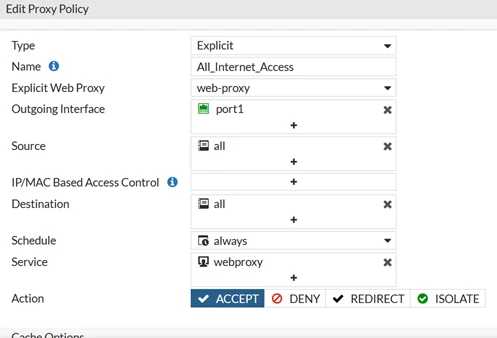
4) To create a second policy to allow redirected URL access traffic.
 |

