


Technical Tip: Configuring FortiProxy Kerberos authentication for explicit proxy
Description
This article describes how to configure Kerberos authentication for explicit Proxy on FortiProxy.
Scope
Any supported version of FortiProxy.
Solution
Windows server general setup.
Kerberos environment - Windows server setup:
For the test, set up a Windows Server 2016 with a domain configuration and Active Directory.
Set the domain name MT-TEST.LOCAL (realm name).
Create an AD user:
testuser is a normal user (can be any existing domain user account).
fortikerberos is the example user that will be used for creating the Kerberos ticket.
Recommendation: Create the username in all lowercase (even if this goes against corporate standards).
The account only requires 'domain users' membership.
Set the password to never expire.
Set a very strong password.
Create a DNS record for FortiProxy.
Create a DNS A record mapping the FortiProxy IP address to the FQDN. For example:
FORTIPROXY.MT-TEST.LOCAL -> 10.0.0.240.
Generate the Kerberos keytab:
On a Windows Server, use the ktpass command through the command line to generate the Kerberos keytab. Note that it is necessary to run the command line as an administrator.
For an explanation of the KTPass syntax, see the Microsoft article ktpass.
Syntax example:
ktpass -princ HTTP/<FQDN of FortiProxy>@REALM -mapuser fortiproxy@domain.com -pass <password> -crypto all -ptype KRB5_NT_PRINCIPAL -out fpx.keytab
Test example:
ktpass -princ HTTP/fortiproxy.mt-test.local@MT-TEST.LOCAL -mapuser fortiproxy@mt-test.local -pass 12345678 -crypto all -ptype KRB5_NT_PRINCIPAL -out fpx.keytab
Targeting domain controller: DC01.mt-test.local
Successfully mapped HTTP/fortiproxy.mt-test.local to fortikerberos. Password successfully set!
Key created.
Key created.
Key created.
Key created.
Key created.
Output keytab to proxy.keytab:
Keytab version: 0x502
keysize 65 HTTP/fortiproxy.mt-test.local@MT-TEST.LOCAL ptype 1 (KRB5_NT_PRINCIPAL) vno 9 etype 0x1 (DES-CBC-CRC) keylength 8 keysize 65 HTTP/fortiproxy.mt-test.local@MT-TEST.LOCAL ptype 1 (KRB5_NT_PRINCIPAL) vno 9 etype 0x3 (DES-CBC-MD5) keylength 8 keysize 73 HTTP/fortiproxy.mt-test.local@MT-TEST.LOCAL ptype 1 (KRB5_NT_PRINCIPAL) vno 9 etype 0x17 (RC4-HMAC) keylength 16 keysize 89 HTTP/fortiproxy.mt-test.local@MT-TEST.LOCAL ptype 1 (KRB5_NT_PRINCIPAL) vno 9 etype 0x12 (AES256-SHA1) keylength 32 keysize 73 HTTP/fortiproxy.mt-test.local@MT-TEST.LOCAL ptype 1 (KRB5_NT_PRINCIPAL) vno 9 etype 0x11 (AES128-SHA1) keylength 16
Encode the output in base64.
It is possible to upload the keytab file directly if configuring using the GUI, without encoding in base64. Use the base64 command available in most Linux distros (or use any other available Base64 encoder) to encode the fpx.keytab file.
Any LF (Line Feed) needs to be deleted from the file.
Example of encoding in a Linux distribution:
base64 fpx.keytab > fpx.txt
In Windows Server 2016, use the native tool to encode fpx.keytab file to Base64. The output will be used for the FortiProxy keytab.
certutil -encode <keytab> <encode-file-name>
FortiProxy configuration.
All of the settings can be configured in the CLI or in the GUI.
Create an LDAP server instance.
From the GUI, go to User & Device -> LDAP Servers and create a new LDAP server object.
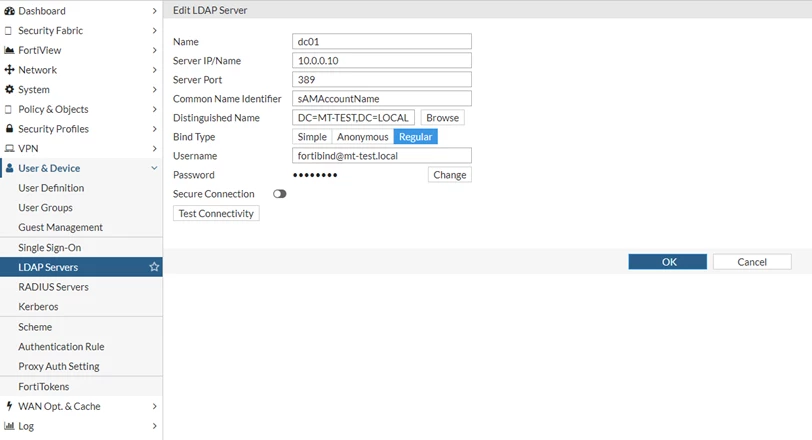
In the following:
Editing 'dc01' is required for authorization.
10.0.0.10 is the LDAP server IP, which is normally the same as the KDC server.
The line 'set group-search-base "dc=mt-test,dc=local"' needs to be manually added from the CLI after configuring this with the web GUI.
config user ldap
    edit "dc01"
        set server "10.0.0.10"
        set cnid "sAMAccountName"
        set dn "dc=mt-test,dc=local"
        set type regular
        set username "fortibind@mt-test.local”
        set password <password>
        set group-search-base "dc=mt-test,dc=local"
    next
end
Define Kerberos as an authentication service.
Go to User & Device -> Kerberos and create a new Kerberos object:
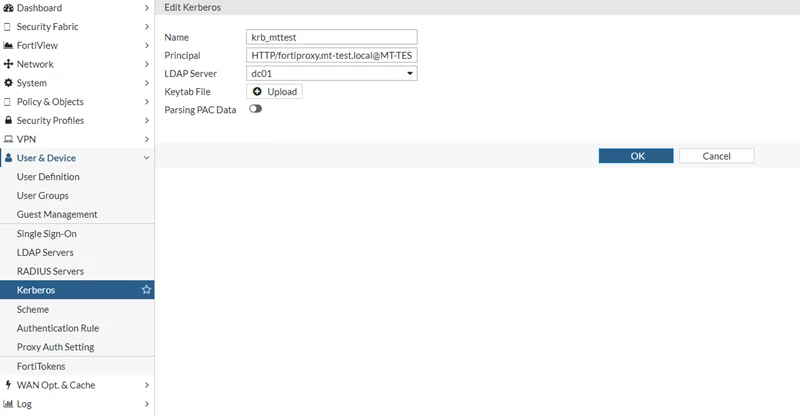
In the following:
'HTTP/fortiproxy.mt-test.local@MT-TEST.LOCAL' is the same as the principal name in the ktpass command on the Windows server.
'dc01' is the defined LDAP server for authorization.
The keytab is Base64 encoded keytab data, created in step 5 of the general setup.
config user krb-keytab
    edit "http_service"
        set principal "HTTP/fortiproxy.mt-test.local@MT-TEST.LOCAL"
        set ldap-server "dc01"
        set keytab "BQIAAABNAAIACkJFUkJFUi5DT00ABEhUVFAAGlRPTllfRkdUXzEwMERfQS5CRVJCRVIuQ09NAAAAAQAAAAAKABcAEJQl0MHqovwplu7XzfENJzw="
    next
end
Go to User & Device -> Scheme and create an authentication scheme with the negotiate method:
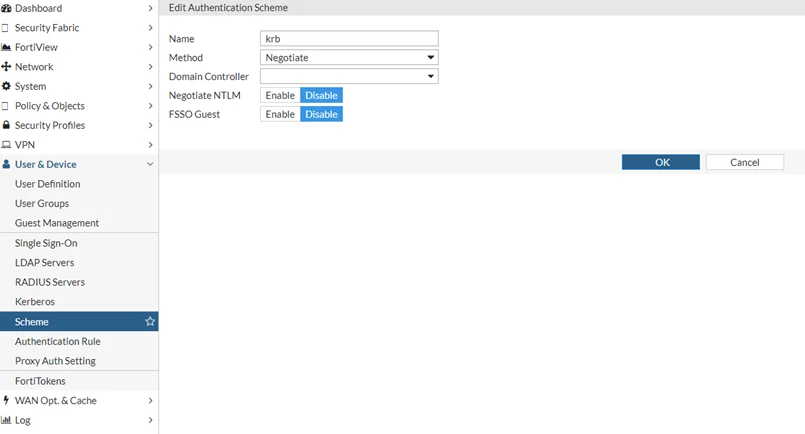
config authentication scheme
    edit "krb"
        set method negotiate
        set negotiate-ntlm disable
        set kerberos-keytab "krb_mttest"
    next
end
Go to User & Device -> Authentication Rule and create an authentication rule with the 'krb' scheme set as the default authentication method:
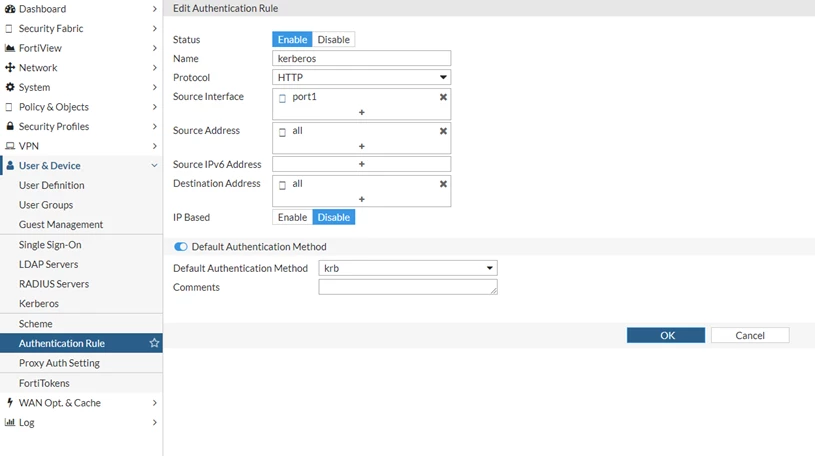
config authentication rule
    edit "kerberos"
        set srcintf "port1"
        set srcaddr "all"
        set dstaddr "all"
        set ip-based disable
        set active-auth-method "krb"
    next
end
Create user group(s).
Go to User & Device -> User Groups and create a new group:
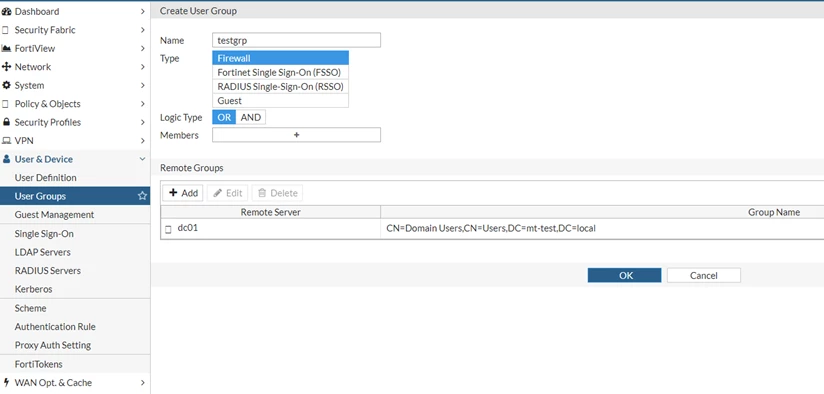
The following group is used for Kerberos authentication, where 'dc01' is the same as the 'ldap-server' option in 'krb-keytab'.
config user group
    edit "testgrp"
        set member "dc01"
            config match
                edit 1
                    set server-name "dc01"
                    set group-name "CN=Domain Users,CN=Users, DC=mt-test,DC=local"
                next
            end
        next
    end
Create a firewall policy.
Go to Policy & Objects -> Policy and create a new 'Explicit Proxy policy':
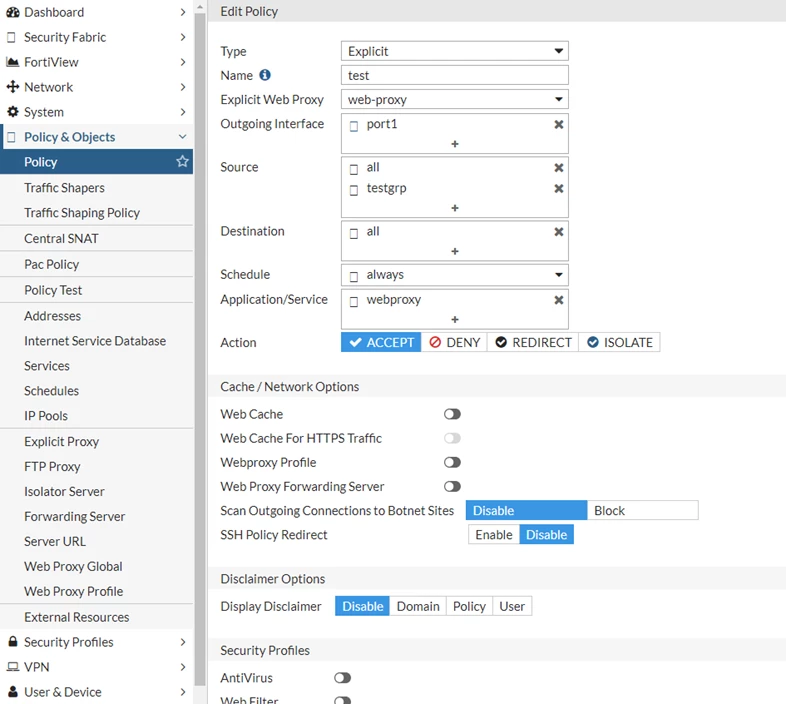
config firewall policy
    edit 0
        set type explicit-web
        set name "test"
        set explicit-web-proxy "web-proxy"
        set dstintf "port1"
        set srcaddr "all"
        set dstaddr "all"
        set action accept
        set schedule "always"
        set service "webproxy"
        set logtraffic all
        set groups "testgrp"
        set utm-status enable
    next
end
Diagnostics.
Once the keytab is imported, check that it has been properly decoded.
It is visible with the following command:
fnsysctl ls -la /tmp/kt
drwxr--r--    2 0        0       Fri May 29 10:19:05 2020               60 .
drwxrwxrwt   31 0        0       Fri May 29 10:28:49 2020             2260 ..
-rw-r--r--    1 0        0       Fri May 29 10:19:05 2020              387 KEY-FILE
Client-side walkthrough.
Check Kerberos is working.
Log on to the domain by using testuser.
Use the klist command to list ticket information.
In the example below, the client has received krbtgt, CIFS, and LDAP tickets.
As there has been no interaction with the FortiProxy yet, there will be no references to it.
klist
Cached Tickets: (5)
#0> Client: testuser @ mt-test.local
Server: krbtgt/MT-TEST.LOCAL @ MT-TEST.LOCAL
KerbTicket Encryption Type: AES-256-CTS-HMAC-SHA1-96
Ticket Flags 0x60a00000 -> forwardable forwarded renewable pre_authent
Start Time: 12/6/2020 14:58:06 (local)
End Time: 12/7/2020 0:58:04 (local)
Renew Time: 12/13/2020 14:58:04 (local)
Session Key Type: AES-256-CTS-HMAC-SHA1-96
#1> Client: testuser @ mt-test.local
Server: krbtgt/MT-TEST.LOCAL @ MT-TEST.LOCAL
KerbTicket Encryption Type: AES-256-CTS-HMAC-SHA1-96
Ticket Flags 0x40e00000 -> forwardable renewable initial pre_authent
Start Time: 12/6/2020 14:58:04 (local)
End Time: 12/7/2020 0:58:04 (local)
Renew Time: 12/13/2020 14:58:04 (local)
Session Key Type: AES-256-CTS-HMAC-SHA1-96
#2> Client: testuser @ mt-test.local
Server: cifs/EthicsGradient.mt-test.local @ MT-TEST.LOCAL
KerbTicket Encryption Type: AES-256-CTS-HMAC-SHA1-96
Ticket Flags 0x40a40000 -> forwardable renewable pre_authent ok_as_delegate
Start Time: 12/6/2020 14:58:06 (local)
End Time: 12/7/2020 0:58:04 (local)
Renew Time: 12/13/2020 14:58:04 (local)
Session Key Type: AES-256-CTS-HMAC-SHA1-96
#3> Client: testuser @ mt-test.local
Server: ldap/EthicsGradient.mt-test.local @ MT-TEST.LOCAL
KerbTicket Encryption Type: AES-256-CTS-HMAC-SHA1-96
Ticket Flags 0x40a40000 -> forwardable renewable pre_authent ok_as_delegate
Start Time: 12/6/2020 14:58:06 (local)
End Time: 12/7/2020 0:58:04 (local)
Renew Time: 12/13/2020 14:58:04 (local)
Session Key Type: AES-256-CTS-HMAC-SHA1-96
#4> Client: testuser @ mt-test.local
Server: LDAP/EthicsGradient.mt-test.local/mt-test.local @ MT-TEST.LOCAL
KerbTicket Encryption Type: AES-256-CTS-HMAC-SHA1-96
Ticket Flags 0x40a40000 -> forwardable renewable pre_authent ok_as_delegate
Start Time: 12/6/2020 14:58:06 (local)
End Time: 12/7/2020 0:58:04 (local)
Renew Time: 12/13/2020 14:58:04 (local)
Session Key Type: AES-256-CTS-HMAC-SHA1-96
Configure client.
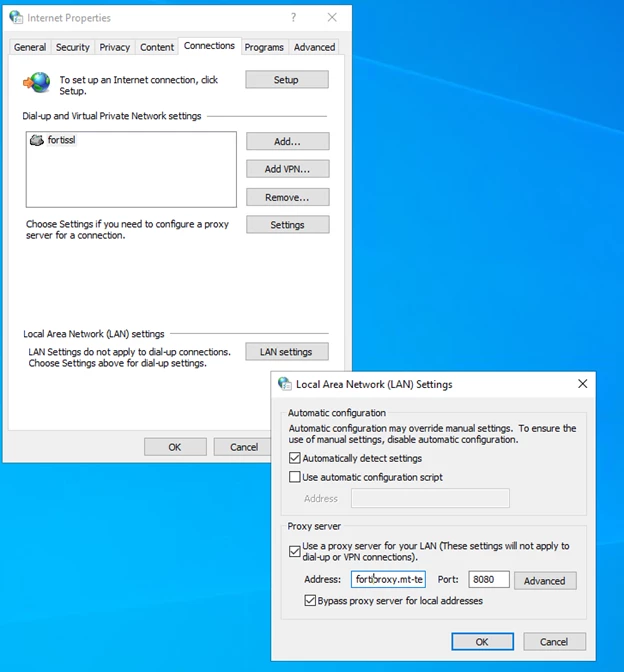
Under Internet Properties, set the workstation to use FortiProxy as an internet proxy. Specify the FQDN of the FortiProxy to ensure a Kerberos ticket is requested.
Push this information through a PAC file:
Open a connection to the Internet.
The client accesses the explicit proxy, but an HTTP 407 Proxy Authentication Required error will be returned.
As 'Negotiate' is set, the client knows the KRBTGT, and it requests a ticket from the KDC with a 'krb-tgs-req' message.
This includes the REALM (MT-TEST.LOCAL) in the reg-body section, and the provided instances SNAME and service (in this case, HTTP/dc01.mt-test.local).The KDC responds with the next KRB-TGS-REP.
This ticket is then available to the client.
In the example below, the ticket-granted-service has issued Ticket #2:
#2>  Client: testuser @ mt-test.local
Server: HTTP/dc01.mt-test.local @ MT-TEST.LOCAL
KerbTicket Encryption Type: RSADSI RC4-HMAC(NT)
Ticket Flags 0x40a00000 -> forwardable renewable pre_authent
Start Time: 12/6/2020 14:59:45 (local)
End Time: 12/7/2020 0:58:04 (local)
Renew Time: 12/13/2020 14:58:04 (local)
Session Key Type: RSADSI RC4-HMAC(NT)
The conversation between the client and the proxy continues as the client responds with the Kerberos ticket in the response. The whole process takes less than a second to complete.
The user is visible as an FSSO logon from the GUI.
If authentication is not working, perform the following debug processes:
diagnose wad filter src <IP address>
diagnose wad debug enable category auth
diagnose wad debug enable category policy
diagnose wad debug enable level verbose
diagnose debug application fnbamd -1
diagnose debug enable
To stop debugging:
diagnose debug disable
diagnose debug reset
Note:
One possible reason the client does not show the ticket for the HTTP protocol under klist is if there is an encryption mismatch between the client and the service. Both need to use the same Kerberos encryption type: see "Unsupported etype" error when accessing a resource in a trusted domain.
For details on the phasing out of RC4, refer to Technical Tip: How to enforce Kerberos keytab with AES256-SHA1 as the used encryption method with Explicit Proxy.
Related articles:

