


Technical Tip: Update SSH timeout
Description
This article describes how to update SSH timeout if Telnet server debug log errors as 'Failed to get operation result within specified timeout:' is appearing.
It Will also help if there is network congestion and requests/replies are taking time to occur.
Solution
For FortiNAC 8.8.x.
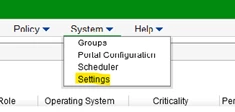
Go to System -> Settings.
Start with 30 seconds and do 30 seconds increments until to get a working interval.
This article describes how to update SSH timeout if Telnet server debug log errors as 'Failed to get operation result within specified timeout:' is appearing.
It Will also help if there is network congestion and requests/replies are taking time to occur.
Solution
For FortiNAC 8.8.x.
Go to System -> Settings.
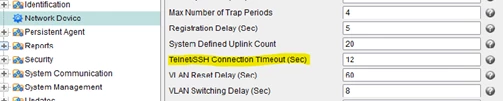
Select 'Network Device' and then change the Telnet/SSH Connection Timeout (Sec).
Start with 30 seconds and increase in 30 second increments until to get a work duration.
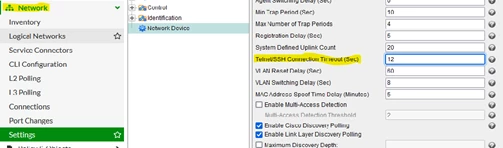
For FortiNAC 9.1.x or higher (This assumes that the settings are in the default locations. Otherwise, it will be the same as 8.8.x).
Go to Network -> Settings -> Network Device.

