


Technical Tip: Device Profiling to Policy assignment
Description
This article describes how to resolve issues when FortiNAC fails to change the VLAN for a profiled Device.
Scope
FortiNAC.
Solution
The device successfully registers using a Device Profiling Rule. Policy Details in Hosts -> Host View displays the correct Network Access Policy.
However, the device does not get assigned the correct VLAN.
In such cases ensure the Authentication Host State is not enforced on the wireless controller/Access Point. Devices registered via Device Profiling Rules do not authenticate. Therefore, if Authentication is enforced, devices registered via Device Profiling Rules will be isolated to the Authentication VLAN.
Host states are described in this article.
- In FortiNAC network inventory, review the Wireless Controller Model Configuration (or SSID Configuration if SSID shows Network Access of 'Inherited').
- Change the Authentication Access Enforcement to Bypass.
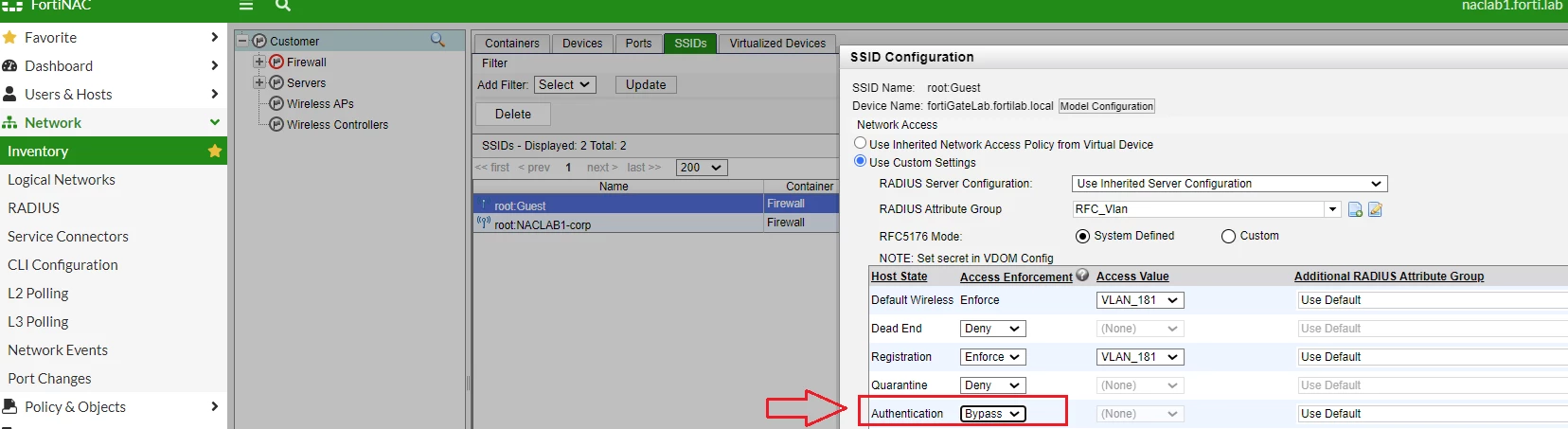 Figure 1. Verifying that "Authentication" Host state is set to "bypass".
Related documents::

