Troubleshooting Tip: TCL Script Execution Failed
| Description | This article describes how to handle issues where TCL script execution failed after updating the admin password in a FortiGate. |
| Scope | FortiManager. |
| Solution | According to the FortiManager administration guide, TCL Scripts use SSH to tunnel through FGFM and they require SSH authentication to do so.
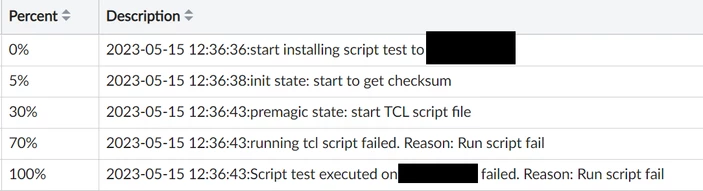
After updating and installing the FortiGate's admin password through the Install Wizard, the following error may be presented when running a TCL script against it:
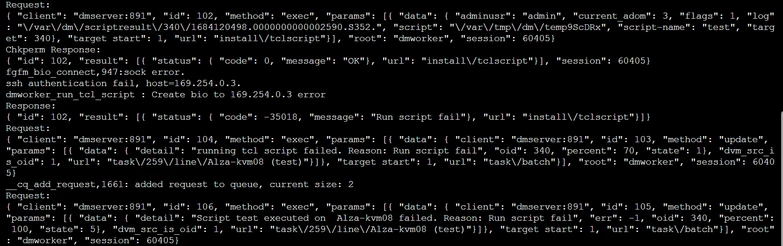
Run the following debugging command while the script is running, and the following error will appear: 'ssh authentication fail':
diagnose debug application dmworker -1 diagnose debug enable
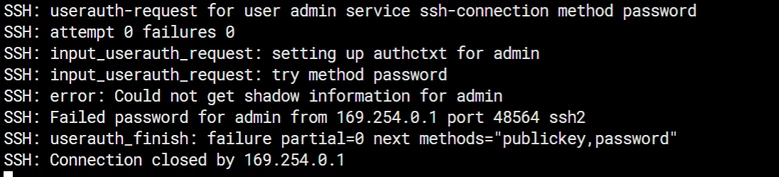
It is also possible to run the following debug command on FortiGate to confirm that the error is due to SSH authentication failure:
diagnose debug application sshd -1 diagnose debug console timestamp enable diagnose debug enable
To stop debugging after the issue has been replicated:
diagnose debug reset diagnose debug disable
The following error should appear:
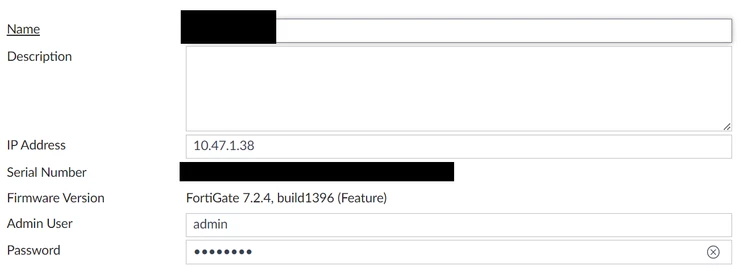
In order to resolve this, it will be necessary to 'right-click' the FortiGate name under Managed Devices, then select Edit to update the device's admin password:
Once done, it will be possible to run the TCL script against it with the new admin password:
|