Esteemed Contributor III
Nov 21, 2023 5:44 AM UTC

Technical Tip: How to create Policy Objects in FortiManager using CLI script

Description

This article describes how to mass-deploy policy objects on FortiManager without creating them 1-by-1 on the GUI.

Scope FortiManager.
Solution
  1. Make sure to be logged in with a Super_User account, otherwise, the Script section might not be visible.
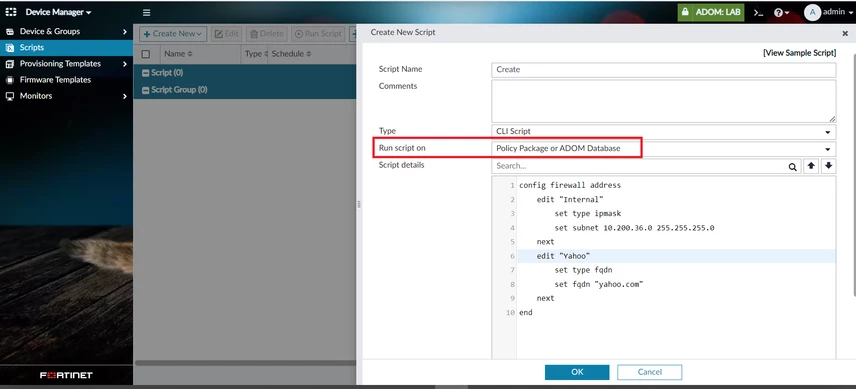
  2. Navigate to Device Manager -> Scripts -> Create Scripts -> Select Run Script on Policy Package or ADOM Database and input the CLI command to create the object.


1. Create.png


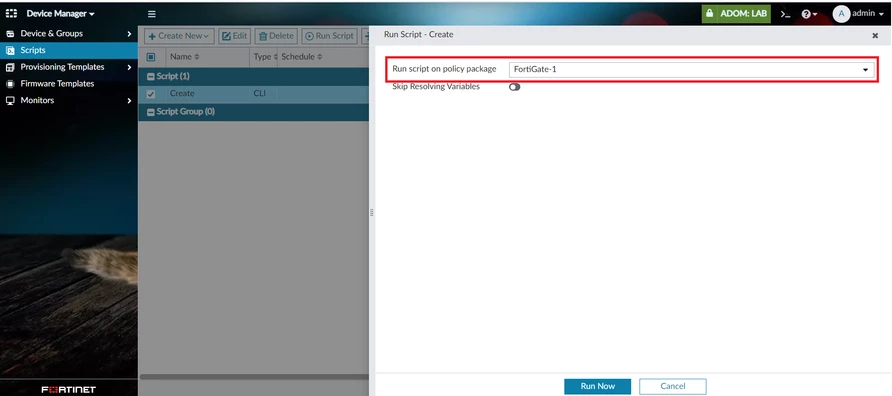
  1. 'Right-click' on the newly created script and select 'Run Script'. Select the appropriate policy package to run the script on and proceed to Run Now.


2. Run Script.png


3. Select Policy Package to run script on.png


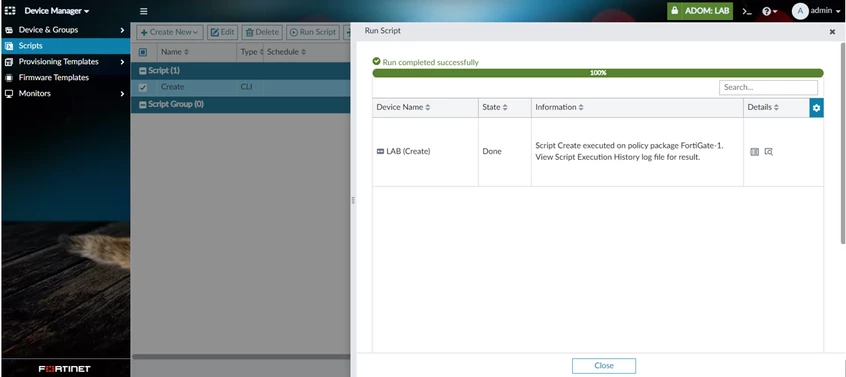
  1. Verify that the script has been run successfully.


4. Script ran successfully.png


  1. Proceed to a check under Policy & Objects. The newly created policy objects are present in the GUI.


5. Objects created.png

    Thought Leadership. Security Summit. Thursday, November 12th, PGA National Resort, Palm Beach Gardens, FL.
    Security Operations Summit: Modernize SecOps. Operate AI-Native.AMER: November 4 | 9:00 AM PST. India and SAARC: November 5 | 10:00 AM IST. EMEA: November 5 | 10:30 AM CET. APAC: November 5 | 11:00 AM SGT