


DNS fallback and cache behavior
Description
This article provides details about two types of DNS behavior:
What happens when the first configured DNS server is down, or the response fails.
How FortiMail uses TTL values from DNS.
Scope
FortiMail.
Solution
DNS fallback.
FortiMail allows two DNS servers to be configured under the following menu:
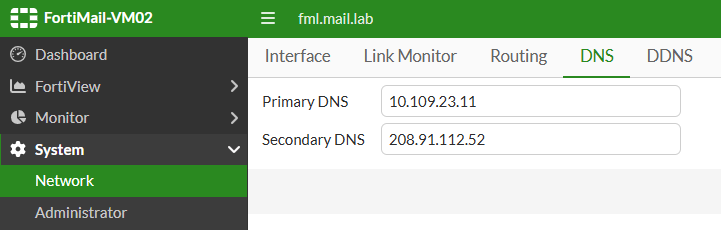
What happens if the DNS query does not get a response from the Primary DNS? Behavior depends on the type of failure:
If FortiMail queries the Primary DNS server but no response is received, after ~5 seconds, an initial query is sent to the Secondary DNS.
If the initial query from the Primary DNS server is responded to with 'SERVFAIL', then this time it is quicker; within a second, a query is sent to the Secondary DNS server.
DNS cache.
Normally, FortiMail caches DNS records based on the TTL of the record received from the DNS resolver. If TTL is 3600 seconds in the response, FortiMail keeps it for 3600 seconds and does not ask the DNS resolver for the same record within this time period.
However, if TTL is below 300 secs, e.g., 60 secs, by default, FortiMail keeps the record in the cache for 300 secs; i.e it overrides the TTL value. This is a configurable setting that is possible to change as below:
fml (dns) # set cache-min-ttl
 <integer>    minimum ttl for cached dns records (seconds)

  --- current value ---
cache-min-ttl:  300
If DNS cache is disabled, then FortiMail does not cache DNS responses at all; i.e every time FortiMail receives an email, it will send the DNS query to the DNS resolver. Local cache is recommended as it will generate less DNS traffic, but can be disabled temporarily for testing purposes as below:
fml (dns) # show
config system dns
  set primary 10.109.23.11
end

fml (dns) # set cache disable
If it is desired to see the list of DNS records cached right now, it is possible to use the following command:
fml # diagnose test application dnscached 2If it is desired to clear the DNS cache, it is possible to use the following command:
fml # diagnose test application dnscached 3
