


Using ping with a specified data size on FortiGate
Description
How to use FortiGate CLI ping options to test connectivity with a specified packet data size and troubleshoot potential MTU-related issues.
Scope
FortiGate.
Solution
To test connectivity using a specified packet data size, configure the ping source and data size, then send a ping to the destination. This can help investigate potential MTU-related connectivity issues along the network path.
The following example uses the WAN1 interface IP address 192.168.254.100 as the source and pings 8.8.8.8 (Google DNS) using a data size of 1350 bytes.
execute ping-options source 192.168.254.100
execute ping-options data-size 1350
execute ping 8.8.8.8
Example output:
PING 8.8.8.8 (8.8.8.8): 1350 data bytes
76 bytes from 8.8.8.8: icmp_seq=0 ttl=57 time=20.4 ms
76 bytes from 8.8.8.8: icmp_seq=1 ttl=57 time=20.3 ms
76 bytes from 8.8.8.8: icmp_seq=2 ttl=57 time=20.1 ms
76 bytes from 8.8.8.8: icmp_seq=3 ttl=57 time=20.1 ms
76 bytes from 8.8.8.8: icmp_seq=4 ttl=57 time=20.0 ms
Note:
The
data-sizesetting specifies the ICMP data payload size, not the total IP packet size.The source address must be configured on the FortiGate and usable for the intended route.
Testing with the Don't Fragment (DF) bit enabled
Use the following commands in two separate CLI sessions.
Session 1: Capture the traffic
diagnose sniffer packet any "host 173.243.129.16 or host 173.243.140.16" 6 0 l
Session 2: Send a ping with the DF bit enabled
execute ping-options data-size 1472
execute ping-options df-bit yes
execute ping 173.243.129.16
Enabling the DF bit prevents IP fragmentation. Testing with different data sizes can help investigate MTU-related connectivity issues along the network path; however, this test alone does not identify the specific router responsible.
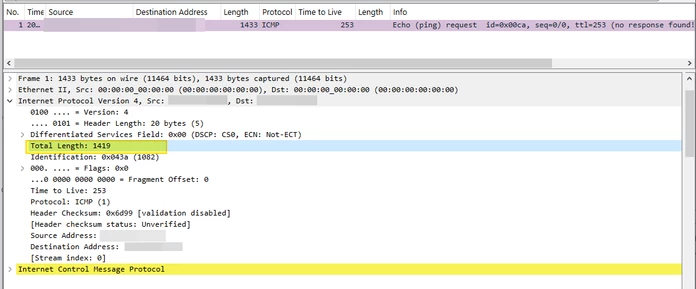
The data-size option specifies the ICMP data payload size, not the total IP packet length. The total IP packet length also includes the IP header and ICMP header. The following packet-capture example shows an IPv4 packet with a total length of 1419 bytes.
Related article:
Troubleshooting Tip: Using PING options from the FortiGate CLI
