When trying to access an internal Microsoft IIS web server through the FortiGate ZTNA Access Proxy with Windows Authentication (NTLM/Negotiate) enabled over HTTPS, end users may experience continuous connection attempts, prolonged loading states and eventually HTTPS connection timeouts.
The issue does not occur when the ZTNA Access Proxy is replaced with a standard (VIP/DNAT) rule. Configuring the IIS web server to use 'Basic Authentication' or 'Anonymous Authentication' allows access through the ZTNA Access Proxy without any connection issues.
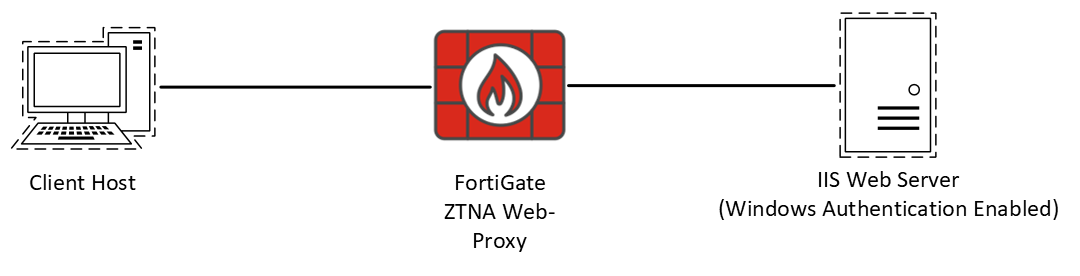
Windows Authentication over HTTPS uses Channel Binding Tokens (CBT) to link the NTLM/Kerberos authentication payload to the outer TLS channel certificate fingerprint. Because the ZTNA reverse proxy terminates the client TLS session and opens a separate backend TLS connection to IIS, the binding tokens do not match, causing IIS to drop or stall the authentication exchange.
In summary: IIS Windows Authentication over HTTPS (443): Incompatible with reverse proxies due to CBT tying authentication directly to the outer TLS session. IIS Windows Authentication over HTTP (80): Compatible with proxies, as it bypasses TLS channel binding requirements (though stateful NTLM connection limits still apply). IIS Basic Authentication over HTTP/HTTPS: Fully compatible through proxies because credentials are sent 'stateless' with every header. IIS Anonymous (No Authentication) over HTTP/HTTPS: Fully compatible through proxies.
The recommended solution is to either change the authentication method to Basic Authentication or disable the 'Extended Protection Token Check' on the IIS server side.
If disabling the 'Token Check' is not possible due to security requirements, the recommended approach is to use a standard VIP/DNAT configuration on the FortiGate to access the backend server instead of using the ZTNA Access Proxy.
Example WAD debug logs from a non-working scenario, where authorization failed (as seen from the '401 Unauthorized' error).
[I][p:3960][s:423955833][r:358771800] wad_dump_http_resp :3141 hreq=0x7f63d8dd6cc0 ###Received response from the server:

HTTP/2.0 401 Unauthorized
content-type: text/html
server: Microsoft-IIS/10.0
www-authenticate: Negotiate
www-authenticate: NTLM
x-powered-by: ASP.NET
date: Fri, 29 May 2026 12:49:58 GMT
content-length: 1293
......
[I][p:3960][s:423955833][r:358771800] wad_dump_fwd_http_resp :3133 hreq=0x7f63d8dd6cc0 ###Forward response from the server:

HTTP/2.0 401 Unauthorized
content-type: text/html
server: Microsoft-IIS/10.0
www-authenticate: Negotiate
www-authenticate: NTLM
x-powered-by: ASP.NET
date: Fri, 29 May 2026 12:49:58 GMT
content-length: 1293

[I][p:3960][s:423956850][r:358771838] wad_http_req_cancel :1554 req(0x7f63d8dd8e58), resp((nil))
[V][p:3960][s:423956850][r:358771838] wad_hmsg_trap_strm_get_peer :128 trace
[I][p:3960][s:423956850][r:358771838] __wad_http_req_close :2049 ret = -1!
[V][p:3960] __wad_http_cstrm_close :622 hs=0x7f63d7bfbba0 msg=(nil)
[V][p:3960] wad_http_mstrm_stop :601 mstrm(0x7f63d7bfbc48) stopped, is_clt=1
[I][p:3960] wad_http_srvs_ssl_tnode_close :1496 tnode:0x7f63d6250790 for srv_addr: 10.10.10.51:443 timeout <<< Connection timeout!
[I][p:3960] wad_http_srvs_ssl_list_close :1470 trace
[V][p:3960] wad_http_mstrm_stop :601 mstrm(0x7f63d262c798) stopped, is_clt=0
[V][p:3960] wad_http_1way_srv_proc_end :5317 srv(0x7f63d262c790) is disconnecting!
[I][p:3960] wad_http_1way_srv_disconnect :5252 srv 0x7f63d262c790, version:HTTP2
Related articles:
| 



