


Troubleshooting Tip: Untrusted certificate warning for HTTPS websites during SSL deep inspection
Description
This article describes how to troubleshoot an untrusted certificate warning shown to a client browser while accessing an HTTPS website through FortiGate with SSL deep inspection enabled, and how to narrow down whether the cause is the client, FortiGate, or the upstream web server.
Scope
FortiGate, FortiOS version 7.4 and above.
Solution
With SSL deep inspection enabled, FortiGate validates the certificate presented by the upstream web server and re-signs a replacement certificate for the client. The certificate authority used for the replacement certificate is a useful starting indicator, though it does not by itself confirm the root cause. From the client browser, the certificate presented for the site can be inspected to see which certificate authority signed it.
If the issuer is 'Fortinet_CA_SSL', FortiGate trusted the upstream certificate and re-signed it normally. The warning appears because the client does not yet trust the FortiGate inspection certificate authority.
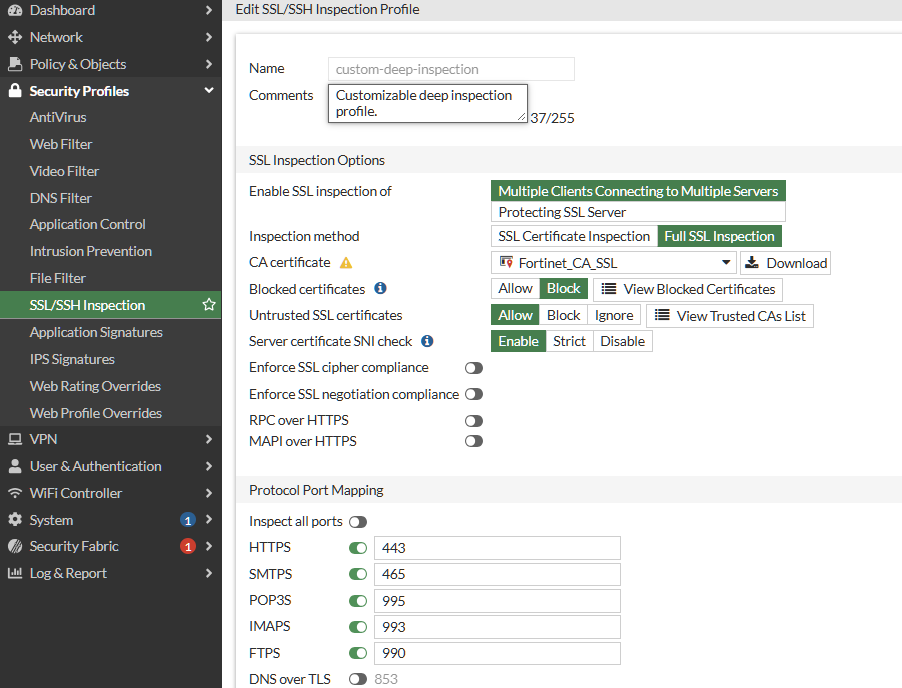
Go to Security Profiles -> SSL/SSH Inspection and select the relevant profile.
Under 'CA certificate', select 'Download' next to the 'Fortinet_CA_SSL' certificate.
Install the downloaded certificate on the client, under its trusted root certificate store.
In an enterprise environment, the certificate can be distributed through Group Policy or an equivalent centralized method, rather than installed manually on each client.
If the issuer is 'Fortinet_CA_Untrusted', FortiGate could not establish trust in the certificate presented by the upstream web server. This points to the server certificate chain, not the client. The certificate authority used is configured under 'set untrusted-caname' in the SSL/SSH inspection profile, and 'Fortinet_CA_Untrusted' is the default.
The 'Fortinet_CA_Untrusted' certificate can be viewed by going to System -> Certificates, under 'Local CA Certificate', alongside 'Fortinet_CA_SSL'. Viewing its details, for example to compare its serial number against the certificate seen by the client, does not require installing or trusting it, and it should never be installed or trusted on a client.
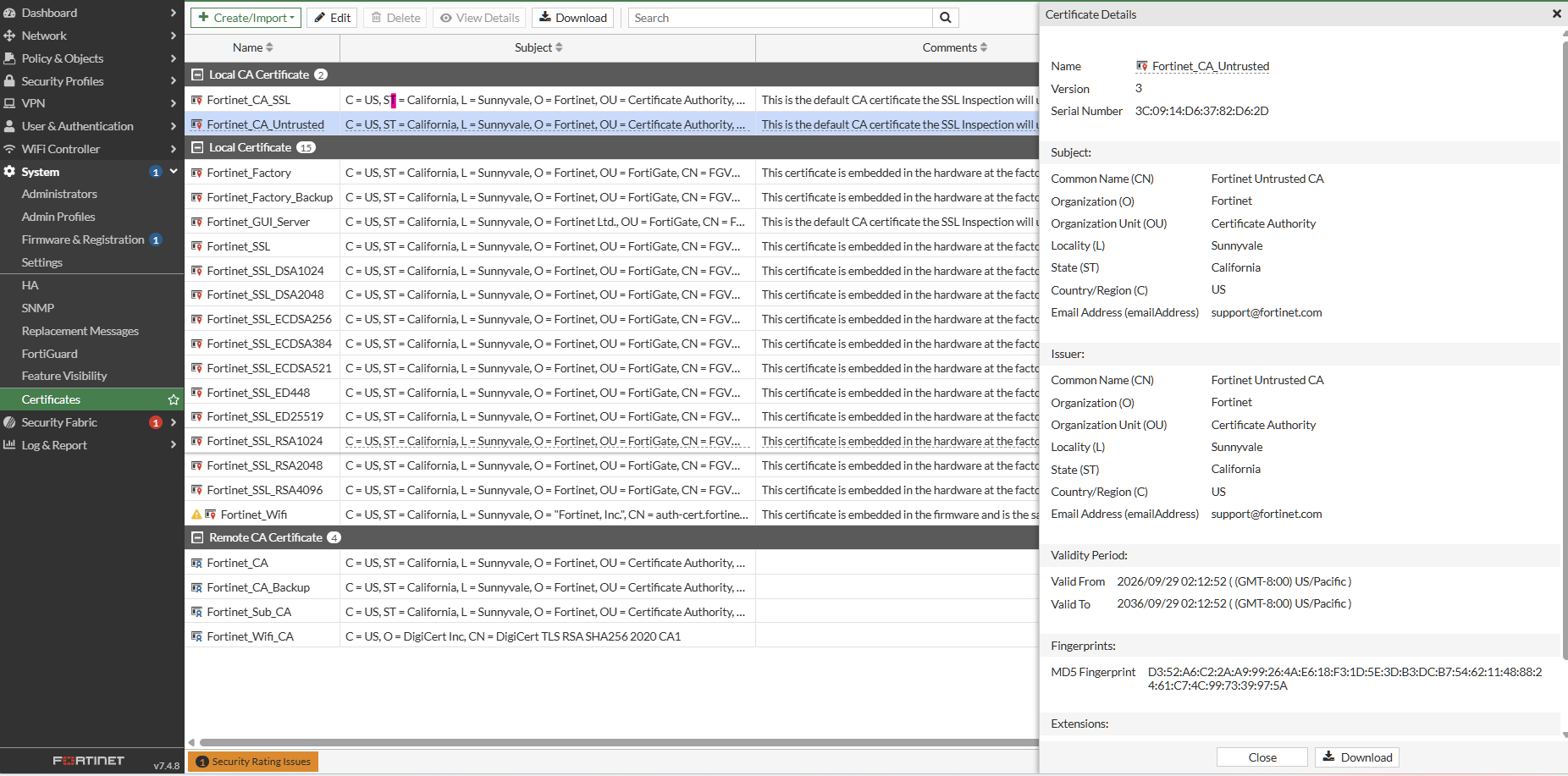
Where 'Fortinet_CA_Untrusted' is seen, the certificate chain presented by the server should be checked for the following.
Certificate expiration.
Subject and subject alternative names.
The issuing, intermediate, and root certificate authorities.
Whether the chain sent by the server is complete.
Whether the relevant certificate authority is present in FortiGate's trusted certificate authority list, reviewed from the same profile page under 'Untrusted SSL certificates', by selecting 'View Trusted CAs List'.
An incomplete chain is one possible cause of a validation failure, along with an expired certificate or a missing certificate authority, and should not be assumed to be the only cause.
The action taken for an untrusted upstream certificate is controlled per protocol in the SSL/SSH inspection profile, under 'Untrusted SSL certificates' in the GUI, or 'untrusted-server-cert' in the CLI.
'Allow', the default, permits the connection and re-signs it using 'Fortinet_CA_Untrusted', producing the warning described in this article.
'Block' refuses the connection instead of allowing it through with a warning.
'Ignore' re-signs the certificate as though it were trusted, suppressing the warning without resolving the underlying validation failure, and should be used with caution.
Where the certificate chain served by the web server is incomplete or incorrect, the permanent solution is for the web server administrator to correct it, rather than changing the FortiGate configuration. This has previously been observed with public certificate authorities, including a historical case involving an Entrust root certificate, where the fix was made on the web server rather than on FortiGate. A certificate authority should only be imported into FortiGate's trusted certificate authority list when it has been independently validated and there is a legitimate trust requirement, such as an internal or private certificate authority, not simply because a website presents it and FortiGate flags it as untrusted.
The following commands can be used to verify the SSL/SSH inspection profile applied to the affected traffic, and to enable additional logging of the server certificate seen during SSL negotiation.
config firewall ssl-ssh-profile
    edit "<profile_name>"
        get
    next
end
config firewall ssl-ssh-profile
edit "<profile_name>"
set ssl-server-cert-log enable
next
end'get' displays the profile's current settings, including 'caname', 'untrusted-caname', and 'untrusted-server-cert'.
'ssl-server-cert-log' logs additional detail on the server certificate seen during SSL negotiation, and is disabled by default.

